December 21, 2019
Solved

1. When I try importing the CSV in form at YYYY-mm-dd I can't import it because you do not support such format,. you only support mm-dd or dd-mm…but no YYYY-mm-dd

  • December 21, 2019
  • 1 reply
  • 0 views
How can I select a different timestamp format?

Best answer by GlinetteC

We can change the date format in your Excel file, forgetme.


Before doing this process, we have to make sure that we've selected the appropriate date format that matches our QuickBooks transactions. In that way, we can avoid getting any errors.


Here are the steps:

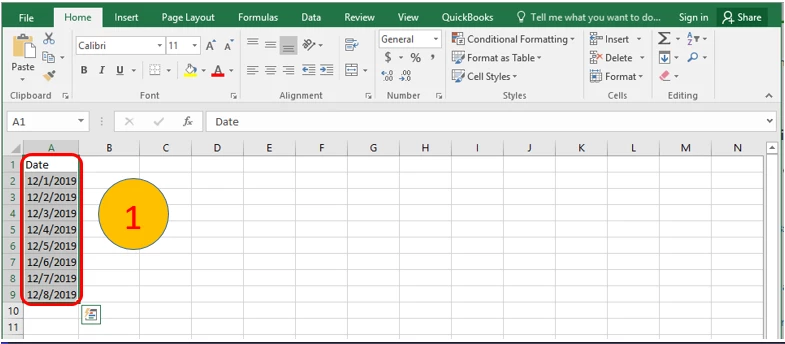
  1. Highlight the Date column in your MS Excel file.
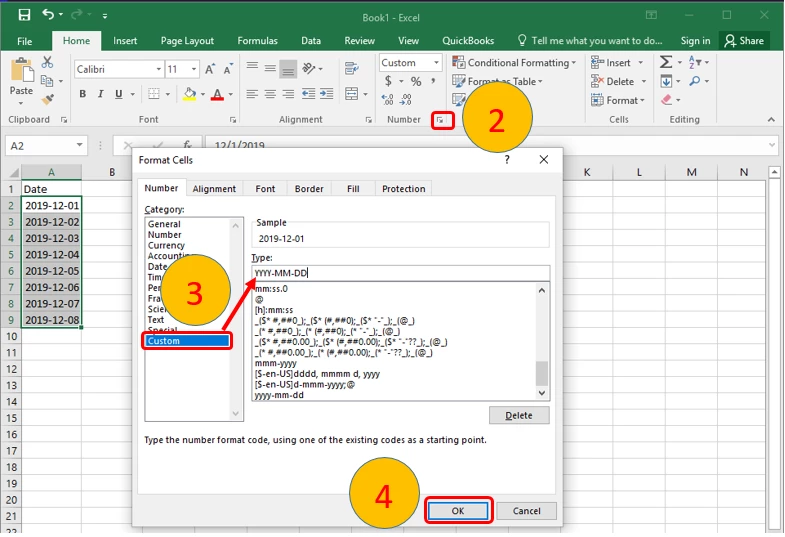
  2. Click the Number icon at the top.
  3. Select Custom and type the date format to wish to achieve.
  4. Click OK.

Please see attached screenshots:

After performing the steps, we'll be able to successfully import the transactions with the format date we wanted.


Please leave a comment below if there's anything else I do to help with changing your CSV file date format. Thanks!

1 reply

GlinetteCAnswer
December 21, 2019

We can change the date format in your Excel file, forgetme.


Before doing this process, we have to make sure that we've selected the appropriate date format that matches our QuickBooks transactions. In that way, we can avoid getting any errors.


Here are the steps:

  1. Highlight the Date column in your MS Excel file.
  2. Click the Number icon at the top.
  3. Select Custom and type the date format to wish to achieve.
  4. Click OK.

Please see attached screenshots:

After performing the steps, we'll be able to successfully import the transactions with the format date we wanted.


Please leave a comment below if there's anything else I do to help with changing your CSV file date format. Thanks!