Solved
allow my suplpier to email an invoice to my quickbooks inbox
How do I allow a supplier to email an invoice directly to Quick Books Online


How do I allow a supplier to email an invoice directly to Quick Books Online
Hi there, @mebecause.
Thanks for visiting the QuickBooks Community. I can share some information about allowing the supplier to email invoices directly to QuickBooks.
For now, you can only send an invoices email directly to your suppliers. Having this feature in QBO is indeed a great idea and I’d appreciate it if you send your product suggestions straight to our Developers for consideration in future updates.
Here’s how to send a product request:
1. Click the Gear icon.
2. Select Feedback.
3. Enter your suggestion.
4. Click Next.
5. Click Skip and send a message.
6. Select a Category.
7. Click Send a message.
As a workaround, you may search for third-party applications that integrate well and allow a supplier to email an invoice directly to Quick Books Online. Though, we're unable to provide recommendations on which one to use.
I suggest you visit the QuickBooks Apps site and look for an app that meets your business needs. You can also do this inside your company, just go to Apps on the left panel and then enter a keyword in the search field.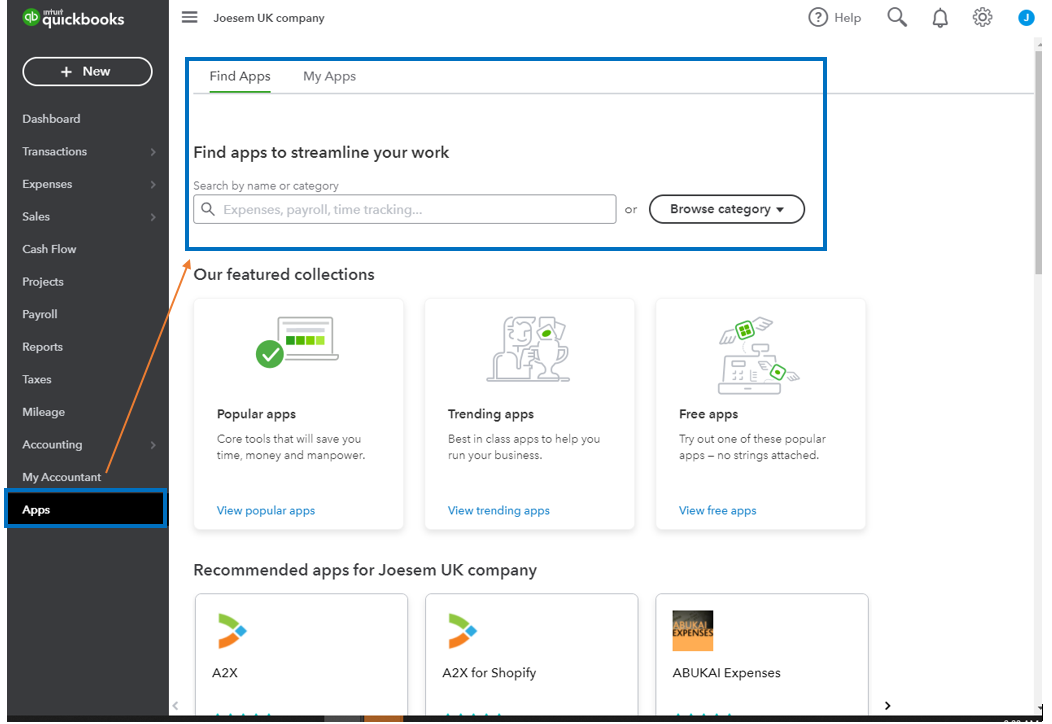
I also invite you to visit the QuickBooks Blog to keep you in the loop on the latest news about the product. From there, you'll see the features added to QBO and resources to help your business thrive.
Additionally, I'm adding these articles that will help you manage your invoices in QuickBooks:
Don't hesitate to hit the Reply button if you have additional questions or concerns. As always, I'm only a few clicks away from help. Have a great rest of the day.
Enter your E-mail address. We'll send you an e-mail with instructions to reset your password.