

October 13, 2019
Solved

bank description column is wrong.

  • October 13, 2019
  • 3 replies
  • 0 views

I downloaded bank transaction to cvs file , the amounts and description column were all correct, but when I imported the transaction to Q.B, I noticed that the  bank description column is wrong:  instead of the correct description in the CSV file  "insurance Group" is it described in the bank description column as "Groupon". how do I fix this?

K.R., Sandi
Best answer by doctorpudge

I think I've worked this out now!

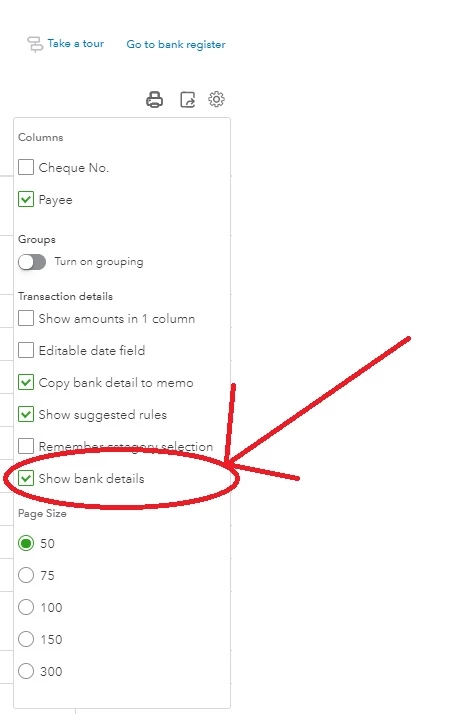
If you click the settings button on the right side of the screen (next to print and export), you get a drop down menu.

If you tick "Show bank details". This uses the actual narrative from the bank, rather than the description that quickbooks wants it to be!


3 replies

AlcaeusF
October 13, 2019

Welcome back to the Community, love hate.


I checked if there's an ongoing issue about this, but there isn't currently one. When you map the CSV file before importing it to QuickBooks Online (QBO), does it recognise the description column?


When preparing the CSV, make sure to removed all symbols in the Amount field and any non-transactional information in the file, such as account numbers, opening, and closing balance.


As an initial troubleshooting step, try logging into your QBO account using a private browser (incognito). There are times that the browser is full of frequently accessed page resources, causing some unusual responses.


Here's how:


  • Press Ctrl + Shift + N (Google Chrome).
  • Ctrl + Shift + P (Firefox or Internet Explorer).
  • Control + Option + P (Safari).


Once logged in, try to import the CSV file again to double-check. Please refer to these articles for further guidance:


If it works, return to your default browser and perform a clear cache. Every so often the cache becomes overwhelmed with older data which can potentially cause viewing and performance issues. Clearing it will refresh the system, and you'll be able to work with a clean slate. However, if the issue persists, try using other supported browsers.


Let me know if you have any other issues or concerns, and I'll get back to you right away. I'm always here to help. Take care!

love hateAuthor
October 14, 2019

Thank you for your advise, but I am afraid that the CSV file has the correct description , and somehow, Q.B changed the description for "Insurance group" to "Groupon" after downloading.  

I would like to know if AFTER downloading the CSV file and accepting the transaction, I can amend the BANK description column , as necessary.

K.R., 

October 14, 2019

Hi love hate


Locate the transaction from the reviewed section, select the the transaction and edit the description.

March 7, 2020

Hi love hate (& all the other respondents)

I'm getting the same thing and the advice of 'click in description field and change it' doesn't work, because you simply can't do that.

I have a direct feed from my bank so I don't have a CSV file to modify.

I have a description of Cars.com appear instead of ANZ Cards and I can't find any advice on how to correct this.  If anyone has a solution I'd love to hear it please.  I've attached a couple of screenshots for reference.

Cheers

JoesemM
March 8, 2020

Thanks for joining this thread, @Batman69.


You'll have to contact your bank website to check why the transactions are not the same when downloading in QuickBooks Online. QuickBooks is just a receiver and depends on the data from your bank.


To fix this, after you add or match, go to the matched transaction and edit the description from there. For more details please read out this article:Add and match downloaded bank transactions [Video].


I'm adding our Help articles it provides tips on how to manage your account in QuickBooks.


I'll be right here if you need any other help. Take care.


March 8, 2020

Hi Joesem

Thanks for your reply.

It is not all descriptions that are incorrect, just the ones in the pictures I uploaded, which hopefully you looked at before you replied.  The information on the bank website is correct however QB seems to change it in some instances,  (again as shown in the pictures).

I've never used Cars.com, ever, so don't understand how this comes up in Description.  I've read QB forums where other users have the same issue for some transactions (Groupon instead of Insurance Group for example) but there has been no clear solution on how to rectify ongoing issues or adjust the information to reflect the correct description, so I'd love a clear step-by-step on how to accomplish this for QB Online, please.


This request is open to anyone that can guide me through this.


Appreciate your time

Cheers

Dave

November 16, 2020

I think I've worked this out now!

If you click the settings button on the right side of the screen (next to print and export), you get a drop down menu.

If you tick "Show bank details". This uses the actual narrative from the bank, rather than the description that quickbooks wants it to be!


February 12, 2023

Legend!!

I have been having the same problem over two years later. And whilst it's not been a big deal for most of the time - just a strange anomaly - something new and much more frustrating started to happen!


Not only was it changing the Description to something different, QBO also started creating random suppliers with the same name as the description.

I now have around 20 additional suppliers that I don't want.

The worst thing - you can't delete them, so now I have loads of 'inactive' suppliers that I can't get rid of.

Very frustrating.


QBO, this is still an issue and is 100% not the fault of the banks.

You have some weird rules in place (that I can't find anywhere) that are changing the Description (and now creating suppliers). Please liaise with your developers so that they know this is a bug, and also ask them to provide you with more information on what the back end does/doesn't do!

AlcaeusF
February 12, 2023

Hi, CH360.


Thanks for joining this conversation. Allow me to chime in and help ensure this is taken care of for you.


If you already followed the steps shared by my colleagues in this thread and the issue persists, I highly suggest contacting our Support team. They have tools such as screen-sharing (remote access) that can pull up your account in a secure environment and check the cause of this odd behavior. They can also create a ticket and forward it to our product engineers for further investigation.


Here's how to reach them:


  1. In QuickBooks Online (QBO), click the Help (question mark) icon at the top right.
  2. In QB Assistant, enter the topic you need help with. You can also enter questions.
  3. Select Contact Us to connect with a live support agent.
  4. Choose a way to connect with us.


I'm also adding this article that tackles categorising and managing bank transactions in QBO for further guidance: Categorise and match online bank transactions in QuickBooks Online.


For more tips and other resources you can use in the future, I recommend visiting our website: Self-help articles.


Please post again or leave a comment in this thread if you have follow-up questions about this or anything else QBO. I'm always here ready to help. Take care.