Solved
can I edit bank reconciliation once saved?
Hello
I noticed that I had entered a wrong end date to one of my bank reconciliations (instead of 31/12/20 I selected 31/01/2021).
How can I amend the end date?
Thanks


Hello
I noticed that I had entered a wrong end date to one of my bank reconciliations (instead of 31/12/20 I selected 31/01/2021).
How can I amend the end date?
Thanks
You made the right choice in reaching out to us, .
In QuickBooks Online (QBO), you have two ways to undo the reconciliation.
You can do it by manually editing the transactions within the register. We would not recommend doing this if there are lots of transactions you wish to remove from the reconcile as the reconcile reports do not show manual removals.
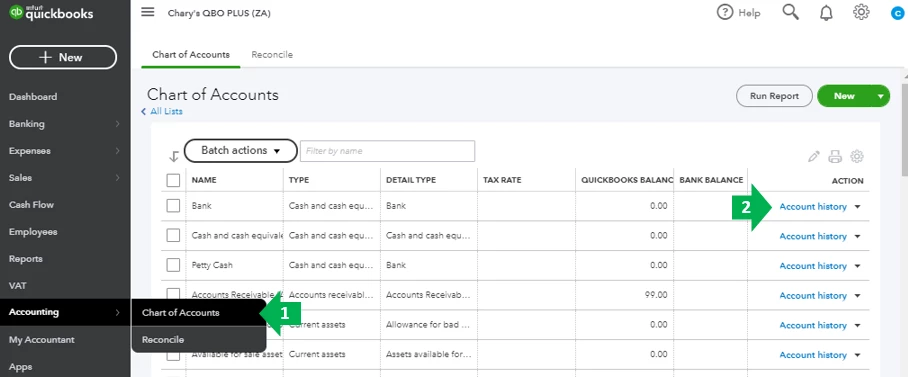
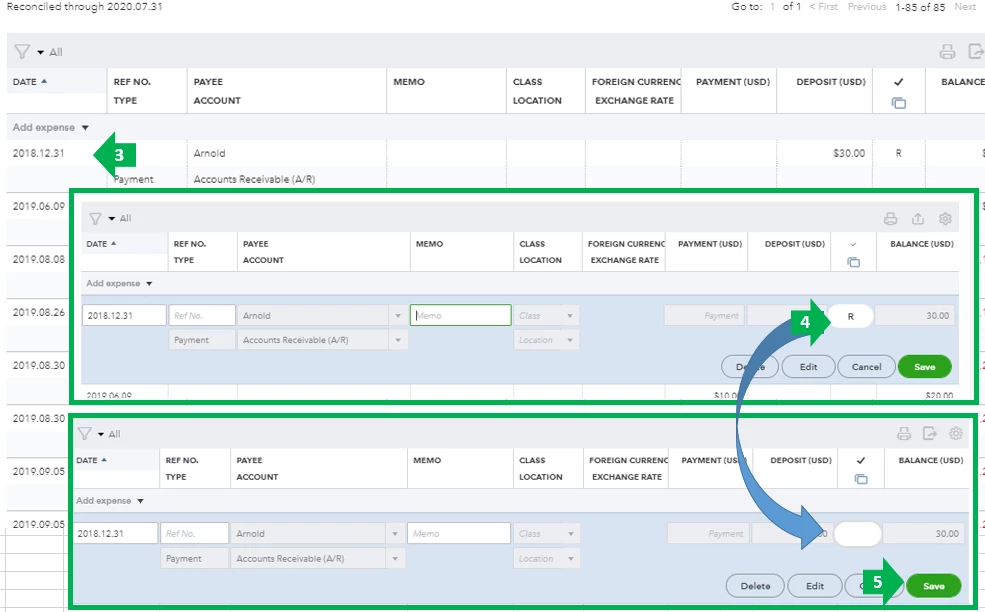
Feel free to read through this article for the entire process on how to undo reconciliation: How to Unreconcile a Transaction or Undo a Reconciliation.
Another option is using the special reconciliation tool which allows you to undo several transactions on past reconciliation by undoing the reconciliation itself. This is only available for accountants who use QuickBooks Online Accountant.
Learn more about this by visiting this link: Undo a client’s reconciliation in QuickBooks Online Accountant
Feel free to visit these links about reconciliation in QBO for reference:
Should you have anything else you'd like to go over while reconciling, feel free to reach out to us again. I'm always here to assist you further.
Enter your E-mail address. We'll send you an e-mail with instructions to reset your password.