September 16, 2020
Solved

Change the "Print As" in a Cheque

  • September 16, 2020
  • 1 reply
  • 0 views

I'm using QB Enterprise. How do I change the Print As in the Cheque. I've already changed the Vendor Name, and it's still showing up as the "old name"

Thank you.

Best answer by DivinaMercy_N

I'm here to ensure you can change the Print As in Cheque, @Abskiboo.


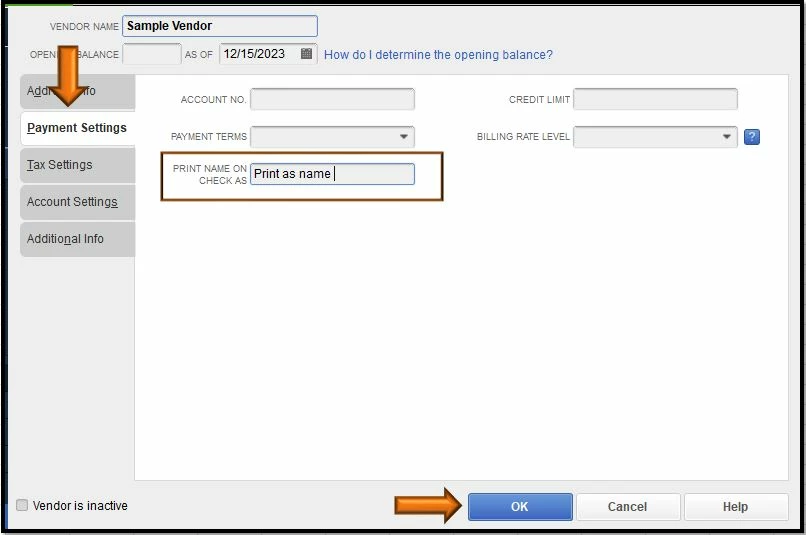
To do so, you'll need to change the name on the Print name on check as field. Here's how:
 

  1. Go to the Vendors menu.
  2. Select Vendor center.
  3. Double click the vendor's name you want to create a check with.
  4. Choose Payment Settings.
  5. In the Print Name on check as field, enter the name you want to appear in Print As.
  6. Once done hit OK.


For more details please see this article: Create, modify, and print cheques. 


To learn how the system builds transactions and reports, you can visit the Targets vs. Sources overview page. 


Let me know if there's anything else you need in creating checks in QuickBooks Desktop. I'm always right here to help. Take care always. 

1 reply

DivinaMercy_N
September 16, 2020

I'm here to ensure you can change the Print As in Cheque, @Abskiboo.


To do so, you'll need to change the name on the Print name on check as field. Here's how:


  1. Go to the Vendors menu.
  2. Select Vendor center.
  3. Double click the vendor's name you want to create a check with.
  4. Choose Payment Settings.
  5. In the Print Name on check as field, enter the name you want to appear in Print As.
  6. Once done hit OK.


For more details please see this article: Create, modify, and print cheques. 


To learn how the system builds transactions and reports, you can visit the Targets vs. Sources overview page. 


Let me know if there's anything else you need in creating checks in QuickBooks Desktop. I'm always right here to help. Take care always. 

AbskibooAuthor
September 30, 2020

Thank you so much. Sorry for the delayed response, couldn't log in to this site. =)
