October 17, 2021
Solved

Contacting UK Customer Services

  • October 17, 2021
  • 1 reply
  • 0 views

Hi.

Anyone know the phone number to contact UK Customer Services?


Trying to reregister 2016 Desktop version as need access to old company file. Unfortunately, it appears as no longer supported the online registration doesn't work.


I have gone through all the help pages, installed and run the ToolsHub. When I go to the help menu and the Need to get in touch either by Phone or Message they are both greyed out and wont work.


I have spent hours try to get this to work and until I can get passed this registration the software is redundant including using to access help.


Cheers

Best answer by LieraMarie_A

Thank you for sharing the steps you've taken in resolving the issue, @1746047.


QuickBooks Desktop 2016 is already discontinued and no longer supported . You might want to consider upgrading your QuickBooks Desktop so you can continue running your business processing. 


If you're interested, you may try the 30-day trial of the latest QuickBooks Desktop version. However, before installing the QuickBooks trial version, ensure that the system meets the proper configurations to run the QuickBooks smoothly. Once done, you can now start installing the latest trial version of QuickBooks Mac. Keep in mind that you're unable to recover a company file that is lower than the current edition.


Here's how:

  1. Go to this link: Download a trial of QuickBooks Desktop.
  2. Click the link for the QuickBooks Desktop edition you'd like to install.
  3. Open the QuickBooks.exe file you downloaded.
  4. Close all running applications.
  5. Double-click the downloaded installer The QuickBooks installation window opens automatically.
  6. Drag the QuickBooks icon to the Applications folder. The Applications folder opens automatically.
  7. Double-click the QuickBooks icon to open the application.


Check out this article for your reference: Install QuickBooks Desktop. Once done, restore your company file.


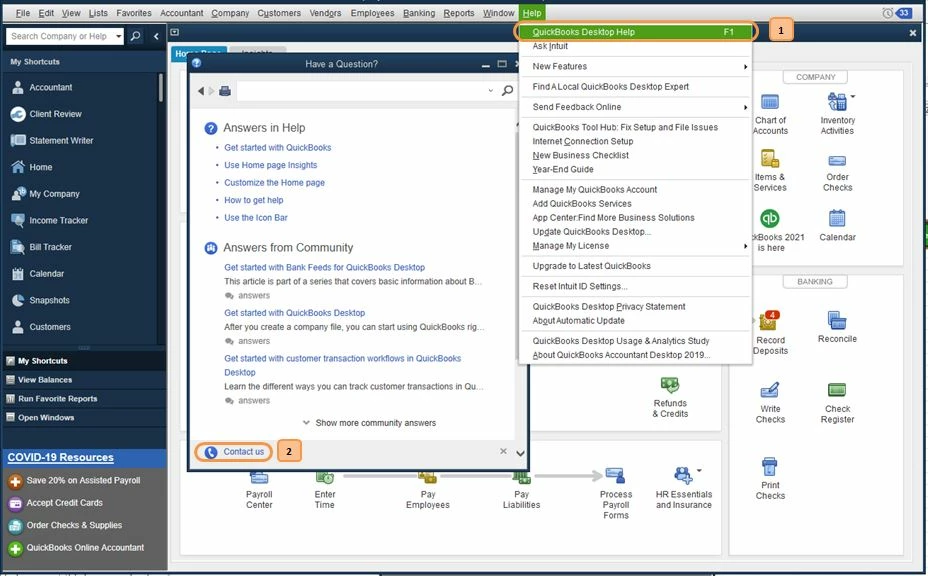
Should you prefer to speak to someone over the Phone or Chat, follow the instructions below:

  1. Select QuickBooks Desktop Help from the Help menu.
  2. Click Contact Us.
  3. Type in a short description of your concern, then Continue.
  4. Choose a way to connect with support.


I'm sure that an agent would be happy to assist you with any questions that you have.


Thanks for reaching out. Don't hesitate to get back to us if you need further assistance in restoring your file. I'll keep an eye out for your response.

1 reply

LieraMarie_A
October 17, 2021

Thank you for sharing the steps you've taken in resolving the issue, @1746047.


QuickBooks Desktop 2016 is already discontinued and no longer supported . You might want to consider upgrading your QuickBooks Desktop so you can continue running your business processing. 


If you're interested, you may try the 30-day trial of the latest QuickBooks Desktop version. However, before installing the QuickBooks trial version, ensure that the system meets the proper configurations to run the QuickBooks smoothly. Once done, you can now start installing the latest trial version of QuickBooks Mac. Keep in mind that you're unable to recover a company file that is lower than the current edition.


Here's how:

  1. Go to this link: Download a trial of QuickBooks Desktop.
  2. Click the link for the QuickBooks Desktop edition you'd like to install.
  3. Open the QuickBooks.exe file you downloaded.
  4. Close all running applications.
  5. Double-click the downloaded installer The QuickBooks installation window opens automatically.
  6. Drag the QuickBooks icon to the Applications folder. The Applications folder opens automatically.
  7. Double-click the QuickBooks icon to open the application.


Check out this article for your reference: Install QuickBooks Desktop. Once done, restore your company file.


Should you prefer to speak to someone over the Phone or Chat, follow the instructions below:

  1. Select QuickBooks Desktop Help from the Help menu.
  2. Click Contact Us.
  3. Type in a short description of your concern, then Continue.
  4. Choose a way to connect with support.


I'm sure that an agent would be happy to assist you with any questions that you have.


Thanks for reaching out. Don't hesitate to get back to us if you need further assistance in restoring your file. I'll keep an eye out for your response.

October 17, 2021

Thank you for the reply.


I understand that my version is discontinued and no longer supported. I have no requirement for any accounts software currently so no need to purchase or load trial versions especially if they re incapable of opening an older versions file.


All I wish to do is open my licensed copy of Quickbooks 2016 Premier to retrieve my data. I was able to do this but unfortunately had to perform a clean install of my computer and now I can't. 


As I understand it I require a Validation Code but have been unable to get a find a functioning link or phone number for customer services


Please advise how I can open my company file without purchasing or installing trial software.


I have used the link proved to contact support but the buttons do not work for Call Us and Message Us (Tried two browsers). Are they only active during the stated hours?


Perhaps Quickbooks should consider removing the requirement to register for versions no longer supported to allow people access to their licensed copies should they need.


I look forward to your reply.

October 17, 2021

I'm here to help you get your license number so you can install QuickBooks Desktop, NickB4.


You can find your QuickBooks Desktop license number in two ways. To begin, you can log in to the Customer Account Management Portal(CAMPS) Site. I'll show you how.


  1. Sign to camps.intuit.com.
  2. Look for QuickBooks in the Product & Services link.
  3. Click Details.


The QuickBooks License Lookup tools are the second choice. You can toggle by business email or phone number used when the product license was purchase. Here is the link: https://emaillicense.quickbooks.com/app/qbdt/licensenumber.


If you're still having trouble finding your license number, I'd suggest reaching out to our QuickBooks Desktop Support . They can securely access your account.


Phone support is available from Monday through Friday from 9 AM to 6 PM, and Chat support is accessible from Monday until Friday from 8 AM to 8 PM local time.


If you haven't had your QuickBooks Desktop installer, you can use this link to download your QuickBooks version: Download QuickBooks Desktop. I've also added this article for your reference: Install QuickBooks Desktop.


Let me know if you need anything else. We're always here to back you up.