Solved
Creating a Bill, In cagtegory section, the QTY and RATE column are missing? Yet they appear when you print the bill!! I need them on the screen so I can use those columns
Original commenter did not share additional details


Welcome to the Community, @accounts312.
The QTY and Rate columns are only available in the Item details section when creating a bill. Let me provide some details and help you from there.
Under the Category details section, you can only select accounts from the Category drop-down and don't have an option to enter the QTY and Rate. However, in the Item details section, you have the option to select and enter the Product/Service, QTY, and Rate from their respective column.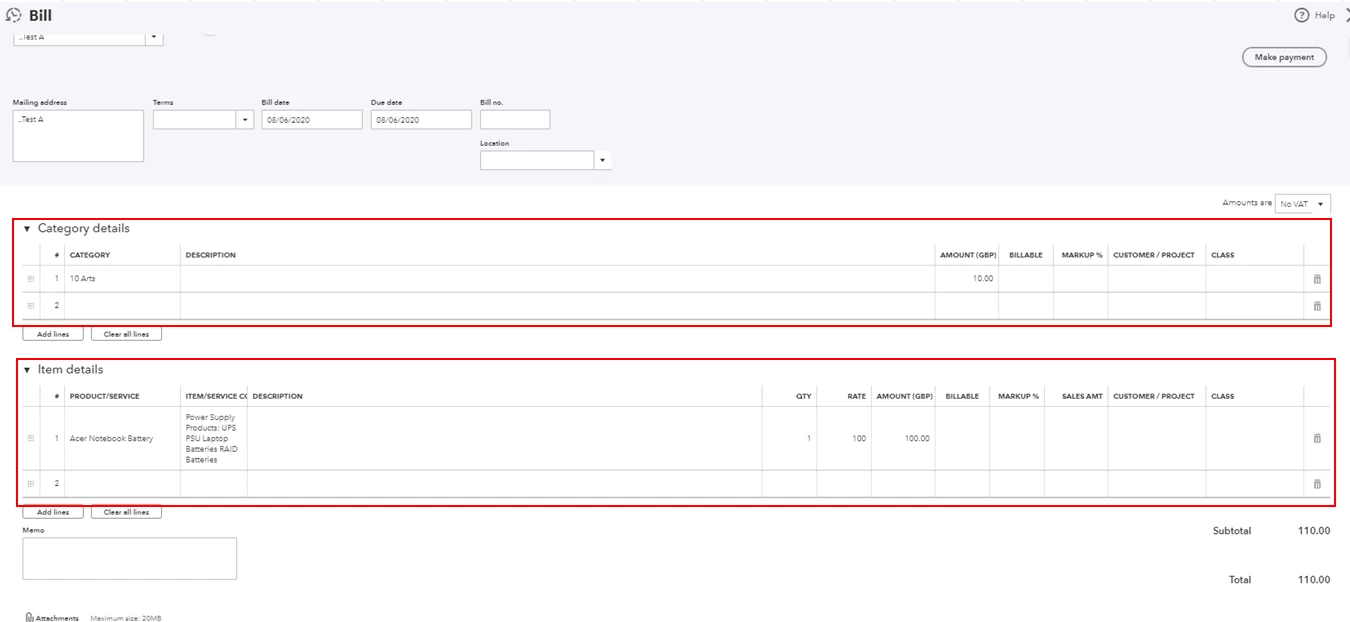
To learn more about creatin bill, feel free to check out this article for more information: Enter and pay bills.
As always, feel free to visit our QuickBooks Community help website if you need tips and related articles in the future.
Keep in touch if you need any more assistance with this, or there's something else I can do for you. I've got your back. Have a good day.
Enter your E-mail address. We'll send you an e-mail with instructions to reset your password.