Thanks for your question, Zach. I’ll guide you through the best way to record a supplier refund in QuickBooks Online, given that your credit card is set up as a bank account.
Since QuickBooks treats refunds as money coming into that account, the most effective method is to record the refund as a Bank Deposit into that credit card (bank) account. This will accurately increase the account balance, just as a refund should.
To keep your records clear and easy to track, I recommend adding a Memo noting that the deposit is a refund from the specific vendor.
Here’s how to do it:
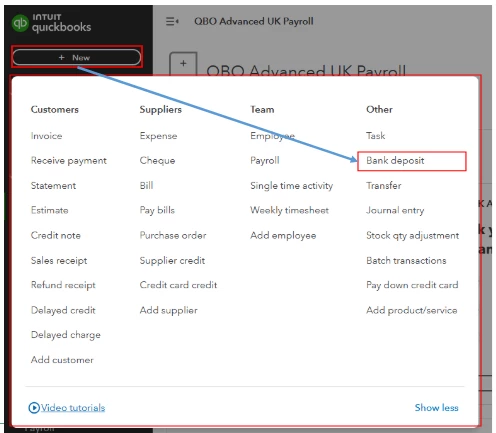
- Click the + New button and select Bank Deposit.
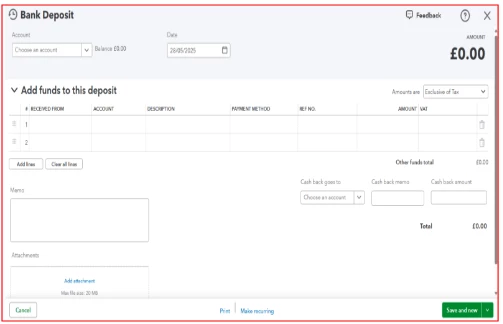
- From the Account dropdown at the top, choose the credit card account.
- In the Add funds to this deposit section, enter all the necessary details, including the supplier’s name and the refund amount.
- In the Memo field, add a note indicating that this deposit is for the refund.
- Save the deposit.
I've included screenshots for your reference:
During reconciliation, you match this deposit against the corresponding refund transaction that appears in your bank feed or credit card statement.
Moreover, I'd like to share these resources to help you balance your accounts and personalize your reports in QBO. One article provides tips on customizing reports to fit your business needs, while others cover managing uncollectible balances. Helping you handle bad debts and maintaining accurate account balances:
We truly value your participation in our Community and appreciate your willingness to seek guidance, Zach. Please revisit this thread with any questions or updates. We're excited to hear about your progress and eager to assist you as you navigate any changes you may encounter.

