NickC6953
February 8, 2022
Solved

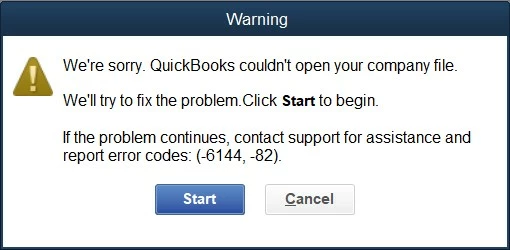
Error Codes -6144, -82

  • February 8, 2022
  • 1 reply
  • 0 views

I have been using a trial version of QB Desktop 2020 in order to recover backups of my, now defunct, QB Desktop 2013. Several problems have reared their ugly heads during the process and this is the latest (see picture above). I have followed all routes suggested by Quickbooks and QB Tools Hub without success.

Does anyone have any ideas how this can be resolved? All suggestions gratefully received.

Best answer by LeizylM

It's nice to see you here, NickC6953. 


Thank you for providing the detailed information about your concern. I can help you get past of the Error Codes -6144, -82 when trying to restore your company file.


QuickBooks error 6144 82 is a common error code in the application that can take place due to the inappropriate network setup. Also, the error can take place when simultaneous users are accessing the company file.


You can fix this error by renaming the.ND and.TLG files. Here's how:


You may want to restore a backup of the company file or use Auto Data Recovery. I've got an article for you that will walk you through the steps of these additional solutions.


1. Go to the folder containing the QuickBooks company file.

2. Now locate .ND and .TLG files

3. Right-click .ND file and select Rename

4. Add OLD at the end of the file name.

5. Now perform the same steps for .TLG files

6. Hit Enter to finish the task.


I've got an article for you that will walk you through the steps of these additional solutions when opening a company file or restoring a backup in QuickBooks Desktop:


If the issue persists, I'd suggest contacting our customer support. This way, they can check your account using their tools and perform a screen sharing session to investigate it further.


Here's how to reach them: 


  1. Open QuickBooks.
  2. Go to Help, then select QuickBooks Desktop Help.
  3. Select Contact Us.
  4. Give a brief description of your issue, then select Let's talk, and then choose a way to connect. Phone support may be limited due to volume.


Refer to this article to learn more about our contact options and support availability: Contact QuickBooks Desktop support


Kindly update me on how things go. I want to make sure your concern is fully addressed and I'm here to provide further assistance. Have a wonderful day.


1 reply

Fiat Lux - ASIA
February 8, 2022

Did you try to restore a QBW file or a QBB file?

NickC6953
NickC6953Author
February 8, 2022

Thank you for replying. It's a QBW file I'm trying to restore.

LeizylMAnswer
February 8, 2022

It's nice to see you here, NickC6953. 


Thank you for providing the detailed information about your concern. I can help you get past of the Error Codes -6144, -82 when trying to restore your company file.


QuickBooks error 6144 82 is a common error code in the application that can take place due to the inappropriate network setup. Also, the error can take place when simultaneous users are accessing the company file.


You can fix this error by renaming the.ND and.TLG files. Here's how:


You may want to restore a backup of the company file or use Auto Data Recovery. I've got an article for you that will walk you through the steps of these additional solutions.


1. Go to the folder containing the QuickBooks company file.

2. Now locate .ND and .TLG files

3. Right-click .ND file and select Rename

4. Add OLD at the end of the file name.

5. Now perform the same steps for .TLG files

6. Hit Enter to finish the task.


I've got an article for you that will walk you through the steps of these additional solutions when opening a company file or restoring a backup in QuickBooks Desktop:


If the issue persists, I'd suggest contacting our customer support. This way, they can check your account using their tools and perform a screen sharing session to investigate it further.


Here's how to reach them: 


  1. Open QuickBooks.
  2. Go to Help, then select QuickBooks Desktop Help.
  3. Select Contact Us.
  4. Give a brief description of your issue, then select Let's talk, and then choose a way to connect. Phone support may be limited due to volume.


Refer to this article to learn more about our contact options and support availability: Contact QuickBooks Desktop support


Kindly update me on how things go. I want to make sure your concern is fully addressed and I'm here to provide further assistance. Have a wonderful day.