

May 9, 2025
Question

Estimate/Invoice text moved

  • May 9, 2025
  • 1 reply
  • 0 views

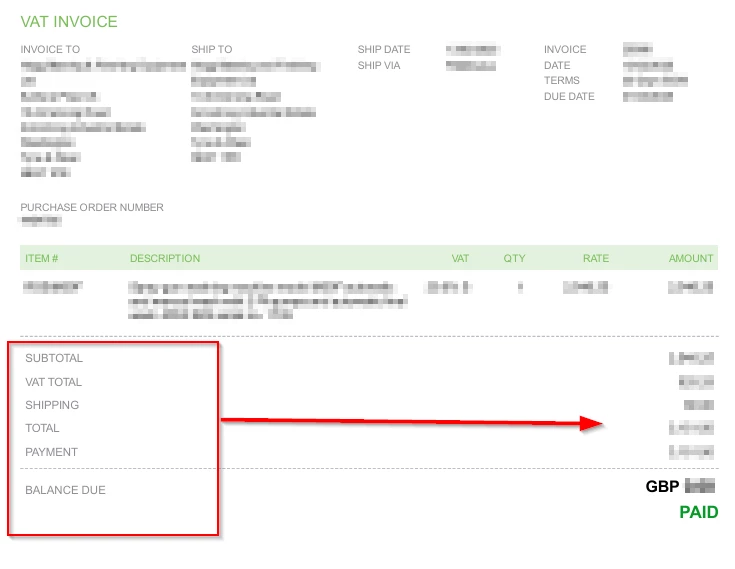
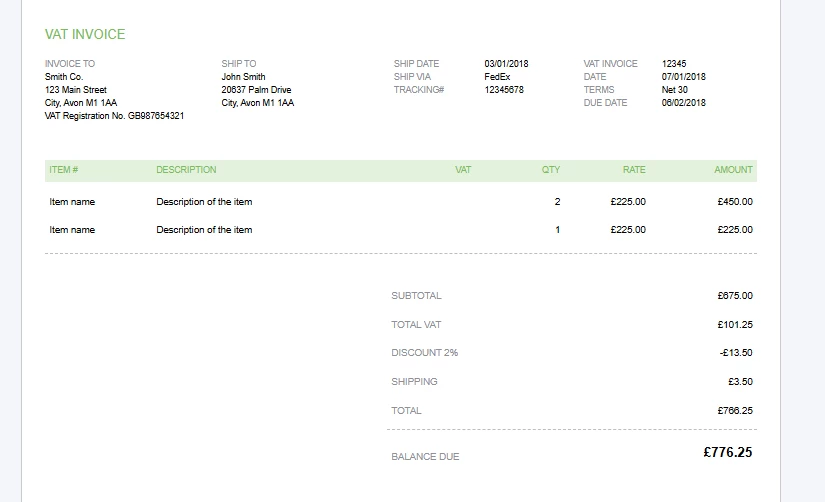
In the Invoice and Estimate etc printouts, the text for the sub-table showing VAT, Total etc has moved all the way to the left, it used to be aligned sensibly to the right (next to the numbers).  In the template editor, it still shows correctly on the right...


Real printout....
Form/Template editor:
1 reply

May 9, 2025

You may be using a different template for your invoice or estimate, Klous. To align all the text to the right when printing, you can switch to a different template, excluding the Airy New template.


Here's how to switch your template:


  1. Go to the Gear icon and select Custom form styles.
  2. Locate the template you usually use and click Edit.
  3. In the Design section, click Change template.
  4. Select any template except Airy New to match your preferences.
  5. Once done, click Done.

For detailed steps in customising your sales forms, refer to this article.


Additionally, you can run a Customer Balance Details  report to view comprehensive information on your customers' unpaid invoices in QBO.


Following these steps should help you achieve your preferred layout, Klous. If you have any further questions about managing your invoices or estimates, please don't hesitate to reach out. I'm here to assist you.

klous-1Author
May 14, 2025

The point is the actual invoice does not match the Template layout and the text is misaligned as per the screenshots.

klous-1Author
May 14, 2025

...and it used to match correctly, so something has changed.