

November 16, 2022
Solved

Export Desktop to Online gives error

  • November 16, 2022
  • 2 replies
  • 0 views

When I try to Export from QBD 2020 I get the below error message. I have seen other people report this, but I can't seem to find anything that makes it work.


I have updated to the latest version of QBD 2020.
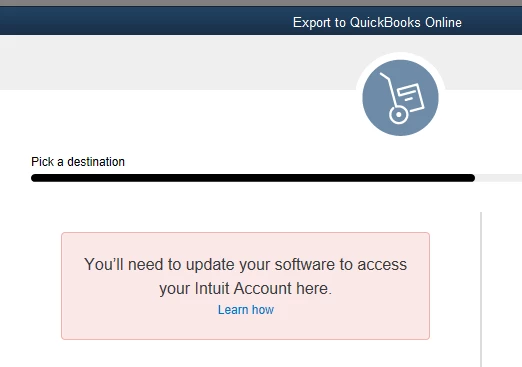
 

Can anyone please help?

thanks

Mark

Best answer by Fiat Lux - ASIA

@markleuty 

Prepare your new blank QBO account

https://quickbooks.grsm.io/UK


then visit MMB website to convert your data. As far as I know, company decided to use their service for conversion purpose. If you need to convert data with multicurrency transactions and/or attachments, you should consider purchasing another 3rd party conversion service

https://movemybooks.co.uk/move-to-quickbooks-old/limitations-of-service-quickbooks/


2 replies

November 16, 2022

I appreciate the detailed information and screenshots you provided, @markleuty. I can help you fix the error message so you can export your company file to QuickBooks Online.


To make the transition of your data from QuickBooks Desktop to QuickBooks Online as smooth as possible, we are developing a new migration procedure. The revised migration method will:


  • Enhance the whole transition to QuickBooks Online experience
  • Improve the size of the data files we can move and the quality of the data transported


All QuickBooks Desktop to QuickBooks Online conversions have been temporarily put on hold. Due to this, we’re unable to assist you in moving your QuickBooks Desktop data to QuickBooks Online.


As a workaround, you can manually transfer your data by entering customer opening balances in a new QuickBooks Online file. After the reconciliation period, whether monthly, quarterly, or yearly, you can begin moving the data. Just make sure you can access the following reports:


  • Bank statements (reconciled)
  • Credit Card statements (reconciled)
  • Debtors & Creditors accounts (reconciled)
  • VAT Returns (filed to date)
  • Any other balance sheet items


Once done, you can import the data using an Excel or CSV file. Before doing so, please know that you’ll need to enable multi-currency and VAT, as this will affect certain lists that are added. Moreover, review the limitations in this article and take note of the Order of Import: Enter customer opening balances in QuickBooks Online.


Here’s an article you can read about the new migration process: Why can’t I move my data from QuickBooks Desktop to QuickBooks Online?


Furthermore, we’re discontinuing all QuickBooks Desktop services for the UK on June 30, 2023. This includes all versions of QuickBooks Desktop Pro, Premier, and Enterprise. Feel free to visit this reference for more FAQs about the discontinuation and transferring your QBDT data to QBO: QuickBooks Desktop discontinuation support hub.


I can show you another guide or overview if you have other questions about setting up your QuickBooks Online account. Just leave a comment below, and the support is just a pole away. Be safe always.

Fiat Lux - ASIA
November 17, 2022

@markleuty 

Prepare your new blank QBO account

https://quickbooks.grsm.io/UK


then visit MMB website to convert your data. As far as I know, company decided to use their service for conversion purpose. If you need to convert data with multicurrency transactions and/or attachments, you should consider purchasing another 3rd party conversion service

https://movemybooks.co.uk/move-to-quickbooks-old/limitations-of-service-quickbooks/


markleutyAuthor
November 17, 2022

Thanks very much for this.


Very helpful indeed


:-)


Mark