November 22, 2019
Solved

How do I export auto tracked mileage? Is it the small blue square with the arrow to the right?

  • November 22, 2019
  • 1 reply
  • 0 views
Original commenter did not share additional details

Best answer by ShallyMarR

Hi, @support29.


Thanks for visiting here in the Community.


Yes, you're correct. You can click the export icon to the right with the blue square and arrow to export your mileage data in QuickBooks Online. 


Here's how:


1. Click Mileage.
2. Select the Export icon.


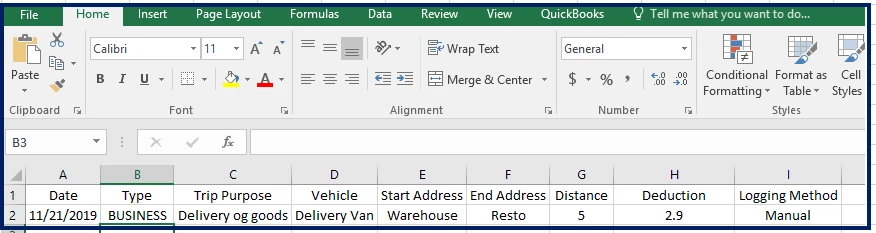
After clicking the export icon, it will download automatically using .CSV file format on Excel. See the screenshot below how it looks like:


Please see this article for more detailed steps about exporting your mileage in QuickBooks Online:  Track mileage in QuickBooks Online.


Just in case, you might check this article for future reference about setting up manual tracking: Manually track mileage for multiple vehicles.


If you need further assistance with the workaround, just let me know. I'm here whenever you need more help.

1 reply

ShallyMarR
November 23, 2019

Hi, @support29.


Thanks for visiting here in the Community.


Yes, you're correct. You can click the export icon to the right with the blue square and arrow to export your mileage data in QuickBooks Online. 


Here's how:


1. Click Mileage.
2. Select the Export icon.


After clicking the export icon, it will download automatically using .CSV file format on Excel. See the screenshot below how it looks like:


Please see this article for more detailed steps about exporting your mileage in QuickBooks Online:  Track mileage in QuickBooks Online.


Just in case, you might check this article for future reference about setting up manual tracking: Manually track mileage for multiple vehicles.


If you need further assistance with the workaround, just let me know. I'm here whenever you need more help.

November 24, 2019

Hi

In my Mileage screen I have the blue box with an arrow to Import and next to it an Export option. However only the Import arrow does anything. I can hover over the Export arrow and ge the hand but selecting the icon does not do anything.see screenshot) Please advise

Jen_D
November 24, 2019

Glad to have you back @cpjelectrics,


Have you tried exporting mileage in a private window? Doing this prevents cookies from being stored on your computer, making it a great place to identify browser issues.


Try these keyboard shortcuts to start a private window:


Google Chrome: press Ctrl Shift N  
Mozilla Firefox: press Ctrl Shift P
Internet Explorer: press Ctrl Shift P
Safari: press Command Shift N


If it works, clear the browser's cache to remove the browsing history and start with a clean slate.


However, if it doesn't work, I would recommend contacting our phone support department to escalate this to our engineers. Here's how to get support:


  1. Click the (?) Help menu at the top right section of your QBO Dashboard.
  2. Tap the Contact us button.


I want to make sure this is resolved, let me know how it goes in the comment. I'll be here to provide additional assistance when you need one. Have a wonderful day!
