

January 6, 2020
Question

how to create tax inclusive invoice in QB Enterprise 13.0

  • January 6, 2020
  • 3 replies
  • 0 views

Hi,


Im trying to create an all item tax-inclusive invoice where in the invoice mentions total amount without taxes, total tax charges and finally total amount. (please see below image for more clarity)
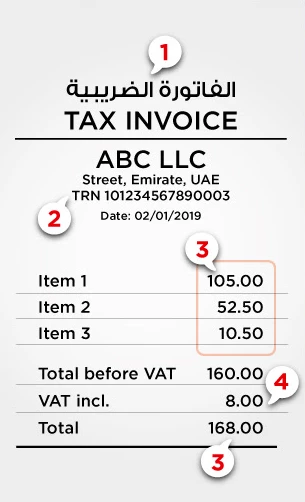


Please help me create a template like the above image, if possible.


Thanks,

S.

3 replies

JenoP
January 6, 2020

I'll provide the steps on how to create an invoice template based on the example that you shared, shaikhsaif.


First, create a new template and make sure to add a sub-total to it. Here's how:


  1. Go to the Lists menu and select Templates.
  2. Press CTRL + N on your keyboard.
  3. Select Invoice and click OK.
  4. Click Additional Customization.
  5. Go to the Footer tab.
  6. Check the Subtotal, Sales Tax, and Total boxes.
  7. Click OK

Second, use it when creating an invoice. Just click the drop-down list for Template within the invoice itself, then select the template that you just created.


You can also check out these articles about templates for more details: 


Let me know if you require additional assistance when managing templates in QuickBooks.


January 7, 2020

Thank you JenoP for your detailed answer but this is exactly what I have at the moment. I guess I framed my question wrong. Lemme try and frame it properly again:


 this is how my invoice should look


  • item1:                       $10.50 (item prices are tax inclusive)
  • item 2:                      $10.50 (item prices are tax inclusive)
  • total before VAT:    $20.00
  • VAT (5%) charged:   $1.00
  • total:                         $21.00

Please let me know if you (or anyone) can assist in creating this sort of format on QB, if possible.


Thanks,


S.


January 7, 2020

Hi shaikhsaif


Are you using the UK or US version?


January 7, 2020

Hi John C..


using US version.

January 7, 2020

Hello shaikhsaif,


As you have reached the UK community team we will need to direct you to our US support who will be able to assist with this. 


Please reach them on this link - for ease you can post the URL to this thread for the agents to view. 


Thanks 

January 7, 2020

ok great. Thanks GeorgiaC.