May 7, 2020
Solved

Is there a way to process supplier credit without an open bill? i have 4 credits from planned airline and hotel which were paid for in advance before covid-19

  • May 7, 2020
  • 1 reply
  • 0 views
the bills were from early january but credit received in april after cancellation

Best answer by MaryLandT

Good day, Chirus Limited,


You'll be glad to know that you can enter a supplier credit without an open bill. Let me show you how to process this entry:


  1. Click + New.
  2. Select Supplier Credit.
  3. In the Supplier field, select the appropriate supplier name.
  4. Enter the Date, Amount, and Account (the account used here is typically the original expense account on the original bill).
  5. Select Save and close.

When you create a bill and wants to apply the credit you've entered above, open the credit. Then, change the expense account to Accounts Payable in the Account field. Doing this will allow you to link both transactions when you make bill payment.
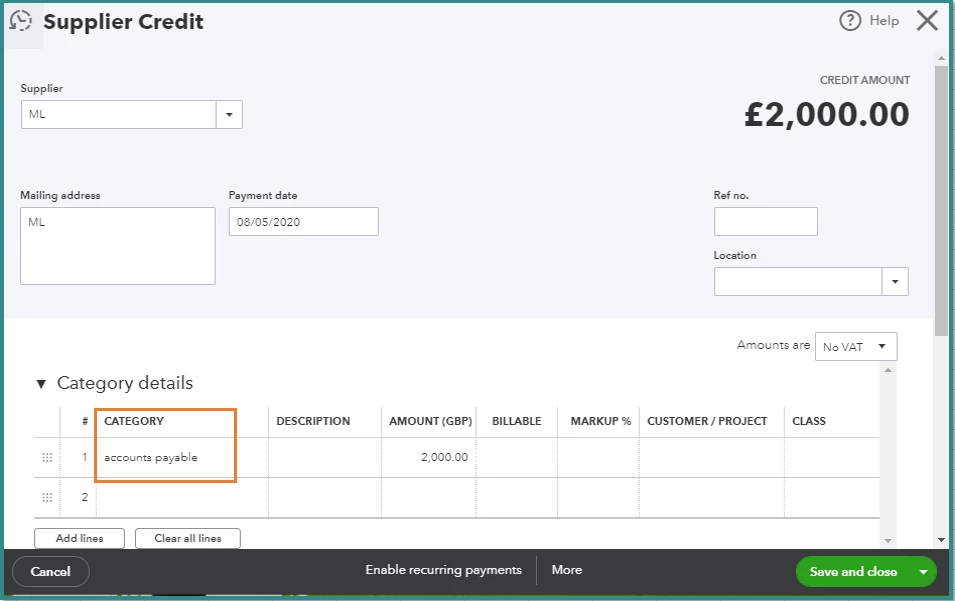
 

To apply the credit:
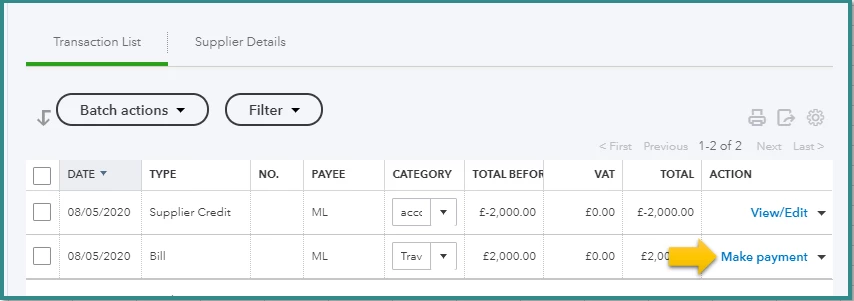
 

  1. Go to Expenses from the left navigation bar, then Suppliers.
  2. Click the name of the supplier to open the profile.
  3. Click Transactions List.
  4. Under Action, select Make Payment.
  5. Mark the Bill under Outstanding Transactions and Supplier Credit under Credits.
  6. Click Save and close.

For additional information, here's a great resource you can check: How do I handle supplier credits and refunds?.


Keep me posted if there's anything else I can help you today. Just tag my name and I'm right here.


Thank you and stay safe!

1 reply

MaryLandT
MaryLandTAnswer
May 7, 2020

Good day, Chirus Limited,


You'll be glad to know that you can enter a supplier credit without an open bill. Let me show you how to process this entry:


  1. Click + New.
  2. Select Supplier Credit.
  3. In the Supplier field, select the appropriate supplier name.
  4. Enter the Date, Amount, and Account (the account used here is typically the original expense account on the original bill).
  5. Select Save and close.

When you create a bill and wants to apply the credit you've entered above, open the credit. Then, change the expense account to Accounts Payable in the Account field. Doing this will allow you to link both transactions when you make bill payment.


To apply the credit:
 

  1. Go to Expenses from the left navigation bar, then Suppliers.
  2. Click the name of the supplier to open the profile.
  3. Click Transactions List.
  4. Under Action, select Make Payment.
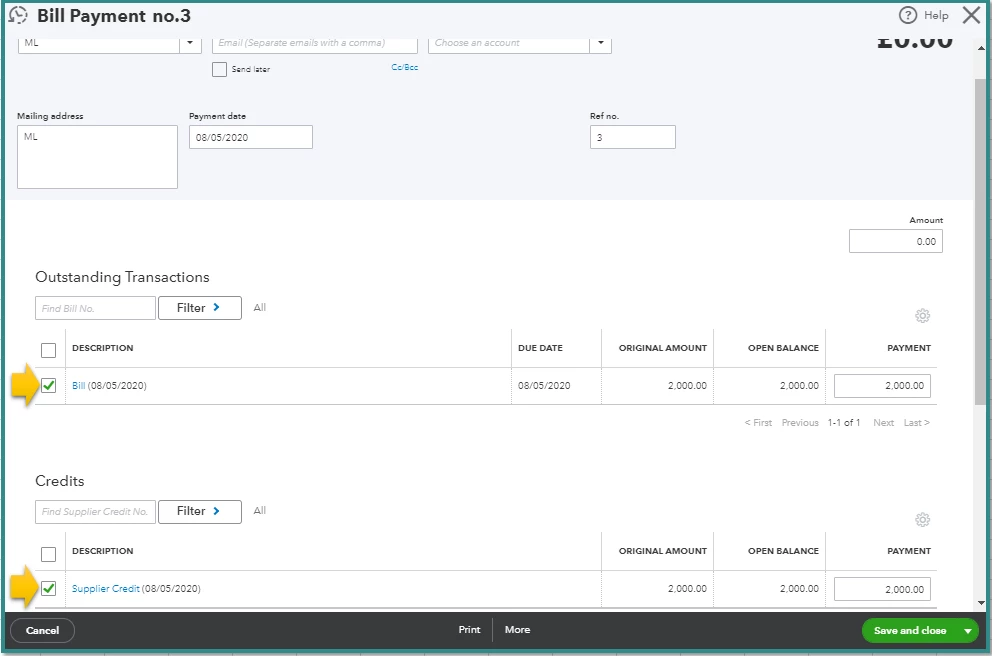
  5. Mark the Bill under Outstanding Transactions and Supplier Credit under Credits.
  6. Click Save and close.

For additional information, here's a great resource you can check: How do I handle supplier credits and refunds?.


Keep me posted if there's anything else I can help you today. Just tag my name and I'm right here.


Thank you and stay safe!
