February 8, 2021
Solved

Method of recording and paying Credit Card business purchases

  • February 8, 2021
  • 1 reply
  • 0 views

I have a business credit card which is paid in full at the end of each month. Can I enter the individual purchases made on the credit card, as bills, ie Enter Bills, then pay them all, ie Pay Bills, with the payment from the bank at the end of the month?  As everything would be entered and categorised on each bill entry, the details would all be there and it would be simple to use the whole bank payment to pay all the CC bills. The payment from the bank would be exactly what the bills amount to.  Can you see any problem with doing this?  I would find it a lot easier to understand and carry out.
Best answer by JasroV

Thanks for getting back to us, @Oscar10.


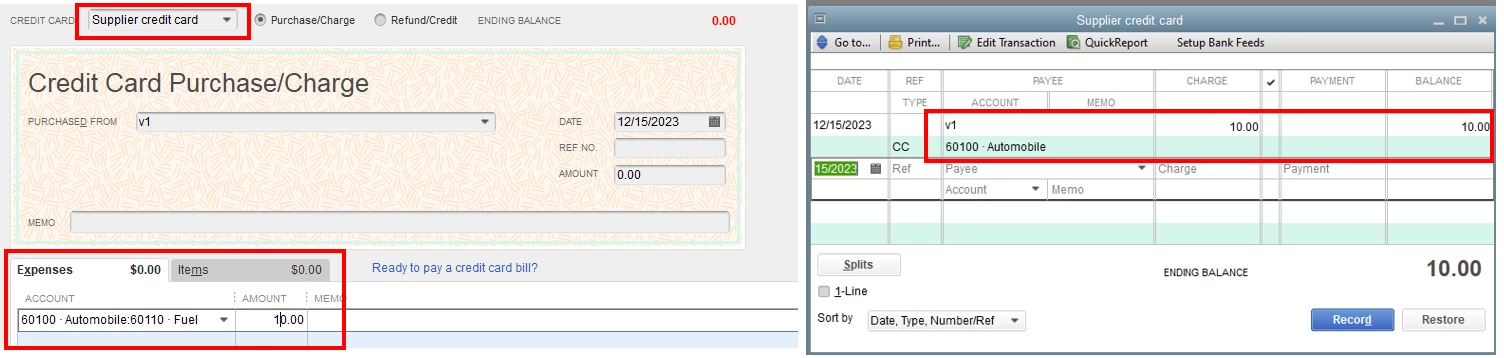
I also appreciate you for sharing additional details with us. I’ve replicated here on my end the credit card charges shows in my supplier accounts after entering a Credit Card Charges.


To isolate this issue, let’s run a QuickReport to your supplier’s account to view the credit card charges transactions. Let me show you how.


  1. Go to the Accountant menu.
  2. Select Chart of Accounts.
  3. Hover to your supplier account and right-click your mouse.
  4. Select QuickReport.
  5. From the report window, select All from the Dates drop-down menu.
  6. Then, click Customise Report.
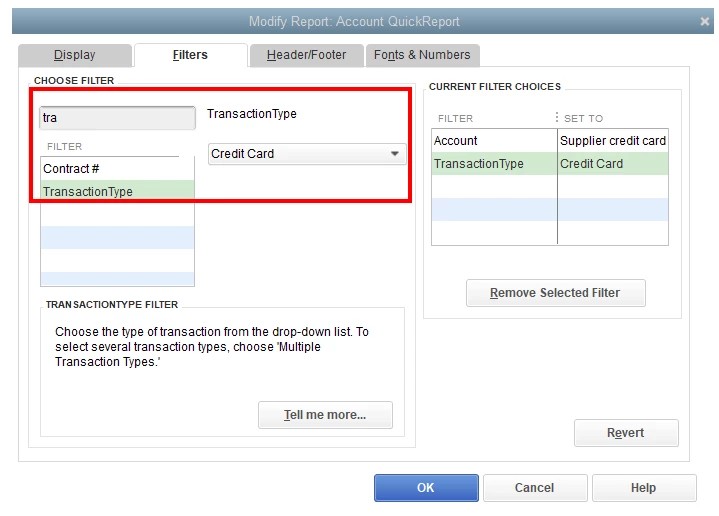
  7. Click the Filters tab.
  8. From the filter field, type in and select Transaction Type.
  9. Select Credit Card from the drop-down menu and click OK


Once done, you can now locate your supplier credit card charges. For more insight about the process, check out this article for reference: Customise reports in QuickBooks Desktop.


When everything looks good, you can now reconcile your account whenever you’re ready. For the step by step process, utilise this article for guidance: Learn the reconcile workflow in QuickBooks.


In case you have a follow-up question about managing your accounts, feel free to tag me in your reply. I’m only a post away from you. Have a great day ahead and keep well.

1 reply

JessT
February 9, 2021

Hi Oscar10!


I also like the idea of entering CC purchases one by one because you can categorize them appropriately and you're reflecting what happened in the reality. However, you'll want to change your process because it's taking the CC account out of the equation hence the bills are directly paid by your bank account. I got a simpler process for you.


Step 1: Enter the credit card purchases against the credit card account, and you can still categorize them.

  1. Go to the Banking menu.
  2. Choose Enter Credit Card Charges.
  3. Enter the details of your purchase and click Save & New to enter the next transaction.

The entered purchases will accumulate a credit card balance in your Chart of Accounts, which is what happened in real life.


Step 2: Pay the credit card at the end of the month. You have 3 options for this.

  • Option 1: Transfer the payment from your paying account to the CC account.


    Option 2: Write a cheque against the paying account and use the CC account in the Expenses section.


    Option 3: Enter a bill first and pay it with your business account. This is preferred by other users because they want to monitor the CC bill that is sent by the credit card company.

After entering the transactions, you can reconcile your credit card account.


That will do it. If you need more help with your credit card transactions, please let me know.

Oscar10Author
February 9, 2021

Thank you, that's very helpful.  I will try this out, but first I have to see how to start off.  I have historical credit card statements from Barclaycard, details were never entered anywhere, just the payment from the bank entered monthly, and the broad outline as stated on the CC Summary was used to allocate block amounts to Expense Accounts, so there are no specific details of vendors and individual transactions etc.  There are too many of them to go back and record them properly now, hopefully this can be done in the future. 


Our financial year began 1st April 2020, ends 31st March 2021.  Due to Covid-19 there are not many transactions this year so I thought this would be a good opportunity to make the correct entries from 1st April 2020 onwards, and then I will become familiar with the procedure to go back and tackle the old statements at a later time. 

However, there is a balance owing on the Credit card at 31st March 2020 of £1,500.  This was paid from the bank account as usual by direct debit in April.  How do I enter / treat this balance and payment?  The transactions this is comprised of would of course have occurred in March but I want to start the new records from 1st April.   

February 9, 2021

Hello Oscar10, 


Welcome to the Community page, 


So you can't miss transactions out, do them in order otherwise you could be assigning credits to the wrong places. 


So they have told you already what you need to know, make the bills with the payments from the card, then transfer the funds from the bank to the card to pay it off. If there is a balance you would need to transfer the funds from the bank to the card to pay it off.  You will need to start with the oldest and work forwards rather than going backward.