Solved
My mileage trips on QBO Desktop have disappeared, and now showing no trips at all.
Original commenter did not share additional details


Yes, audit log checked and I am in the correct account.
All transactions, payroll, and bank look OK.
Only the mileage record has completely disappeared.
I have the downloaded mileage report for previous months if you need to see them.
I'm grateful for the updates that you gave, @samahmed.
I want to ensure that you'll be able to see the recorded mileage in QuickBooks Online.
Any transaction entered on the app will show once you pull up your account on the browser or vice versa. The system will automatically sync the data on both platforms.
To help verify why the mileage record has disappeared, I recommend reaching out to our Customer Care Team. They have the tools that can help investigate the root cause of this matter and apply a fix.
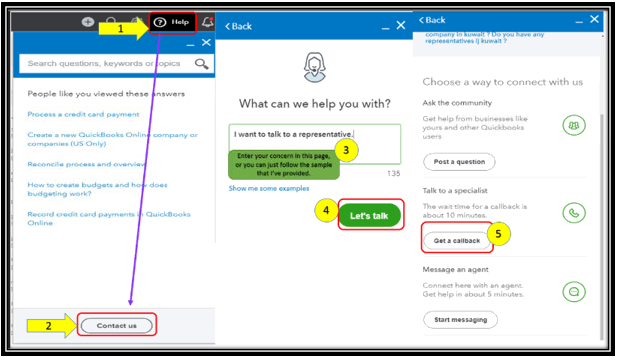
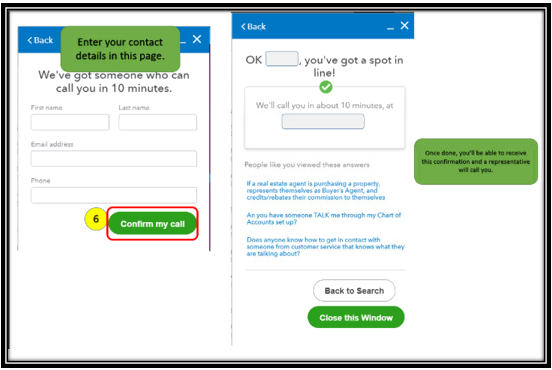
The best way to reach our support team is to sign in to your account, select the Help icon on the top right, and then Contact Us at the bottom of the panel.
Please see the steps and snips below for your reference:
Lastly, to give you more details about managing trips in QBO, you can always use this guide: Learn how to record business miles for one or more vehicles.
Comment here again if you have other questions with QuickBooks Online or the mobile app. My colleagues and I will be here to help.
Enter your E-mail address. We'll send you an e-mail with instructions to reset your password.