Hello, GFS8823.
I appreciate your reply and let me take this time to welcome you to our Community space.
Now, let's work things out together and ensure you'll be able to record your invoices and the payments, and take care of your Self-Assessment taxes.
I take it that you've signed up for QuickBooks Self-Employed trial. To clarify, it doesn't matter if you have a trial or the paid version.
Both of them will let you experience all of the functions and features offered (with the exception of the trial limited to 30 days until you are subscribed).
So in regards to your first question, we'll want to reach out to HMRC to clarify the details about when to submit your first Self-Assessment taxes. This way, we'll have an accurate guide on the deadline.
Alternatively, we can visit this HMRC publication about handling Self-Assessment taxes: https://www.gov.uk/self-assessment-tax-returns.
Let's head on to your invoices. I should first point out that in QuickBooks Self-Employed, the Invoicing feature is for recording purposes only.
Meaning, they are entered for the sole purpose of having your own manageable records of your invoices. We can send them to your customers or clients, but they won't affect your tax calculations or amounts.
With that being said, we can definitely enter the previous year's invoices in QuickBooks Self-Employed. Since they are for recording purposes only, what we can do is to record the invoice payments made from the previous tax year.
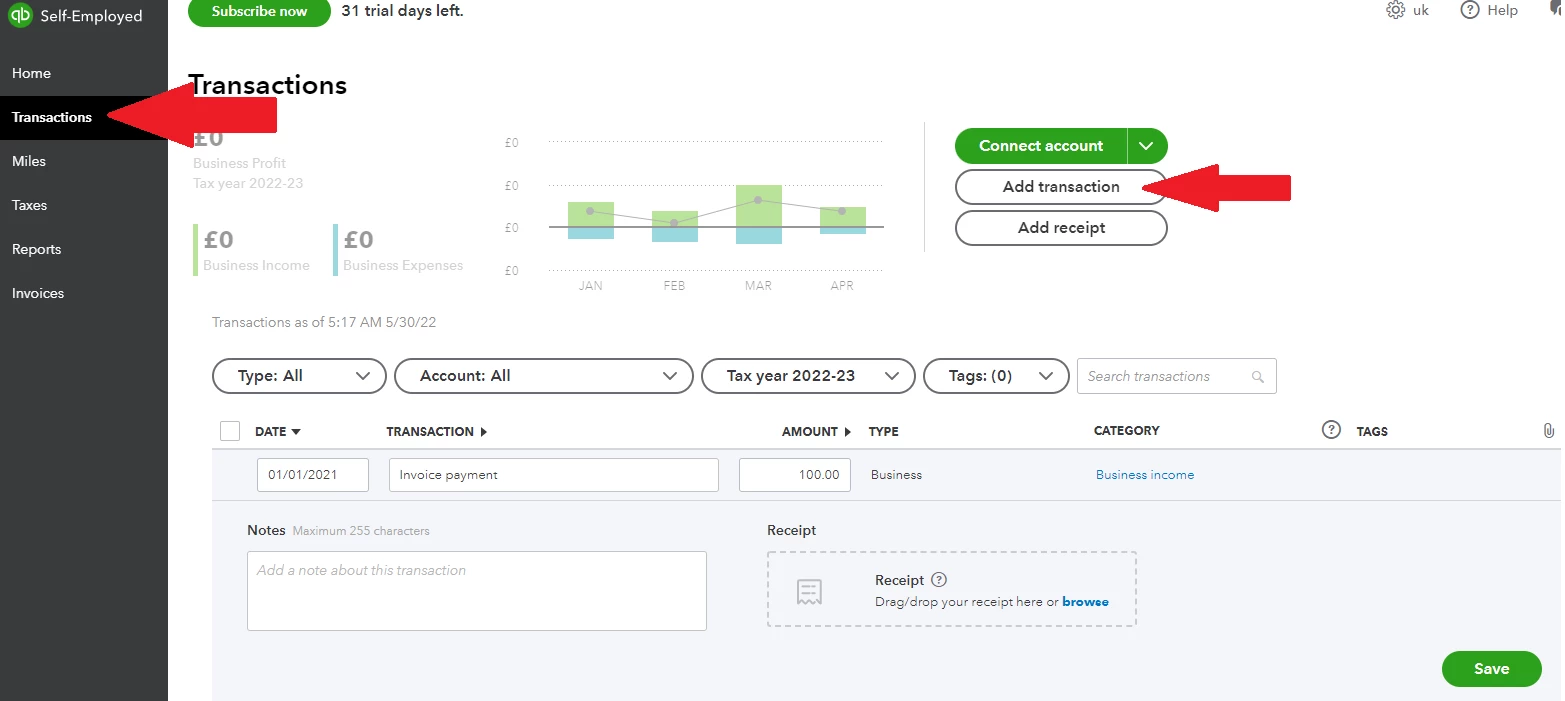
To record the invoice payment:
- Go to the Transactions page.
- Click the Enter first transaction button.
- Proceed with the Add transaction button.
- Enter the Date of the invoice payment (previous year), Description and Amount.
- Make sure to categorise the invoice payment under Business income (click the Select a category link).
- Add other details, then hit Save.
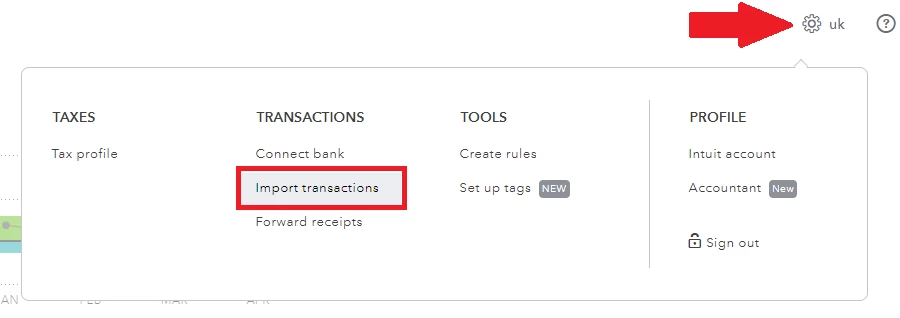
If you have a CSV file for all of your invoice payments, we can also upload it into QuickBooks Self-Employed:
- Click the Gear icon, then select Import transactions.
- Proceed with the import transactions link.
- Browse for the CSV file, then proceed with the mapping and import process.
- Categorise the invoice payments after importing.
Although, we can always record both the invoices and their corresponding payments.
To record an invoice, go to the Invoices page then click on Create invoice. Add the details to your invoice, then save it as a draft or send it to a dummy email (the Self-Employed platform won't let us save an invoice without sending or saving it as a draft).

Need more details about managing your invoices and recording your transactions manually? Check out these articles:
Ready to manage your Self-Assessment taxes after recording those invoices and their payments? We can take a look at this checklist for a guide: The QuickBooks Self Assessment for Income Tax checklist.
You're more than welcome to ask around if you have more questions about managing your transactions and taxes in the Self-Employed program. We're always here to help.

