

June 4, 2020
Solved

No export option on Mileage page

  • June 4, 2020
  • 1 reply
  • 0 views

Hi, I need to export my mileage for my end-of-year accounts but the square with the arrow symbol is missing from the mileage page on both the Mac desktop app and the online version in Chrome. I've searched 'Export mileage' and it just comes up with "1. Select Mileage. > 2. Select the Export icon." I have the Export icon on other pages but not on Mileage. I've even checked it wasn't hiding off the edge of the browser window.


Am I missing something or is there a report I can run?


Many thanks
Best answer by lizard2

Hi, Thanks for the quick reply. Trying different browsers etc. did not work but I have found the solution.


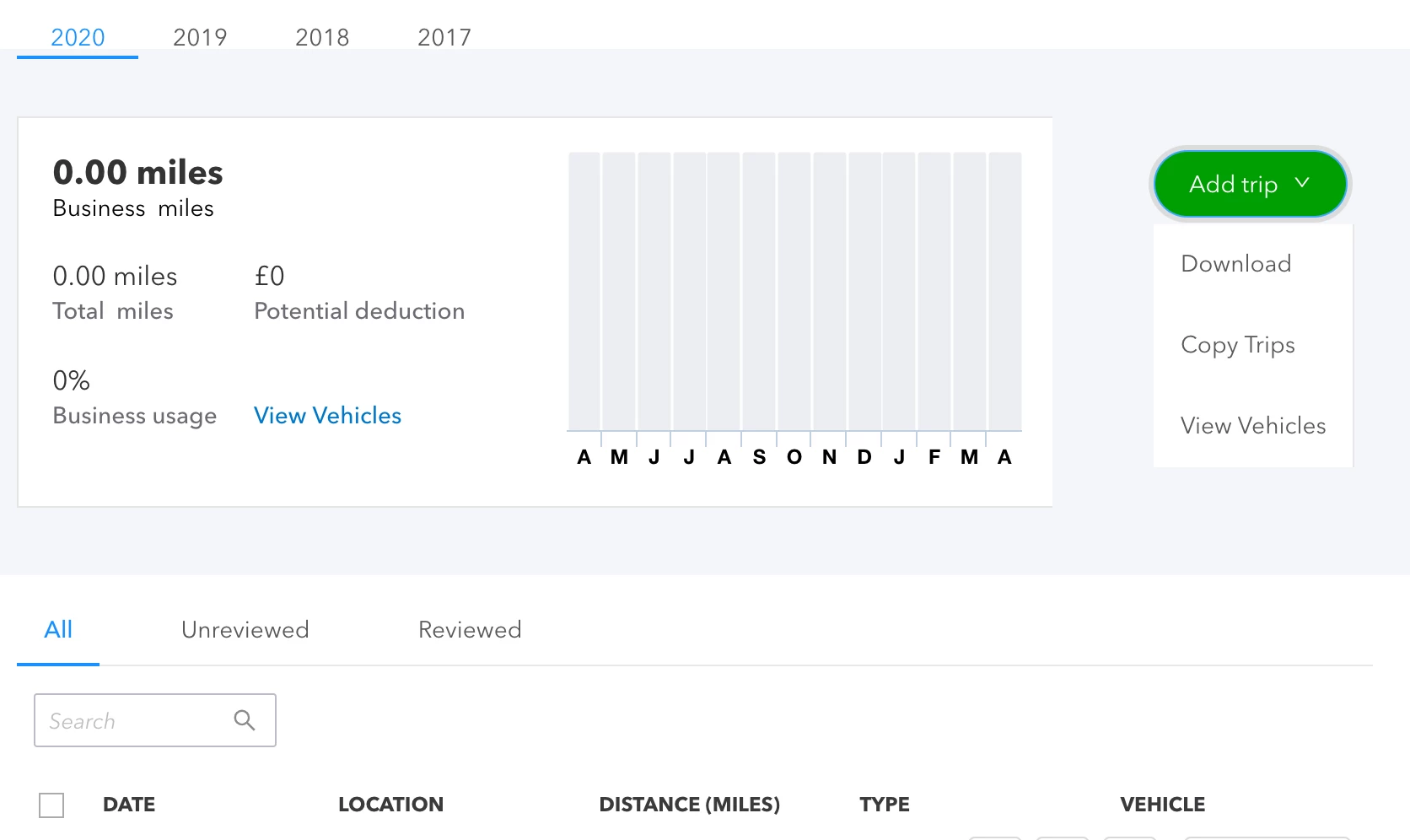
I looks like something has changed. Export symbol has gone and the green 'Add trip' button now has a drop down menu with options - one of which is 'Download'. It only shows when you hover over it. I have included a screenshot.


Not sure if this is just a UK thing. All sorted now thanks. 


Many thanks for your help.

1 reply

Angelyn_T
June 4, 2020

Hello, @lizard2.


The blue square with an arrow symbol should be available to export your mileage data in QuickBooks Online.

Since it's missing from your end, let's try accessing your account in a private window to isolate the issue. At times, the regular browser tends to hold onto information, and over time it could cause problems while working with QuickBooks.


To save you time, use either of these keyboard shortcuts:


  • Mozilla Firefox: press Ctrl Shift P
  • Internet Explorer: press Ctrl Shift P
  • Safari: press Command Shift +N

If the export button is already available from there, go back to your original browser and clear its cache to start fresh. Also, using other supported browsers can help us narrow the cause of this problem.


If you're getting the same problem, I encourage reaching out to our Support Team so a representative can check and investigate this unusual behaviour.


Get back to me if you have any other questions. It's my pleasure to help. Have a fantastic day!

lizard2AuthorAnswer
June 4, 2020

Hi, Thanks for the quick reply. Trying different browsers etc. did not work but I have found the solution.


I looks like something has changed. Export symbol has gone and the green 'Add trip' button now has a drop down menu with options - one of which is 'Download'. It only shows when you hover over it. I have included a screenshot.


Not sure if this is just a UK thing. All sorted now thanks. 


Many thanks for your help.