

February 7, 2025
Question

Product Service Pop up box width has changed

  • February 7, 2025
  • 2 replies
  • 0 views

When entering an item the popup that appeared as you typde was a suitable width so you could read the products (the pop up overlapped the other columns).


Now it is very narrow, as narrow as the column, meaning you only see the first part of the description, all of which are similar e.g. "O-Ring" " as the item ID# takes up the majority of the width. 
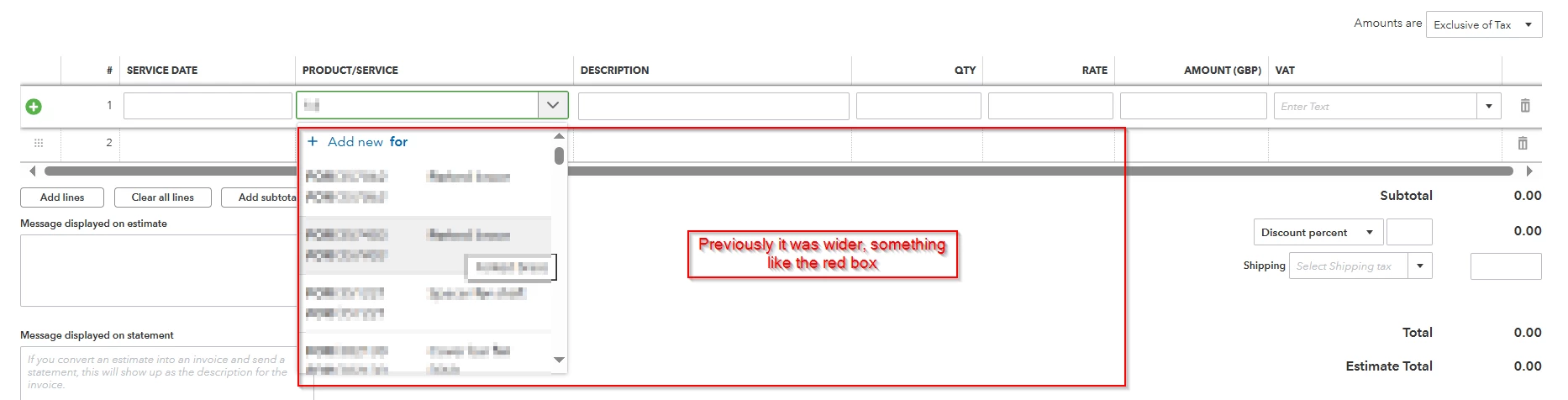
 

Is it possible to change this back?

I've tried various computers, private window.


2 replies

February 7, 2025

Hi, klous-1. QuickBooks Online (QBO) has a new design on the Invoice page. I'm here to share details about this.


Currently, we're improving the QBO invoice layout based on the users' feedback to better meet the business needs. The enhancement leads to a new interface when selecting products and services. This is why the description looks narrow when adding the items.


I understand the need to switch back to the old interface. At this time, the option is unavailable. In the meantime, I recommend hovering your mouse over the Question Button icon when choosing which products and services to add to the invoice. For visual reference, I've added a screenshot below:


We recognize that each company has unique needs, and I can see how the feature to revert to the old invoice design would benefit and empower your business. I recommend sending this request straight to our product engineers through feedback. It helps us improve the features of the program. I'll show you how:


  1. Go to the Gear icon and select Feedback.
  2. Type in your suggestions about restoring the notes.
  3. Then, submit your request.


Alternatively, you can share this idea on our QuickBooks Idea Exchange Board page. To do so, click this link: https://quickbooks.intuit.com/learn-support/quickbooks-idea-exchange/idb-p/uk-idea-exchange. Then, select the Suggest an idea button. After entering your suggestion, choose Post.


Additionally, I've added these articles to gently remind customers about invoice due dates and track the payments on time in the program:


If you have other questions about managing products and services in QBO or creating sales transactions, feel free to comment below. The Community team is always here to assist you.

Northern Game
February 9, 2025

I would love to know which customers have suggested making this box smaller.  It's terrible!!


Please change it back to what it was.  This is not an improvement and slows down the whole process of creating invoices and sales receipts.  Why keep changing things that don't need changing!!


At the least provide an option to go back to the other one if people wish

February 11, 2025

We are having the same problem as the OP> The box is too narrow to see the full length of the product name. We have lots of similar products with similar names apart from the last section. It used to be nice and easy to enter products, now it takes so long having to click more buttons just to see what always used to show. Who ever suggested this, and I don't believe for one minute that any user would, should need retraining or even should be removed from the job. 


Why try to fix something that is not broken. Its always the same with Quickbooks. Lots of developers, no work for them so lets create some and make the product worse. Try fixing things that are broken, like the Feedback link after clicking the setting gear icon. That never works.

February 12, 2025

This isnt an improvement, no one is saying well done quickbooks great job..... everyone is saying that the box is too small and now we cant see the full description !!

Please for the love of god change it back to how it was, dont tell us its an improvement, we all know its a mistake  in the coding and no one picked it up!!!!

change it back please. why are you hell bent on making everything so difficult for your customers!!!!