

April 7, 2022
Question

QUICKBOOKS DESKTOP DATA FILE INVOICE TEMPLATE ISSUE
  • April 7, 2022
  • 1 reply
  • 0 views


Hi Quickbooks community


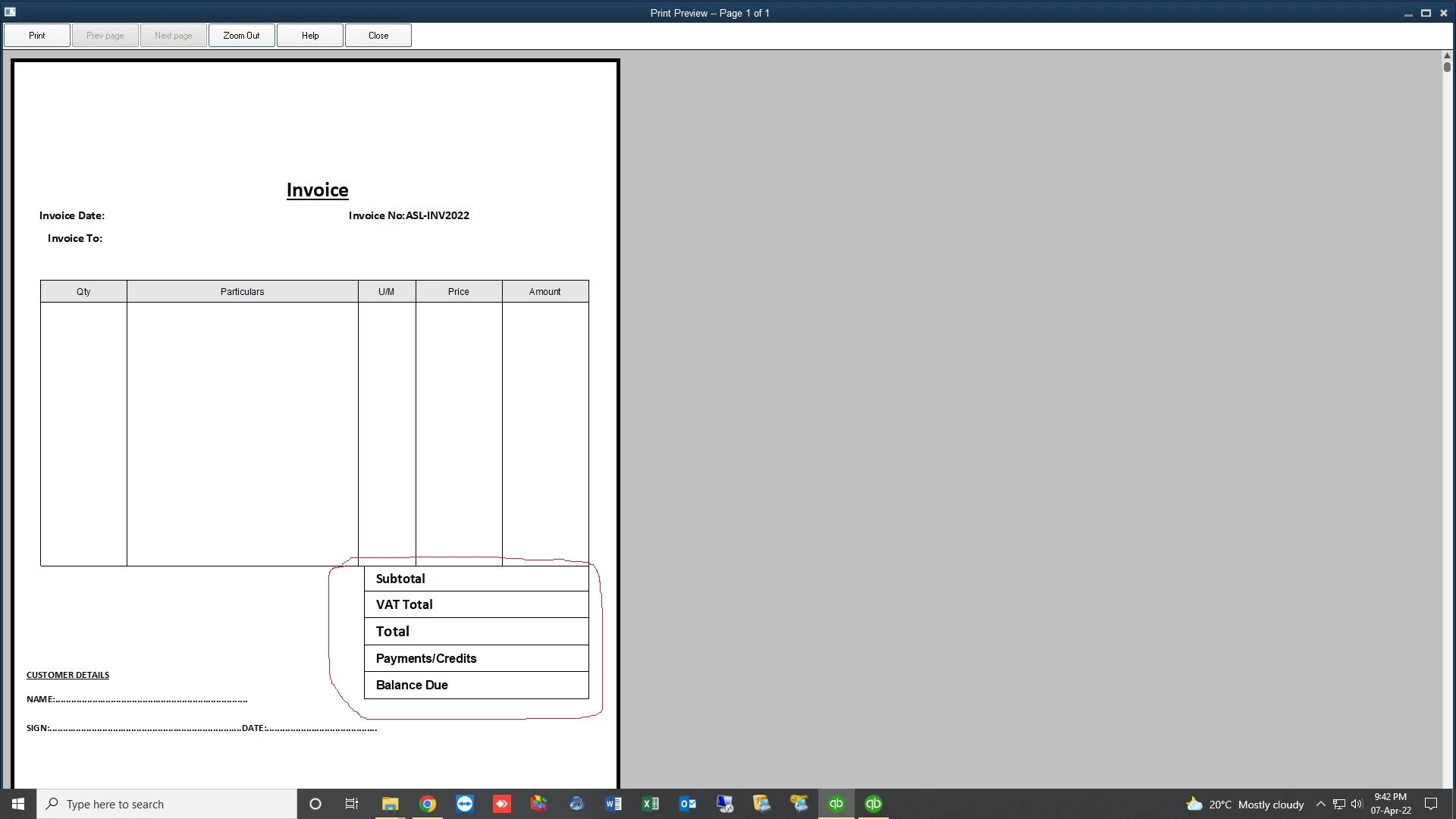
i have an issue with my client's company file in that all print templates cant display the footer data for subtotal, total etc on preview and printing after the upgrade.


any help?


1 reply

April 7, 2022

Thanks for laying out the details of your concern and attaching a screenshot as well, @NICHOLARS. Let me share some troubleshooting steps to fix the issue when printing the invoice template in QuickBooks Desktop (QBDT).


The first thing you'll need to do is to ensure that your QBDT is updated to the latest release. This way, you'll have the most recent features and fix it.


I checked if there was an ongoing issue with this, but there isn't currently one. To isolate this, let's run the Verify and Rebuild data tools in QBDT. This resolves the most commonly known data issues within your company file.


Here’s how:


  1. Go to Window, then Close All.
  2. From the File menu, click Utilities.
  3. Select Rebuild Data.
  4. Follow the on-screen instructions to back up your data.
  5. When the tool finishes, select OK.
  6. Go to the File menu, then click Utilities.
  7. Click Verify Data, then select Rebuild Now once QuickBooks finds an issue with your company file.


If the issue persists, I recommend contacting our Technical Support team. This way, they have the tools to help you find the root cause of your concern and fix it.


In addition, you can try to recreate the template to resolve the error your client is having. Feel free to check out this article for more information: Fix common issues when you use and customize templates


Kindly update me on how things go, @NICHOLARS. I want to make sure your concern is fully addressed, and I'm here to provide further assistance. Take care!

NICHOLARSAuthor
April 7, 2022

Hi Kelvin,

There's nothing i have not done concerning the above.

The funny part is the rebuild tells me there's no issue with the file.

Also when i export a template from that file and imports in another file it works perfectly.

If you can share your email i can share the file with you to check

NICHOLARSAuthor
April 7, 2022

Or if there are other advanced tools i can use to see where the issue is.

Could this be an issue with prefferences because if i use that file to create a new file from existing it still carries the same problem.


NOTE: FUNNY PART IS WHEN AM ON LAYOUT DESIGNER WINDOW THE SAMPLE TEXT IS DISPLAYING BUT WHEN CLICK OK TO PREVIEW ITS NOT THERE.

COULD THIS BE AN ISSUE WITH CURRENCY TABLES AS WELL OR MYSQL DATABASE STRUCTURAL ISSUES?


Kindly assist