January 26, 2024
Question

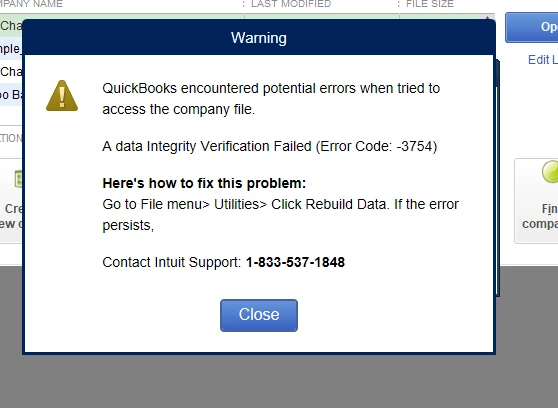
Anyone got this error message?

  • January 26, 2024
  • 1 reply
  • 0 views

Got a Jump out error message. Want me call service line 1-800-537-1848.

Customer service didn’t want me call this number and cannot solve it. 
1 reply

January 26, 2024

Hi jinger088, 


Thanks for reaching out in the Community regarding the error you've encountered. I'd be happy to help you resolve that.


The error message that you've encountered is a symptom of a data integrity issue. Verifying and rebuilding function is a good start to isolate the issue since this process scans your company files for errors or data damage.


To totally get rid of that error, you can run the QuickBooks File Doctor. First, download and install the most recent version (1.4.0.0) of QuickBooks Tool Hub. Then, open the file you downloaded (QuickBooksToolHub.exe) and follow the on-screen steps to install the program.


Once done, double-click the icon on your Windows desktop to open the tool hub. To get the most out of your QuickBooks File Doctor experience, we recommend using it on Windows 10, 64-bit. When you're ready, follow these steps to run the Quick Fix my File utility:
 

  1. From the tool hub, select the Company File Issues tab.
  2. Select Quick Fix my File.
  3. Click OK, then launch your QuickBooks.

If you still get an error message, you'll have to use the Run QuickBooks File Doctor function. Here's how:


  1. From the tool hub, go to the Company File Issues tab.
  2. Select Run QuickBooks File Doctor.
  3. Choose your company file from the drop-down menu.
  4. Select Check your file (middle option only), then click Continue.
  5. Enter your QuickBooks admin password, then hit Next.

After the scan finishes, open QuickBooks and your company file. Please take note that your issue may have been resolved even if the scan says it was unsuccessful. To learn more about this process, I encourage reading this guide: Fix company file and network issues.


Feel welcome to reach out to me again with any questions you may have. I'll be more than happy to help.

jinger088Author
January 26, 2024

no works.

Fiat Lux - ASIA
January 27, 2024

@jinger088 

QB ToolHub or reinstalling your QB will not work.

Can you find the following files in the same folder?

90s.trf

QuickBooksDownloader.exe.config

QuickBooksDownloader.exe.manifest

