

November 17, 2019
Question

"Building Report" when opening company in Quickbooks Desktop. Takes a long time. Why?

  • November 17, 2019
  • 2 replies
  • 0 views

Hi,

When we open our company in Quickbooks Desktop, we see a "Building Report" window showing. It as a progress bar with a percentage. It says "Searching" and "Press ESC to cancel". It disapears and come back many times (around 7-8 times). It does that for around 1 minute and then the company file opens.   
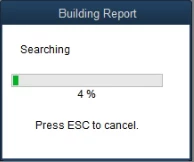
 

It's a bit anoying that we have to wait everytime we open the company. Is there a way to fix this?


We have a good processor Core i5-4570 3.2GHz, 8 GB memory and a SSD drive on that computer. It running Windows 10 pro. Its really fast for all the other tasks we do on that computer.

2 replies

November 17, 2019

Which version (year) do you have? Try Verify and Rebuild your file (menu File > Utilities) and notice the result.

November 17, 2019

Hi Plung,

It's Quickbooks Premier 2019 Canada updated to the latest update. I already tried Verifying and Rebuilding the file.

So is that something that should normally happen every once and then? But for us is happening all the time?


November 17, 2019

Since it was saying "Press ESC to cancel" I thought "Why the heck, not", and pressed the Escape key. Since then, I didn't see this "Building Report" window again. Now when we open the company, it goes very fast and it opens directly to the Quickbooks GUI.  I hope it will stay like that. We'll see in the next days. 


Thanks for the help.

November 18, 2019

Open your file on trial license of QuickBooks 2020. If the problem still persists, your file maybe damaged.

November 18, 2019

Good Idea.


We'll try it as it is now, since it's working. If it continues bugging us, I'll try that suggestion.


Thanks Plung. Appreciate it.