May 12, 2019
Question

Can't import Google Maps Mileage

  • May 12, 2019
  • 4 replies
  • 0 views

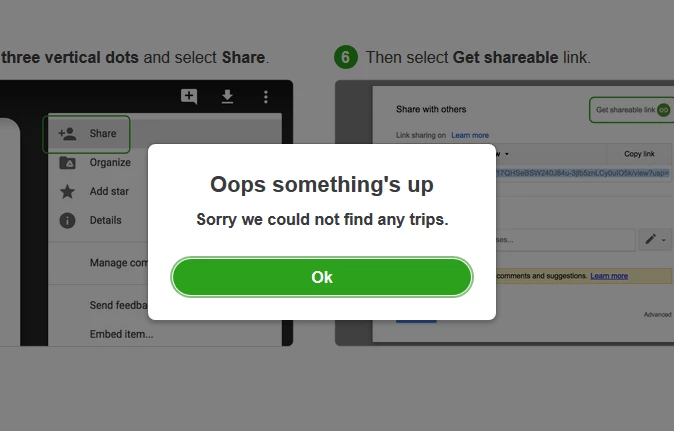
I am trying to import trips/mileage from Google Maps in QB Self-Employed but I am getting this error for past couple weeks. I have followed all steps exactly that are mentioned.

 

4 replies

AlexV
May 12, 2019

Hello there,  saadsiddique.


Let's try to import it using a private browser. You can follow these shortcuts to open private browser:

  • Google Chrome, press CTRL  + Shift + N
  • Mozilla Firefox: press CTRL  + Shift + P
  • Internet Explorer: press CTRL  + Shift + P
  • Safari: press Command + Shift + N

If it works, go back to the regular browser and clear the cache. Too much cache results to some browser error. Also, try to import it using another browser like Google Chrome, Internet Explorer, or Mozilla Firefox. 


You can also check this article with very detailed steps on how to import trips from Google.


Reply to this thread if you have other concerns.

May 12, 2019

I've tried three different browsers, in Private/Incognito mode. No use. This is more like backend error instead of browser/cache issue :-)

AlexV
May 13, 2019

There's no ongoing investigation about importing trips from Google Maps, saadsiddique.


As a workaround, you'll want to manually add trips. You can follow these steps on how to add trip:

  1. Go to Miles on the left navigation menu.
  2. Click Add trip. If this is your first trip, QuickBooks will ask you to complete the fields in the Vehicle info.
  3. Enter the date of the trip and description. The description should include the business purpose and the starting and ending locations.
  4. Enter the mileage, then choose Save.

To see your travel details, go to Google Maps and log in to your Google account you used on your mobile device. Then, go to Menu and select Timeline.


Please let me know if you have other concerns.

April 15, 2020

They told me today they are working on the fix but no timeline. They said the only option was is manual entry.

June 20, 2020

GRRRRRRRRRRRRRRRRRR  I cannot put these in individually


@Odin wrote:

They told me today they are working on the fix but no timeline. They said the only option was is manual entry.


!

December 9, 2020

This has been the same problem for at least the last 3 yrs I have tried! Never works. Their app misses trips. Really should have been fixed long ago.

PatriciaT
December 10, 2020

Hi Kimberlye727,


Thanks for sticking with us for 3years! I know how important it is to keep your books accurate, and I can see how having missing trips in your app isn't the outcome you'd expect. While we're working on a permanent fix for this issue, I'd encourage you to add your trips manually using the steps shared above on this thread. Feel free to also share your thoughts with our QuickBooks Self-Employed product development team. You can do so by going to the Assistant menu, typing and entering "feedback", then following the prompts to send your comments directly to our engineers. 


Let me know if there's anything else I can do to help!


December 29, 2020

Still not working. SMH

May 21, 2021

HEY I CAN HELP!!!! Do this exactly and it will import all the miles you need.

 1.https://selfemployed.intuit.com/home#/app/mileagelog

2. Click "Import Google Trips" > "Google Takeout"

3. On step one, leave it on the "Mulitple Formats" then click "Next Step"

4. "Export Once" > ".zip" > "2GB" > "Create Export"

5. **IMPORTANT PART** "Open In Drive" > "Share" > BEFORE YOU COPY LINK, CHANGE THE OPTION THA ALLOWS WHO CAN AND CANNOT VIEW LINK TO EVERONE.


You're welcome

August 18, 2021

Does Not Work!

August 18, 2021

Hi wjmcspirit. Glad to have you reach out to us here. I'll be happy to assist so you can get back to doing what you love. To make sure I'm on the same page as you, could you elaborate more about what you're looking to accomplish using the program?
