

May 7, 2019
Question

Changing Columns on receive Bills page?

  • May 7, 2019
  • 1 reply
  • 0 views

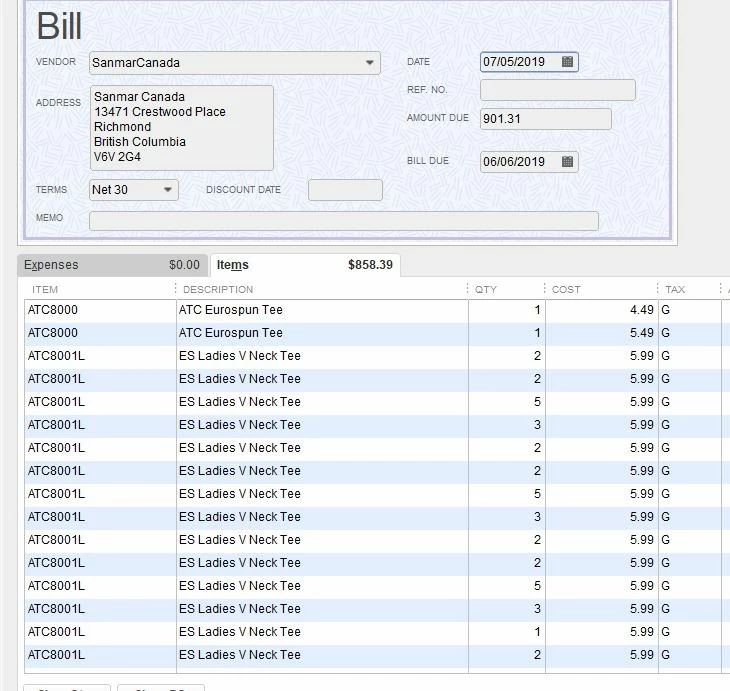
On my purchase orders i order my clothing by size and color but when i try to receive the PO with Bill it only shows me the qty and cost colums. is there a way to add more columns on this page to make it easier to see what i need to receive? EG. I order 10 small red , 10 med red, 10 large red and 10 small blue, 10 med blue and 10 large blue tshirts but when i receive i may have only got 9 red medium but there is no way to tell when line this as as all i see is that the qty is 10 for all items and the cost is the same for all items. i don't know which line is which item?
 

1 reply

May 7, 2019

Hi Overtime01,


I appreciate the screenshot and it's cool to hear that you're using QuickBooks Desktop to keep track of your clothing apparel merchandise.


One great way to keep track of various items that are the same is to use the description to help you identify what it is. For instance, you could add S, M, L, and whatever else you need, including colours, to help you differentiate between the various items more quickly. That way, you can simply glance at the bill and know what you've got on there.


To edit your inventory items, follow these steps.

  1. Click Lists from the top toolbar.
  2. Choose Item List.
  3. Find the item in question and double click to open it.
  4. Change the Description in the Edit Item window.
  5. Click OK to save.

Let me know if you have more questions!

May 7, 2019

Thanks for your answer but there there are literally 1000's of items that I order and Sell without even beginning to break them down by size and colour.  I added the custom fields of Size and Colour on my PO form but these do not carry over into the receive items form and there is no way that i can see to format these forms.  Am i correct or can these fields be added into the item receipts/bills page?

May 8, 2019

Hello again, Overtime01,


I appreciate you getting back to us.


Currently, the custom fields that you've added on your PO doesn't carry over.


QuickBooks integrate with hundreds of third-party software developers.  


To view wide-range of options of compatible third party applications, you may wish to consider looking to our third party application provider: Intuit Marketplace.


Please let me know if you have any further questions concerning your QuickBooks Desktop account, I'm always here to assist.