January 24, 2024
Question

Depreciation

  • January 24, 2024
  • 1 reply
  • 0 views

Hi, I use QB Pro 2020 for Canada. The balance sheet shows the following:
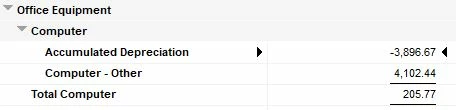
How is "Computer - Other" derived?

Thanks!

1 reply

January 24, 2024

Hi HarvMan,


Welcome to Community!  I'll be happy to provide some insight here, so you're on the right track with recording depreciation in QuickBooks. 


When you set up an asset account to track depreciation, the account can represent a single asset, or a group of related assets.  When you create the 'Fixed Asset' accounts, you would give them a name, for tracking purposes, such as vehicle, equipment, or computer.  Each main account should have two subaccounts.  One to track the cost of the asset, the second would track accumulated depreciation.  QuickBooks subtracts the depreciation amount from the current value of the asset, in the main account.  For the account tracking depreciation, QuickBooks enters the amount as an increase to your depreciation expense.


Should you require additional assistance, please don't hesitate to contact our QuickBooks Desktop Customer Care team.  With your consent, they can work with you in real time, and ensure you're able to accomplish your QuickBooks goals with confidence!


If you have any other questions, feel free to reach back out.  We would be glad to help!
