July 27, 2021
Solved

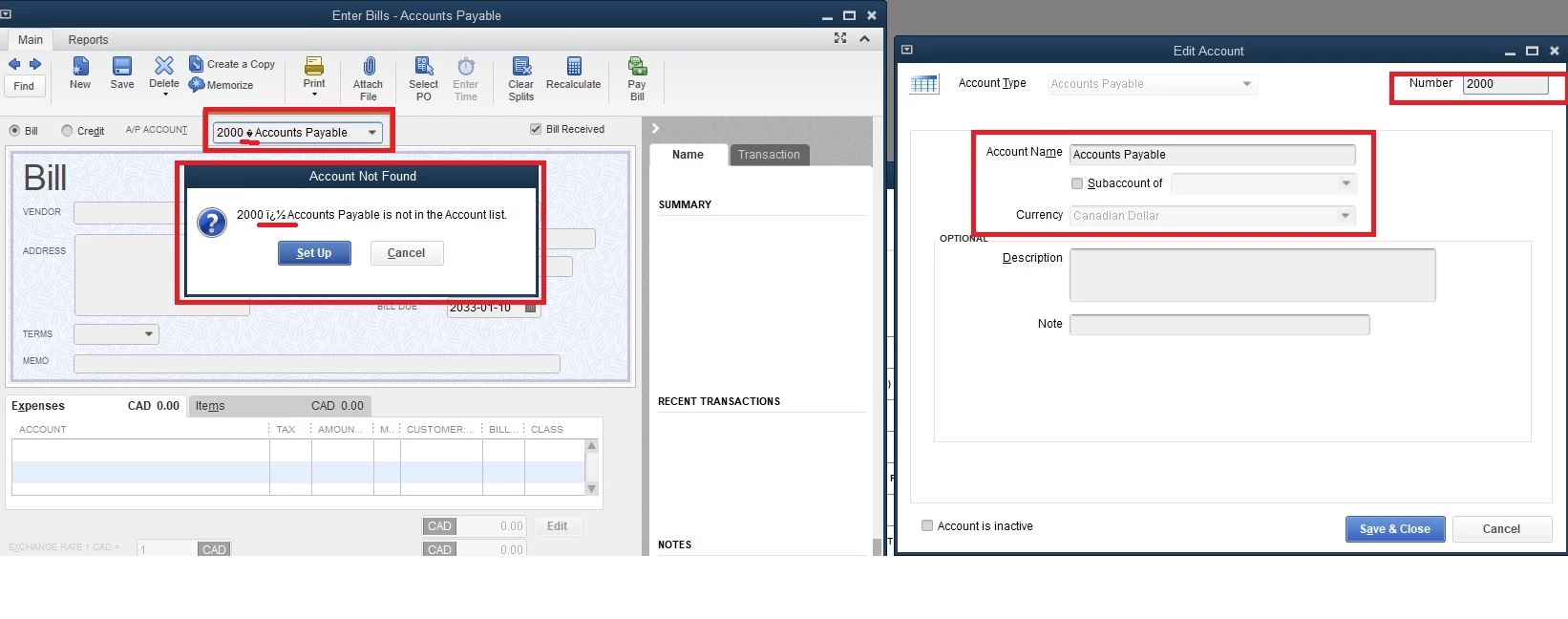
How can I remove the symbols?
  • July 27, 2021
  • 1 reply
  • 0 views


As you see, there are some symbols between account numbers and names. How can I remove these symbols? I am using Windows 10, desktop premier 2020 version. 

Best answer by JamesM4

Hello 2371169,


Glad to have you reach out to us here. I'll be happy to steer you in the right direction so you can get back to doing what you love with the help of the amazing features offered in QuickBooks. 


Based on what you've described, I highly recommend troubleshooting this issue using the QuickBooks Desktop Tool Hub. The Tool Hub is great for fixing issues and errors associated with QuickBooks. This article here does a great job of showing you to use the Tool Hub. Let me know if you have questions as you browse through the troubleshooting steps provided in the article above. 


I'll be one message away in case you have additional questions, I've got your back. 

1 reply

JamesM4Answer
July 27, 2021

Hello 2371169,


Glad to have you reach out to us here. I'll be happy to steer you in the right direction so you can get back to doing what you love with the help of the amazing features offered in QuickBooks. 


Based on what you've described, I highly recommend troubleshooting this issue using the QuickBooks Desktop Tool Hub. The Tool Hub is great for fixing issues and errors associated with QuickBooks. This article here does a great job of showing you to use the Tool Hub. Let me know if you have questions as you browse through the troubleshooting steps provided in the article above. 


I'll be one message away in case you have additional questions, I've got your back. 

November 23, 2022

Hello 
I Have the same problem, I used the QuickBooks tools hub and I was testing the repairs from the tool hub but still had the same problem. 


for more info, the company file is stored on the other computers and the others don't have any problem. 
my new laptop recently installed windows and the recently installed the QuickBooks


I uninstalled the QuickBooks program and reinstalled it again but it didn't solve either.


looking forward to hearing from you soon 

November 23, 2022

Hi there Abdulqdir Ballaky,


Thank you for trying the steps in the tool hub. For further assistance with removing the symbols, you'd need to reach out to the QuickBooks Desktop support team outside of the Community. They'll be able to analyze the settings of your software with you in a secure setting in order to help you with your display. You can reach out to them using the methods provided in the QuickBooks Desktop software support policies.


If you have any other questions, feel free to reach out here.
