August 27, 2019
Solved

QB chart of account import from excel mapping

  • August 27, 2019
  • 1 reply
  • 0 views

Why I need to map the chart of account two times with similar details? Refer the file I uploaded

Best answer by

We appreciate you following the recommended solutions in the first response, amir201202.


That's right. The system can't have the same name for two accounts. However, QuickBooks allows you to decide on what to do with the duplicate accounts. 


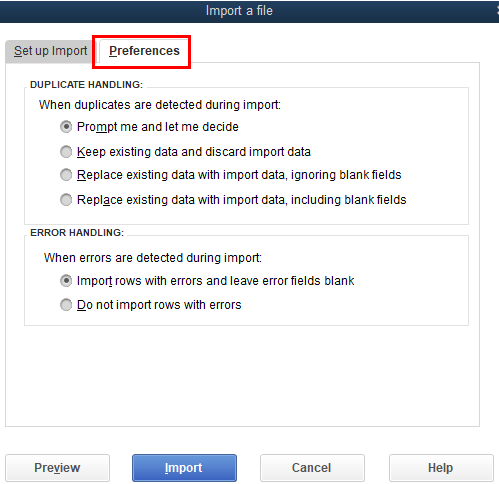
On the Import a file window, go to the Preferences tab. From there, select the appropriate actions on how to handle these accounts with the same name. Then, click on the Import button.


We are looking forward to speaking with you about these duplicate mapping entries in QuickBooks (based on your screenshot). Our support team will need to get your company information. Then, we will escalate it to our engineers. They'll be the one to fix the issue. 


If you need anything else, please let us know. 

1 reply

RenjolynC
August 27, 2019

Hello there, amir201202.


Sometimes, this can happen if the company file in your QuickBooks Desktop is damaged. We can do the Verify and Rebuild Data to identify and fix these issues.


You can follow the steps in this article: Verify and Rebuild Data.


Once done, let's make sure to update your QuickBooks Desktop to the latest release. Then, import your chart of accounts again and check to see if you're getting the same details.


If you're getting the same result, please contact our Customer Care Team. We will check your import setup and investigate the issue further.


Here's how you can reach out to us:

  1. Click Help located at the top.
  2. Choose QuickBooks Desktop Help.
  3. Enter a brief description of your issue and click Continue.
  4. You can choose Message an Agent or Talk to a Specialist.

For other questions or concerns about QuickBooks Desktop, feel free to visit us here. Thanks.

August 27, 2019

Hi RenjolynC


Thanks for the tips. Did all the suggestion and the problem did not solve. I will contact the Customer Care Team.


In the mean time, during the import of chart of account, the account name cannot be the same with any account listed even it is sub-account? 

Answer
August 27, 2019

We appreciate you following the recommended solutions in the first response, amir201202.


That's right. The system can't have the same name for two accounts. However, QuickBooks allows you to decide on what to do with the duplicate accounts. 


On the Import a file window, go to the Preferences tab. From there, select the appropriate actions on how to handle these accounts with the same name. Then, click on the Import button.


We are looking forward to speaking with you about these duplicate mapping entries in QuickBooks (based on your screenshot). Our support team will need to get your company information. Then, we will escalate it to our engineers. They'll be the one to fix the issue. 


If you need anything else, please let us know.