

QB2013 Pro Change Dear Mr/Miss/Ms Email Template
How can I go about changing the default dropdowns from Dear Mr/Miss/Ms in this QuickBooks 2013 Pro instance? In other versions of quickbooks this was easily editable but now I only have the option between a few dropdown selections. I want it to say "Dear Client". Reason being: Microsoft hotmail/outlook now flags emails that say "Dear Customer" and rejects them as spam - and Dear Customer is the default when no First Name or Last Name is set for a company when going to invoice them. I was able to fix this for one client so far as they had a different version of Quickbooks that was seemingly more customizable and I could change from Dear <FirstName/LastName> to Dear Client - removing the variable completely. We're missing the Edit button on this version.
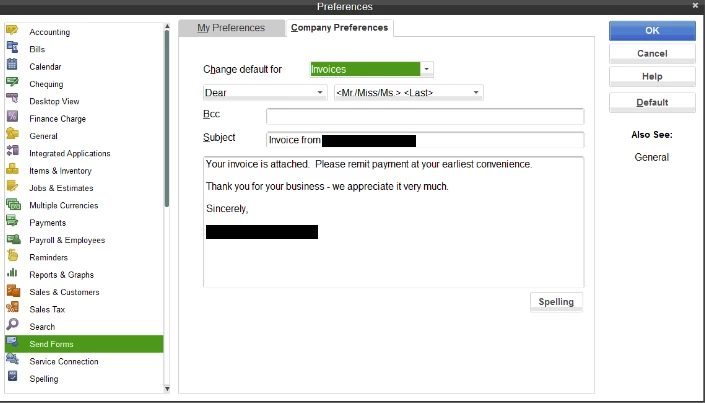
Right now I have the person using quickbooks going to edit the email and manually changing the word Customer to Client before sending the email but that can be a pain doing that every time.