

April 5, 2023
Question

Quickbooks Application With No Certificate Screen does not show up

  • April 5, 2023
  • 1 reply
  • 0 views

I developed a Quickbooks Desktop Application. When I run this application, ideally I should see Quickbooks Application With No Certificate Screen which includes the application name so that I can allow the access (I used other's image to show dialog box) like below
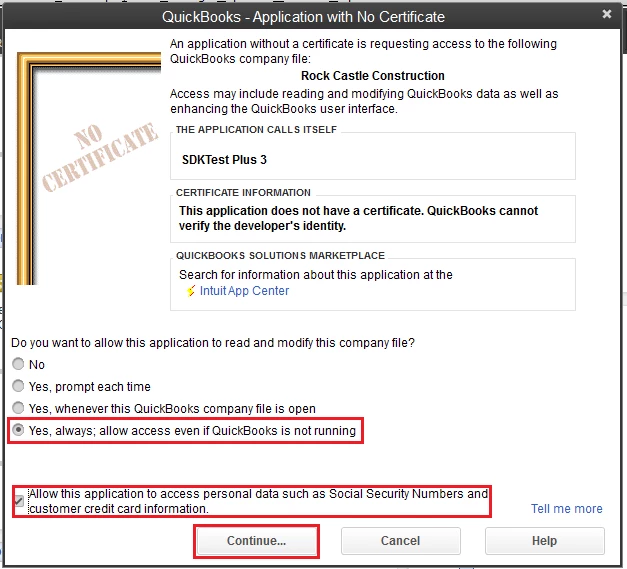
I don't have clear steps how to get the dialog box like above. When I run my application, I get this error message

Description: A modal dialog box is showing in the QuickBooks user interface. Your application cannot access QuickBooks until the user dismisses the dialog box.


When I open quickbooks and could not see a screen like above. Where can i find this dialog box?


I tried to run quickbooks as administrator and seems not help.


Thanks in advance


1 reply

Tori B
April 5, 2023

Hey there, @vanpeter


Thanks for reaching out and sharing those details. 


With QuickBooks Desktop, you can go into the company preferences and allow the third-party app. 


Here's how: 


  1. Click on the Edit menu at the top. 
  2. Choose Preferences
  3. From the left pane menu, select Integrated applications
  4. Then you can make your approvals. 


If you have any issues getting QuickBooks to see that the program has been certified, you may need to remove your third-party app's QWC file from Web Connector. Then, download the QWC file again from your third-party app. You can see additional details about this in Fix Common Web Connector errors


Should you still have issues with the app, I recommend connecting with our Intuit Developer Team. This way, an agent can get more details about your app and let you know the best process to integrate into QuickBooks without error. You can use the link I've included below to connect with them directly. 


Please let me know if you have any additional questions or concerns. I have your back. Take care!