April 3, 2019
Solved

Quickbooks Desktop Invoice Terms

  • April 3, 2019
  • 2 replies
  • 0 views

I apologize if this question has been answered before but I could not find an answer in my lengthy search. Our (utility) company bills all of our customers on a monthly basis, between the 1st and 4th of the month. The invoices are due at the end of the month; for example, if we bill on April 2nd the due date for the invoice would be April 30th. How are the due date terms set for the end of the month in Quickbooks Desktop?

Best answer by Rasa-LilaM

Good day, pGrove.


Thanks for being part of the QuickBooks family. I’ll be your guide, so you can set up a term that’s due for the end of the month.


The process is a breeze. Let me walk you through the steps.


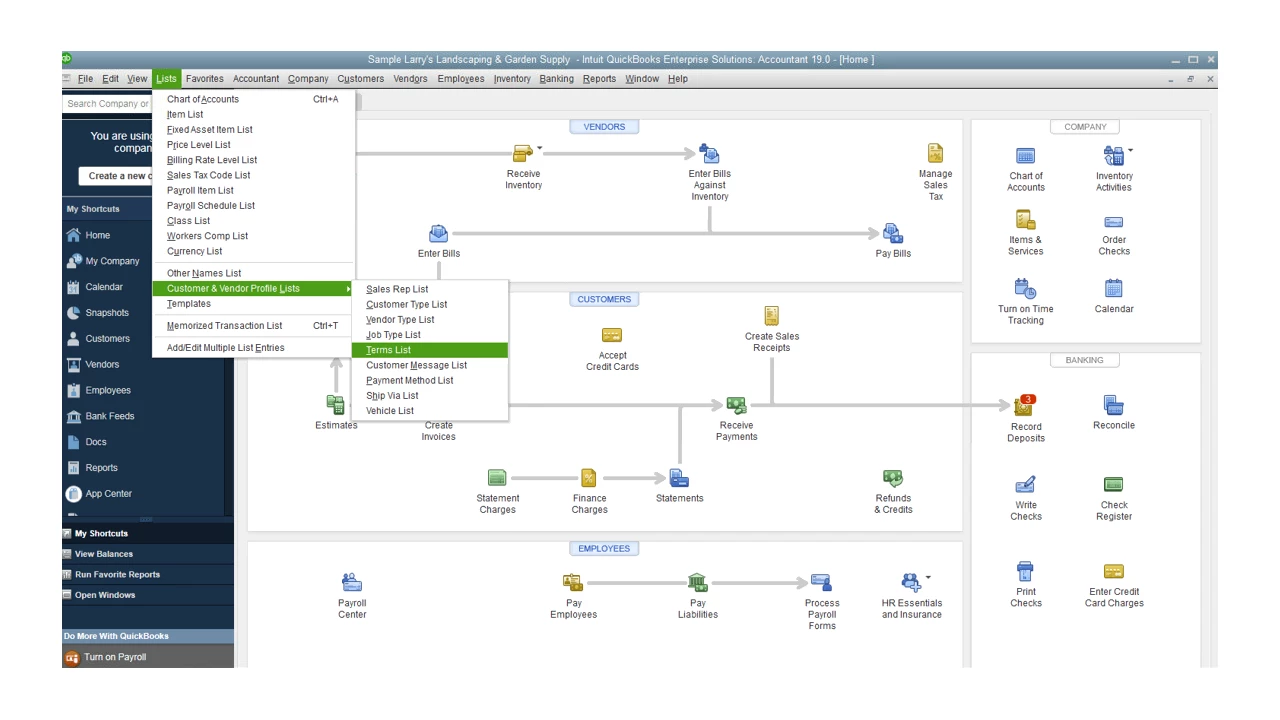
  1. Go to Lists at the top menu bar, then choose Customer & Vendor Profile Lists.
  2. Select Terms List.
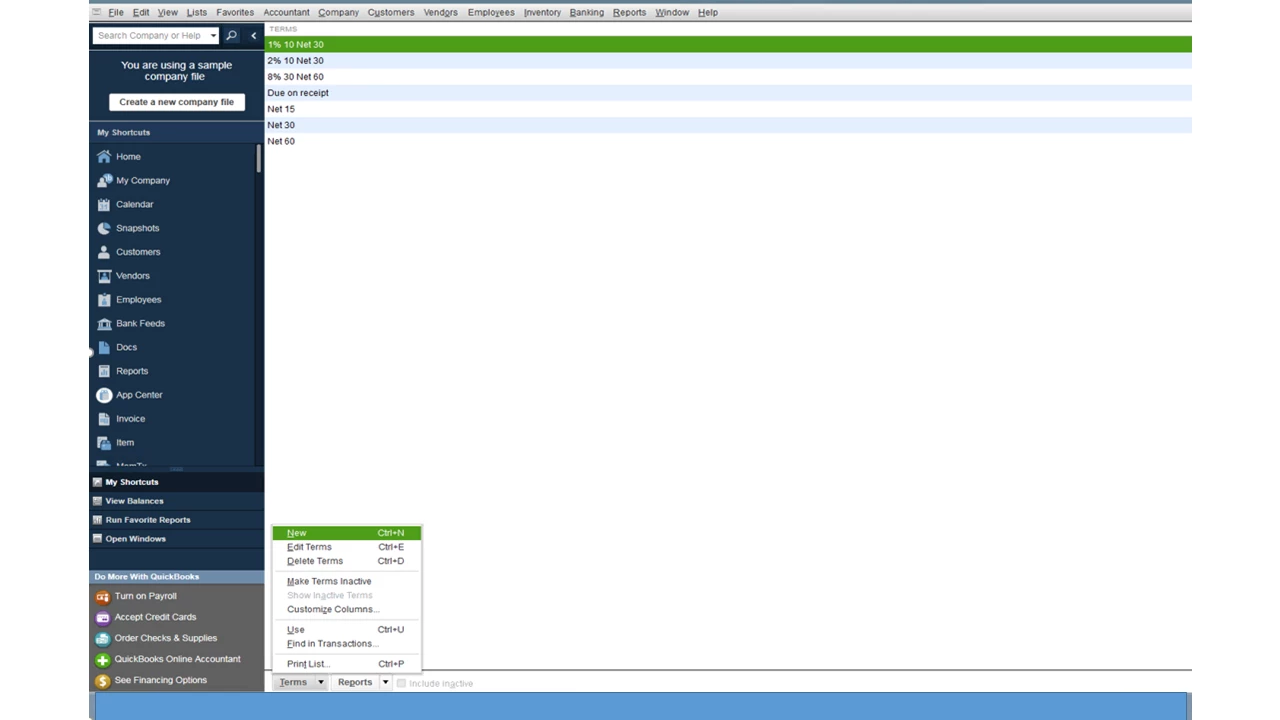
  3. Go the bottom of the page, then click on the drop-down for New.
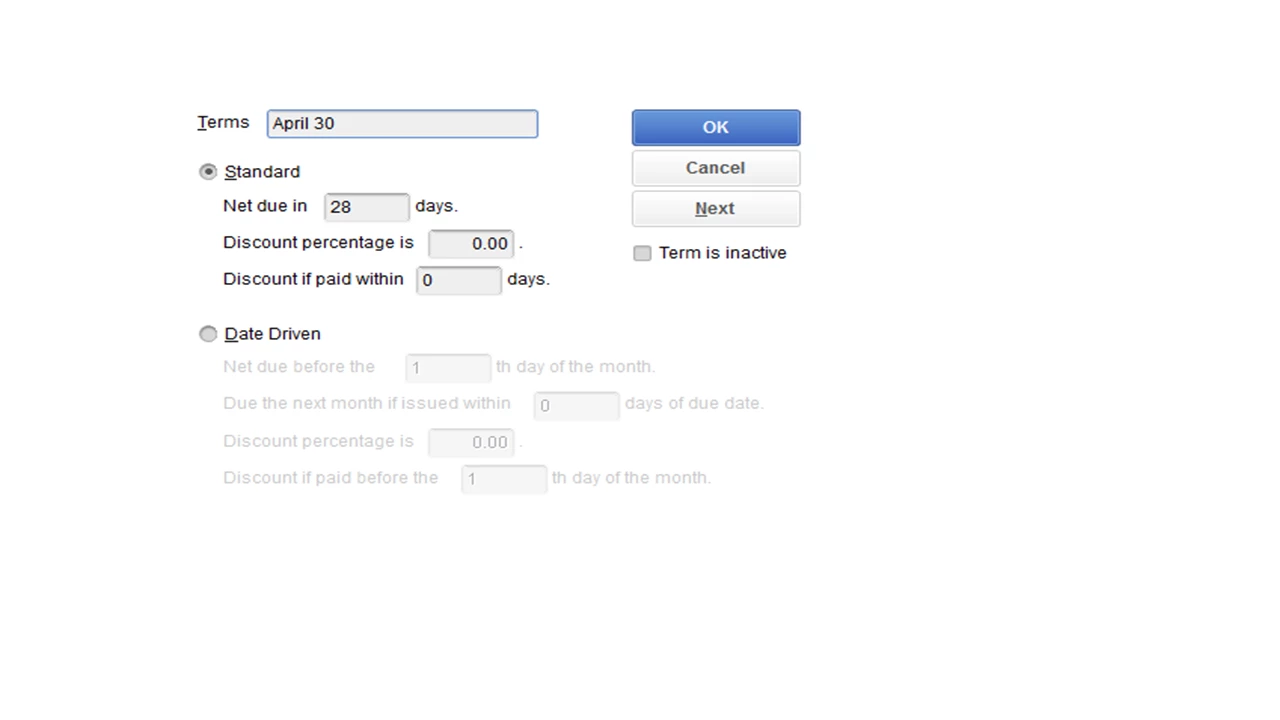
  4. In the Terms field box, enter the name.
  5. Mark the radio-button for Standard or Date-driven payment terms.
  6. In the Net due field enter 28 days.
  7. Enter the discount percentage a customer earns for early payment of an invoice or that your business earns for early payment of a bill in the Discount percentage is field box.
  8. Enter the number of days within which a customer or your business can pay and receive a discount for early payment in the Discount if paid box.

For the date Date Driven terms, follow the step by step process in this article and proceed directly to the Date Driven section.


Once you create an invoice, the due date should now show April 30.


If you need further assistance with any of these steps, leave me a comment. I’ll be more than happy to help. Wishing you the best.


2 replies

April 3, 2019

Good day, pGrove.


Thanks for being part of the QuickBooks family. I’ll be your guide, so you can set up a term that’s due for the end of the month.


The process is a breeze. Let me walk you through the steps.


  1. Go to Lists at the top menu bar, then choose Customer & Vendor Profile Lists.
  2. Select Terms List.
  3. Go the bottom of the page, then click on the drop-down for New.
  4. In the Terms field box, enter the name.
  5. Mark the radio-button for Standard or Date-driven payment terms.
  6. In the Net due field enter 28 days.
  7. Enter the discount percentage a customer earns for early payment of an invoice or that your business earns for early payment of a bill in the Discount percentage is field box.
  8. Enter the number of days within which a customer or your business can pay and receive a discount for early payment in the Discount if paid box.

For the date Date Driven terms, follow the step by step process in this article and proceed directly to the Date Driven section.


Once you create an invoice, the due date should now show April 30.


If you need further assistance with any of these steps, leave me a comment. I’ll be more than happy to help. Wishing you the best.

pGroveAuthor
April 3, 2019

Thank you so much. That worked perfectly.

July 26, 2019

@pGrove wrote:

I apologize if this question has been answered before but I could not find an answer in my lengthy search. Our (utility) company bills all of our customers on a monthly basis, between the 1st and 4th of the month. The invoices are due at the end of the month; for example, if we bill on April 2nd the due date for the invoice would be April 30th. How are the due date terms set for the end of the month in Quickbooks Desktop?


July 26, 2019

Hi gacnog. QuickBooks Online makes it easy to set up payment terms. You can set these up when creating the invoice. You have the option to set the terms and you can also manually enter a due date. I'll attach a screenshot below for reference. Let me know if you have questions. 


July 26, 2019

NO, this is NOT a FIX.  you can just customize the HEADING but when you receive the payment, QB DOES NOT AUTOMATICALLY deduct based on the date, you have to MANUALLY enter it.  This is an admin burden because our customers will pay 10-15 invoices at a time and take advantage of the 2% some times... so we would have to MANUALLY enter the deductions as a line item one by one on EACH invoice.

This is a SIMPLE everyday business transaction not covered by QB Development...It's on Enterprise but NOT online.