January 7, 2020
Question

Upgrade & rebuild file taking a long time. Not responding.

  • January 7, 2020
  • 1 reply
  • 0 views

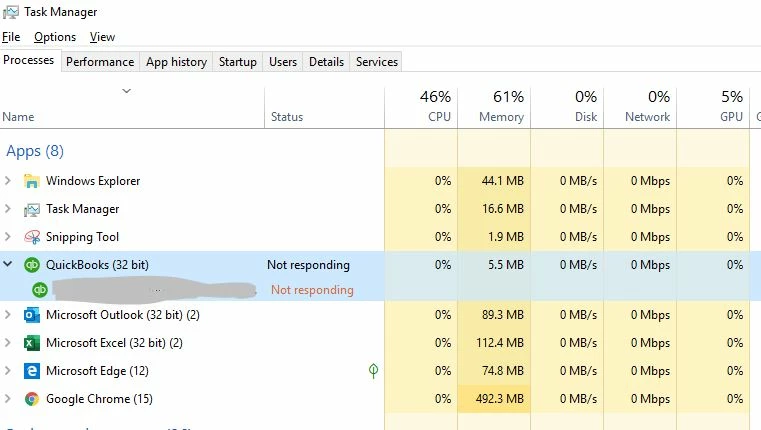
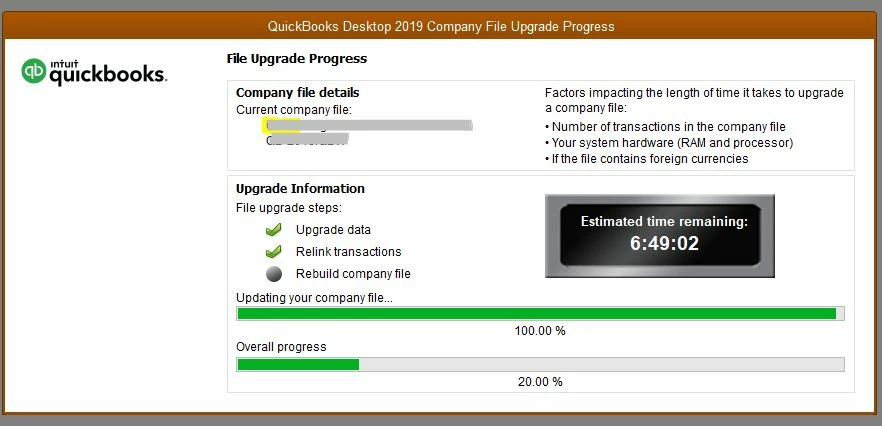
I installed an update today for QB Pro Premier 2019 CA edition. The company file is rebuilding but taking a very long time. The file is 700mb in size, so I expect it take a while. QB has stopped responding (but the mouse moves, etc). The countdown clock hasn't changed either. 


- How long should I wait to restart? It's been running for an hour +

- What are the likely consequences of forcing QB to close and restart?


1 reply

January 7, 2020

Hello there, superyawn,


I really appreciate the screenshots of what you're seeing when you try to reopen your company file after updating your QuickBooks 2019. I want to make sure you're able to get back into your books and back to work.


There are a few things to consider when it comes to your company files, such as the size of the file and your computer's overall setup with QuickBooks. Part of the problem could simply be that the file size is 700mb since this is pretty sizable for the Pro or Premier program. In this case, it's worth considering starting a new company file. If you're at the end of your fiscal year, it's the perfect time to do so!


Verifying your system requirements is also important in these situations to make sure that your computer can handle running the program. Check out the following article for more details about this: System requirements for QuickBooks 2019 and Enterprise Solutions 19.0


If you're using a 4.8 .net framework on your system, this will also cause problems with the program as QuickBooks Desktop is not currently compatible. I recommend checking with your IT professional or doing a quick Google search to find out more information about how to verify what framework you're using and how to downgrade it if necessary.


QuickBooks File Doctor is another great resource in these situations as it can work to find an repair issues with your company file. The Fix company file and network issues with QuickBooks File Doctor goes over how this works and how to get going with putting it into play.


For further support, reach out to our phone team. Check out the Intuit QuickBooks Desktop software support policies for important details about contacting us, including hours and how to get in touch.


Take care!

superyawnAuthor
January 7, 2020

Thanks for your input.


Will I do more harm if I try to force QB to close and restart? 

January 7, 2020

Great question. It shouldn't hurt anything and it's something you'll need to do in order to proceed with the troubleshooting I've outlined anyway. If you'd like to have an agent on the line while you do this just in case you run into trouble, please don't hesitate to reach out!