I got you covered, @usermaoldom.
To clarify, are you referring to the Company name in your customer profile? If so, you can change the name on the Display name as field without clearing the customer's first name and surname. This way, the company name will show on the customer transactions. Here's how:
- Go to the Sales menu.
- Choose Customers.
- Look for the customer you'll need to edit.
- Click the name of the customer and select Edit.
- From the Display name as field, enter the company name.
- Once done, click Save.
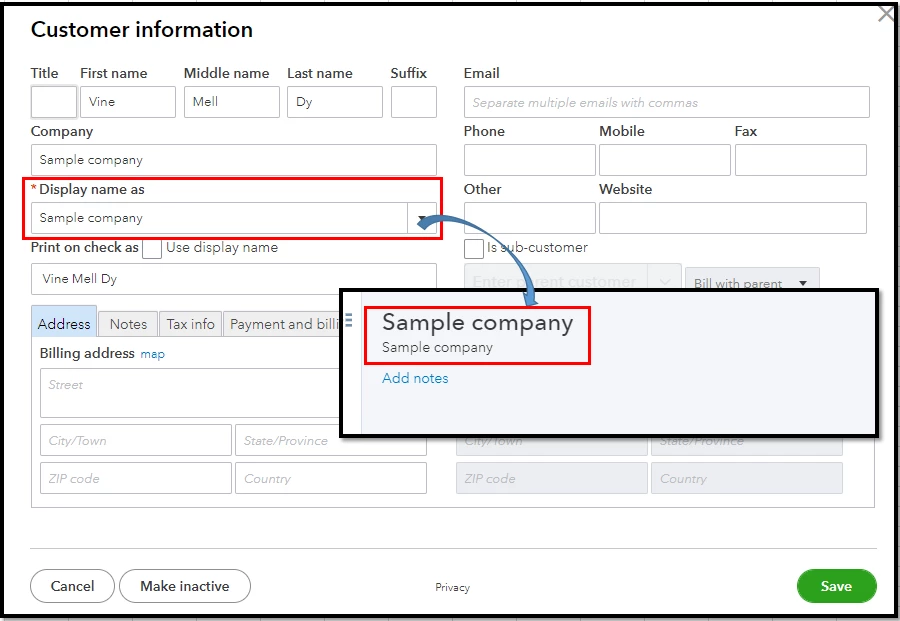
For more info about the process, please see this article: Edit customer information.
Also, QBO has several ready-made reports that you can access to view your customer information and their transactions. Just simply go to the Reports tab and type the "customer" keyword and click whichever customer report you'd like to open.
Don't hesitate to get back here if you have a further concern about managing your customer's profiles. I'll be always around to help. Keep safe.

