Currently, the feature to snap and upload receipts in QuickBooks Online is available only in select regions. However, you can download snap receipts by batch. I'm here to help you with this process, @dan9.
To export your receipts, follow these steps:
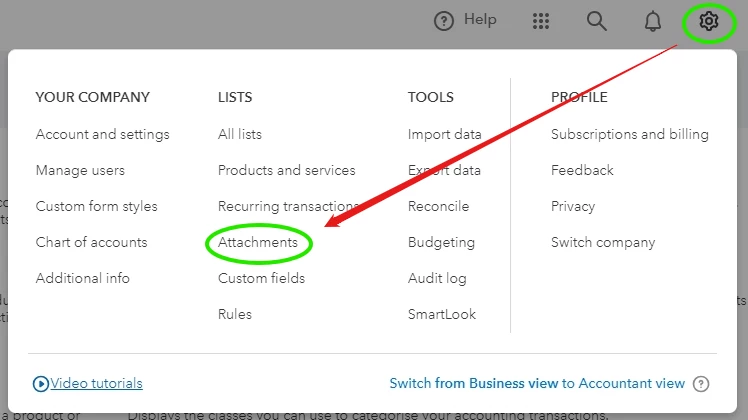
- Go to Settings ⚙.
- Under Lists, click on Attachments.
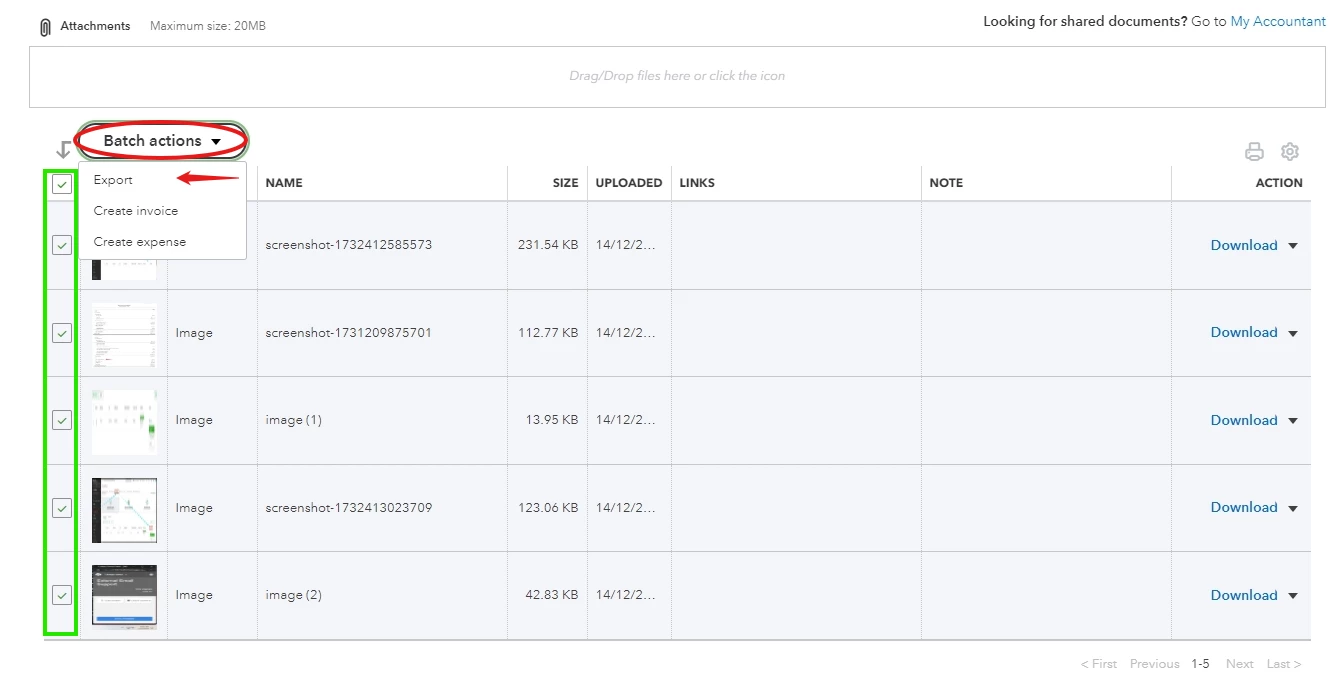
- Check the boxes next to the receipts you want to export.
- Select the Batch actions ▼ dropdown and choose Export.
- A ZIP file will download to your computer. Open the ZIP file to access a folder containing all of your selected receipts.
For more information on exporting receipts, check out this article: Export your receipts in QuickBooks Online.
In the meantime, you might want to explore third-party applications for scanning receipts. You can find options in your Apps menu or through this link: Apps help QuickBooks run better.
Additionally, here are some resources to help you learn more about the import feature and creating sales receipts:
Please comment below if you need further assistance managing receipts or have any other QuickBooks questions. We're always here to help!

