Currently, the patch update that enables printing three 1099-NEC forms per page in QuickBooks Desktop has not been released yet, @trowray1. Let me have additional information to make sure your tax filing experience remains efficient and uninterrupted.
I appreciate you for updating your QBDT to the latest version. We want you to note that there’s no specific release date for the QuickBooks patch yet. I suggest checking for new updates regularly to successfully print your 1099-NEC as soon as it’s available. Rest assured; it will be released before the 1099-NEC filing deadline.
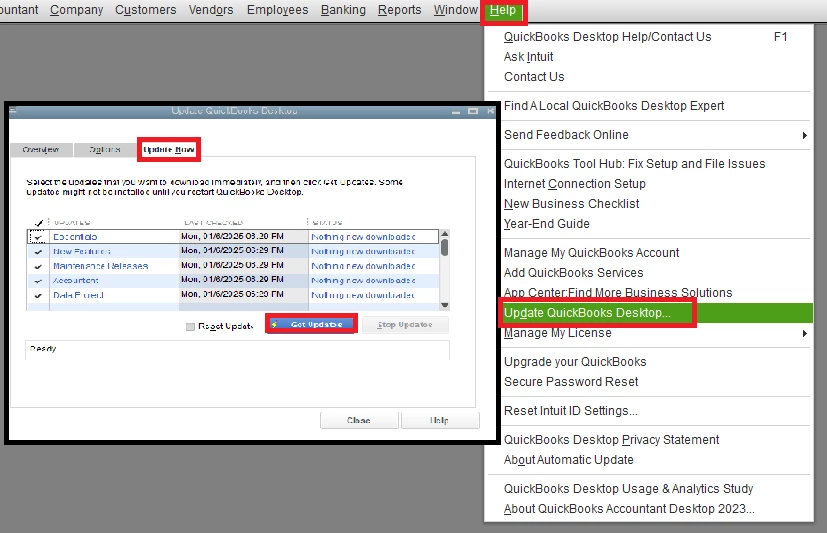
To update, here's how:
- Go to Help and select Update QuickBooks Desktop.
- Select Update Now, then Get Updates.
- Close and reopen QuickBooks to install the update again.
Moreover, know that QuickBooks will send the recipient's copy on January 31, regardless of how early you filed the forms.
On the other hand, you may find this article useful as a reference to help you close out the previous year and prepare for the new one using QBDT: Year-end guide for QuickBooks Desktop.
We appreciate your keen interest in the updates, as they are integral to ensuring a seamless and compliant process when filing your forms. Should you have any further questions about printing 1099-NEC forms, please feel free to reach out to us for support. Your concerns are always valued.

