October 5, 2023
Question

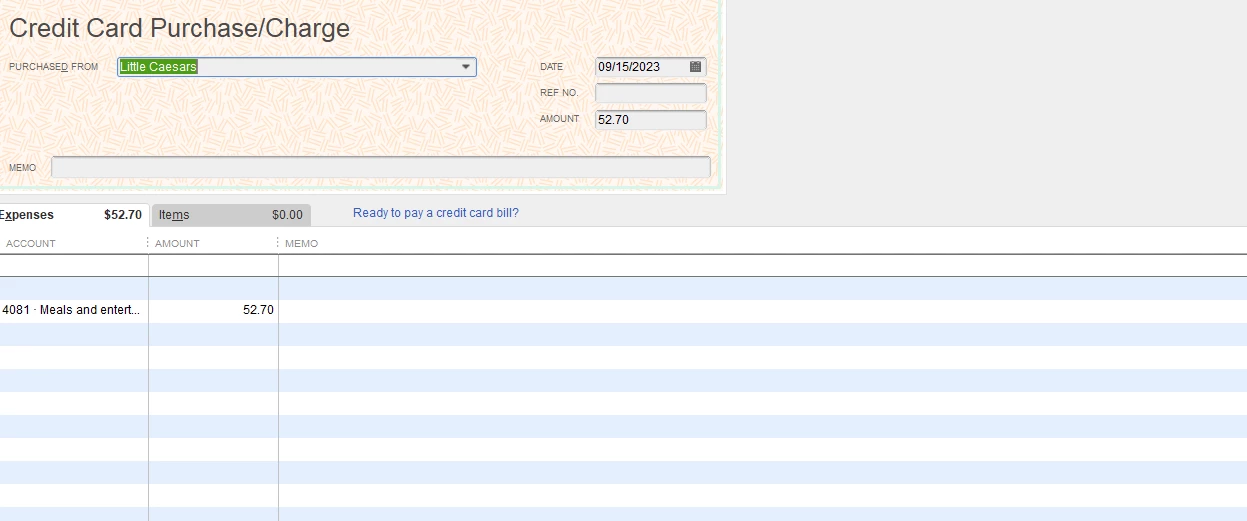
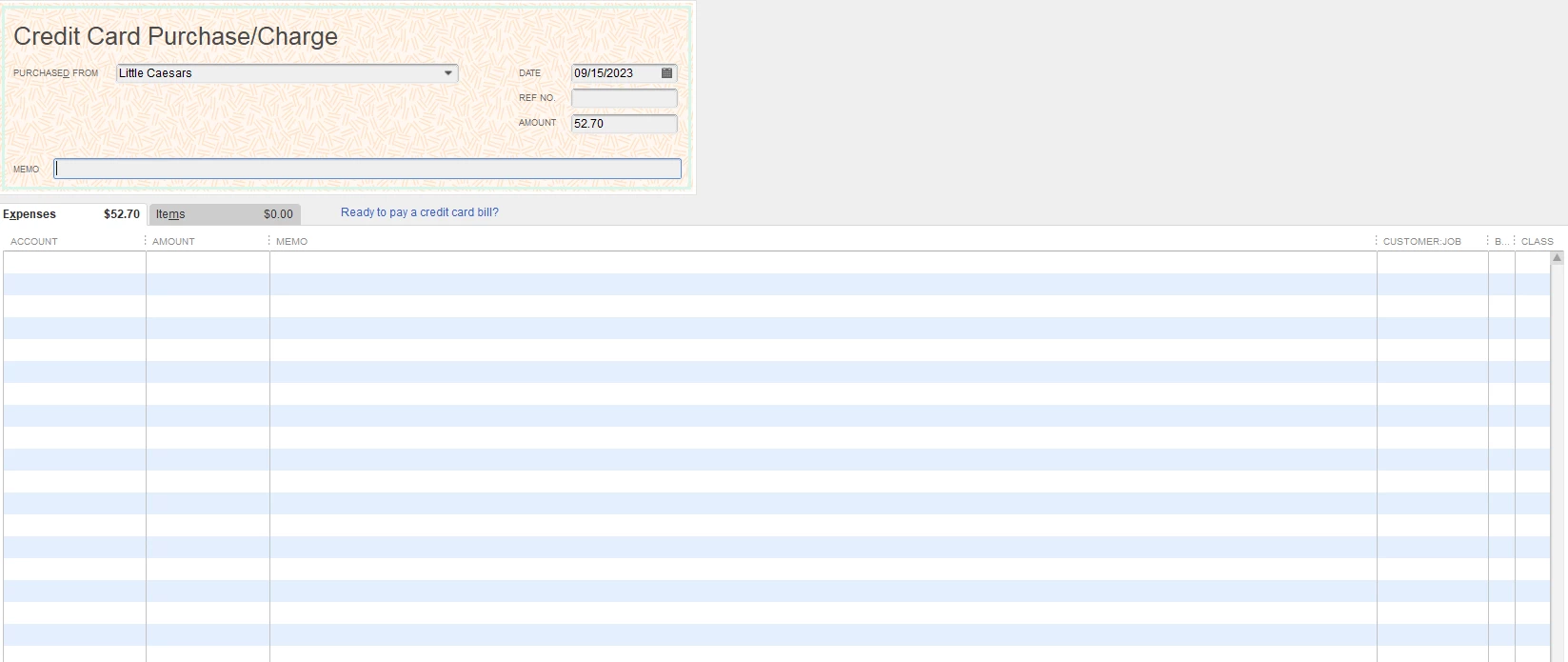
Account item disappearing under expenses when entering bill, shows up as two line items when I return.

  • October 5, 2023
  • 3 replies
  • 0 views

When entering a bill or a credit card charge, under the tab "expenses" it is blank and it usually has the autogenerated account name along with the amount that I entered at the top. If I add it in, the price doubles. If I save it blank and go back in, it will duplicate the line items. I have added screen shots because I don't think I can explain this without pictures. We use QB 2023 Premier Plus Contractors Edition. Not sure if this will affect end of year 
3 replies

October 6, 2023

Hello there, ssap296! Thanks for considering the QuickBooks Community forum to help you out with your concerns.


After reviewing the screenshots you shared, the issue you're experiencing with the missing account item when entering a bill seems unusual. We can run the Verify Rebuild process first to fix the account item that is disappearing under expenses when entering a bill.  It can improve the overall efficiency of the software. The Rebuild tool in QuickBooks Desktop can help you fix some minor data issues within the system.


In addition to the missing account item, I see that you're also experiencing a problem where the price doubles when you enter it. This is an important detail and indicates an issue from the ongoing investigation.


Our engineers are currently working on to resolve QuickBooks from displaying a different value, which is doubling the price. While our engineers are looking into this, I suggest reaching out to your Support Team to ensure that your company details are added to the list of affected users. This will help them keep you updated on any progress or resolutions regarding this issue. You can provide this number to them: INV-93725


Please go to QuickBooks Desktop Help and select Contact us.


Stay in touch if you have any additional need further assistance about bills and credit card purchase charge. I'm here to provide support and guidance whenever you need it. Stay safe and have a great day!

BigRedConsulting
October 6, 2023

@SarahannC 

RE: We can run the Verify Rebuild process to identify and fix this unusual behavior in QuickBooks. It can help eliminate unnecessary data, fix data inconsistencies, and improve the overall efficiency of the software.


No, that will not work. There is nothing wrong with the company file. Many of your co-workers have posted and admitted this is a bug included in the latest release, one of quite few bugs. Do you guys not communicate?

October 7, 2023

I'm having the same issue. and it is fairly annoying. the expense lists on one of the last lines possible when entering bills where you have to scroll down to find it.

October 7, 2023

This is not what we want you to experience, @mwfarm19. I also want to thank you for letting us know that you're experiencing the same so we can address this right away and give you a smooth experience.


Does your expense amount when entering the bill also double? If yes, I'd like to inform you that just recently, we've received similar reports about the amount being doubled, specifically when entering bills in QuickBooks Desktop. Our engineers have created an investigation that's already closed and we're able to assist the affected customers.


Since you're still experiencing the same issue, we can perform the provided workaround which is to fill out the bill form from the bottom up (for bills). This means adding the expenses or items at the bottom of the form before entering the vendor or amount due at the top of the form. You can also turn off the Automatically remember transaction information feature in QuickBooks Desktop. Here's how:


  1. In your QBDT file, go to the Edit menu, then select Preferences.
  2. In the General tab, untick the Automatically remember account or transaction information.


If the same thing persists, I'd suggest getting in touch with our Customer Support Team so they'll be notified that there are still customers like you who are still affected by the issue. 


On the other hand, if the amounts of your bills don't double up and just appear near the bottom when entering, we can perform the Verify Rebuild tool as this scans data issues within the company file and self-resolves them. 

Beforehand, make sure your QuickBooks Desktop is up-to-date. This way, you always have its latest features and fixes. Follow the steps below on how to verify data:
 

  1. On the top menu, click File.
  2. Choose Utilities.
  3. Select Verify Data.
  4. Click OK when QuickBooks doesn't detect any problem with your data.
  5. If Verify finds an issue with your data, you'll be prompted to Rebuild Now or View Errors.
  6. Click Close or View Errors and take note of the specific error message.


Next, check out this article to learn how to rebuild the data: Verify and Rebuild Data in QuickBooks Desktop.


Furthermore, if you need to stay organized with your bills, you can utilize the bill tracker feature in QuickBooks Desktop. For more information on this, please refer to the following article:  Use the bill tracker to see your upcoming bills.


Thank you for your patience and understanding as we strive to address this problem. If you need updates on the investigation or clarification on the suggested workaround, please feel free to leave a comment below. We are here to support you throughout this process. Stay safe.

October 9, 2023

We are experiencing this same problem. It is creating a huge time management issue for us. Please fix your most recent update!

October 11, 2023

I fixed mine by going to Edit, Preferences, General. Check off "Automatically remember account or transaction information". Close Quickbooks.  Reopen, go to Edit, Preferences, General. Check it back on. Close Quickbooks. Reopen.


Wahla. 


Fixed.