January 3, 2019
Solved

Accruing sick leave hours for salary or commission employee's.

  • January 3, 2019
  • 2 replies
  • 0 views

All of our employee's are either paid commission or salary.  Can someone tell me if there is a way in QuickBooks Pro Desktop to track hours for the new Washington state family and medical leave law, when they are not paid hourly, yet we need to keep track for accrual? 

Best answer by MaryGraceS

Hi there, @rollanda.


Thank you for posting in the Community. I'd be happy to help share some information about Accruing sick leave hours for salary or commission employees.


You can track sick accruals by adding the time to the employee's paycheck. However, this field is only available for hourly and salary paid employees. Let me walk through how to do it.


To start, you need to set up sick leave on your employee's profile. 


Here's how:  

  1. From Employees menu, select Employee Center.
  2. Double-click the employee's name to edit information.
  3. On the left pane select the Payroll Info tab, then click the Sick/Vacation tab.
  4. Select an Accrual period.
  5. n the Hours Accrued field, enter the number of hours that will be accrued.
  6. In the Maximum number of hours field, enter the maximum balance of sick hours that the employee can have.
  7. If you want sick hours to reset to zero when a new accrual year begins, select Reset hours each new year?.
  8. Enter the date that sick time should begin accruing.
  9. You can enter other information needed.
  10. Click OK to save changes.

After that, you can add the sick time on a paycheck, as mentioned by @197905.


Here's how: 

  1. When creating the paycheck, open the Preview Paycheck window.
  2. For salaried employees, enter the number of hours worked next to the regular salary earnings item in the Hours column.
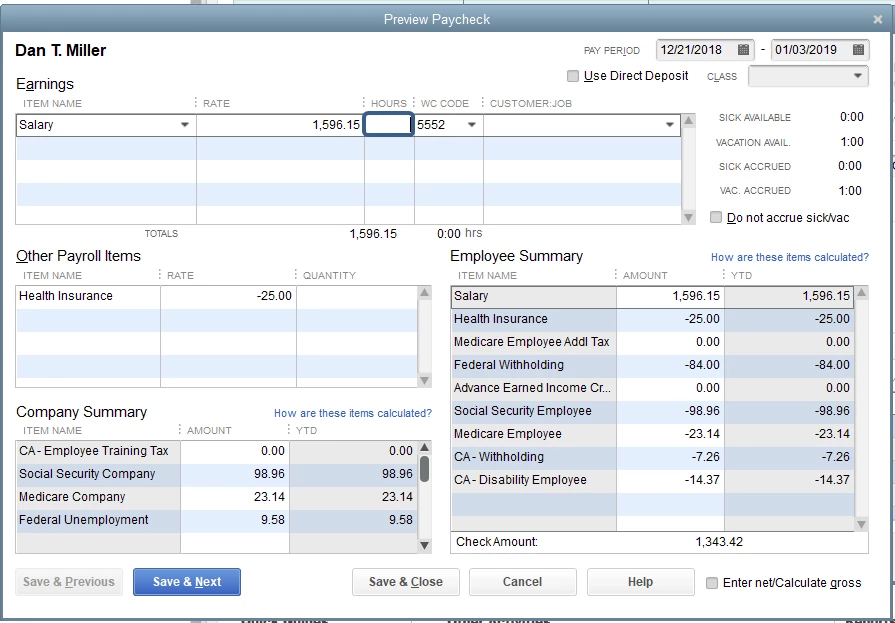
The following article contains additional information about this, as well as screenshots for some steps: Set up and pay sick and vacation time.


If you need assistance in going through with the steps, feel free to reach out to our payroll support. They have tools like screen sharing to help you get to a resolution quickly.  


Here's how:

  1. Open this link: https://payroll.intuit.com/support/contact/?infosrc=qs&service=16. 
  2. Select Basic, Standard, and Enhanced
  3. Click Payroll, then click View Contact Info

That should do it.


I'm just a post away if you have any other questions about accruing sick leave hours in QuickBooks Desktop, or if you're referring to something else. I'll be happy to help you out. Have a great day!


2 replies

January 3, 2019

If the tax calculates on the hours worked, then you may need to enter hours on a 0.00 rate pay item.  Is that the case?

rollandaAuthor
January 3, 2019

Yes.  Can you suggest how I can do that?  I currently pay commission, which is entered under quantity.   Thank you for your help.

January 4, 2019

Thank you for the quick response, @rollanda.


Currently, tracking sick leave hours for commission employees isn't available. In the meantime, you can temporarily keep track of these accruals in an Excel file and save it on your computer. 


 I can see how this additional options and functionality would be helpful for both you and your business. I encourage you to submit these requests and suggestions directly to our Product Development Team for consideration in future updates.


You can submit this from within your QuickBooks by selecting the Help menu then select Send Feedback Online or by going to the following link: QuickBooks Online Feature Requests. Please know that I'm going to submit feedback from my side as well.


Feel free to leave a comment down below if you have any follow up questions. I'll get back to you right away. 

January 3, 2019

Hi there, @rollanda.


Thank you for posting in the Community. I'd be happy to help share some information about Accruing sick leave hours for salary or commission employees.


You can track sick accruals by adding the time to the employee's paycheck. However, this field is only available for hourly and salary paid employees. Let me walk through how to do it.


To start, you need to set up sick leave on your employee's profile. 


Here's how:  

  1. From Employees menu, select Employee Center.
  2. Double-click the employee's name to edit information.
  3. On the left pane select the Payroll Info tab, then click the Sick/Vacation tab.
  4. Select an Accrual period.
  5. n the Hours Accrued field, enter the number of hours that will be accrued.
  6. In the Maximum number of hours field, enter the maximum balance of sick hours that the employee can have.
  7. If you want sick hours to reset to zero when a new accrual year begins, select Reset hours each new year?.
  8. Enter the date that sick time should begin accruing.
  9. You can enter other information needed.
  10. Click OK to save changes.

After that, you can add the sick time on a paycheck, as mentioned by @197905.


Here's how: 

  1. When creating the paycheck, open the Preview Paycheck window.
  2. For salaried employees, enter the number of hours worked next to the regular salary earnings item in the Hours column.

The following article contains additional information about this, as well as screenshots for some steps: Set up and pay sick and vacation time.


If you need assistance in going through with the steps, feel free to reach out to our payroll support. They have tools like screen sharing to help you get to a resolution quickly.  


Here's how:

  1. Open this link: https://payroll.intuit.com/support/contact/?infosrc=qs&service=16. 
  2. Select Basic, Standard, and Enhanced
  3. Click Payroll, then click View Contact Info

That should do it.


I'm just a post away if you have any other questions about accruing sick leave hours in QuickBooks Desktop, or if you're referring to something else. I'll be happy to help you out. Have a great day!

May 19, 2020

My sick time accumulate is supposed to stop at 48 but it has NOT stopped to this date.  I have everything set up correctly based on other posts.  This is very frustrating as I have to go in an manually lower the accumulated time to 48.

IamjuViel
May 19, 2020

Hello, @jayjay3.


Let's make sure that you've set up a maximum number of hours for the year in your QuickBooks preferences and employee's payroll details. By doing this, you'd received a prompt to tell you that the sick p


Here's how:

  1. Go to the Edit menu.
  2. Choose Preferences.
  3. Select Payroll and Employees.
  4. From the Company Preferences tab, click the Sick and Vacation button.
  5. Under Set accrual limit, select the appropriate option for you:
    • Maximum hours at a time
    • Maximum hours for the year
  6. Click Ok.

Once completed, you can run a payroll checkup. This way we can review your employees' payroll information.


Here's how:

  1. Choose Employees.
  2. Select My Payroll Service.
  3. Pick Run Payroll Checkup.
  4. Follow the onscreen instructions.
  5. Click Continue to go through the various steps.

Keep me posted if you have other questions about managing your employee's payroll information. I'm always here to help.