I’m happy to help you set up fees for vendor payment in QuickBooks, @Cassandrafish.
We can create a pay term in your vendor's profile. Let me show you how:
- Go to the Vendors menu and then select Vendor Center.
- Double click the name of the vendor.
- Select the Payment Settings tab.
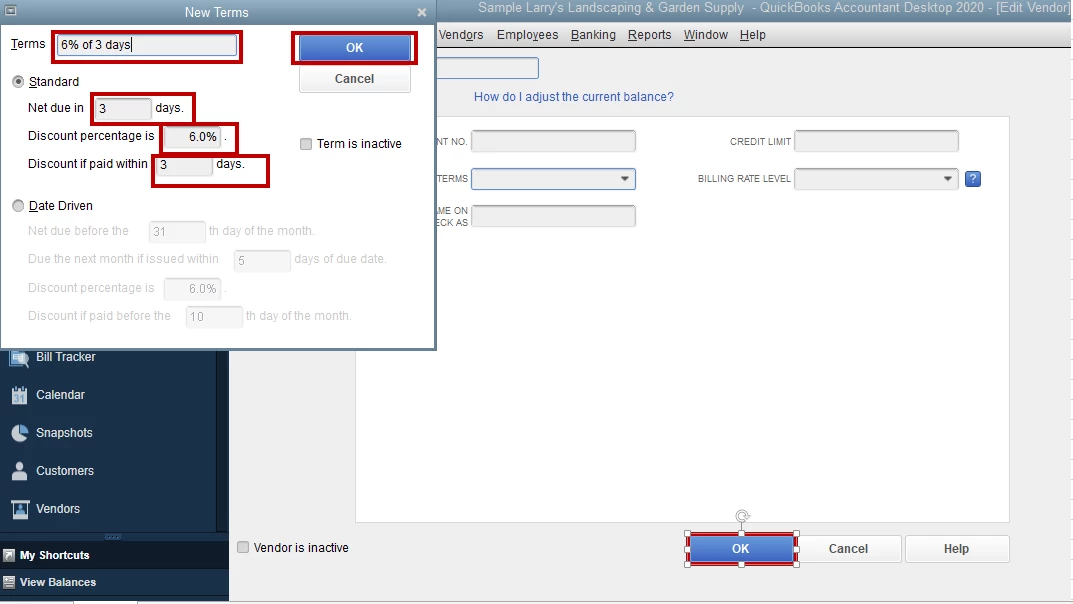
- Click the Payment Terms dropdown menu and click Add new.
- Enter the term's name, input the Net due to 3, and the Discount percentage which is 6%.
- Once done, click OK.
Then, you can start entering bills for your vendors. After you record what you owe to your vendors, you can go to the Pay Bills window to settle your payables.
That should do it. Let me know if you have any issues after following those steps. I’m always here to help. Have a good one!


