Great job in importing your products, @userbeveragesunlimit.
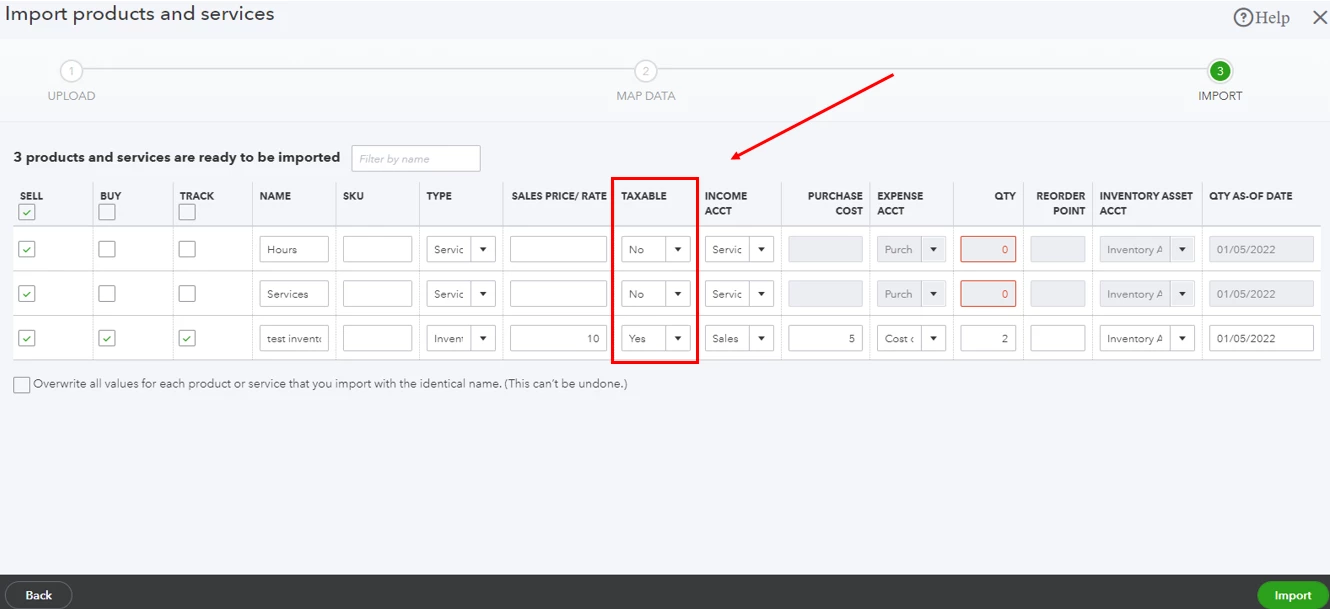
I also appreciate you for sharing an update with us. To steer away from any issues in importing your product and services, You'll want to ensure you've map your imported files correctly and select Yes in the Taxable column. This way, it'll automatically show as taxable in your QuickBooks Online (QBO) account. I'll show you how.
- Go to the Gear icon, and select Import Data.
- Select Products and Services.
- Click Browse to upload the file from your computer. Choose the file, and then select Open.
- Select Next.
- Map your information, and select Next.
- If you see some cells highlighted in red, this means the cell is invalid. Check the cell in your spreadsheet and try importing again.
- Select Yes in the TAXABLE column to make the product/service taxable.
- Click Import.
On the other hand, you can adjust your stocks without importing them. You can refer to the steps outlined in this article for details: Adjust inventory quantity on hand in QuickBooks Online.
Furthermore, I'm adding this link that you can read for reference in seamlessly tracking your inventories: Set up and track your inventory in QuickBooks Online.
If you need more help with inventories or with your QBO account, you can always tag me in your reply. I'll be more than happy to help you anytime. Have a good one!

