

February 26, 2023
Question

Amazon Business App Sync - Missing Account Ledger (Quickbooks Online US)

  • February 26, 2023
  • 3 replies
  • 0 views

We recently received an email from Intuit telling us to remove and re-add our Amazon Business app sync account to QBO as Amazon changed their TOS.


We went ahead and did as such.  Everything was working fine until I went to categorize and add some transactions that the app sync pulled from my Amazon account.


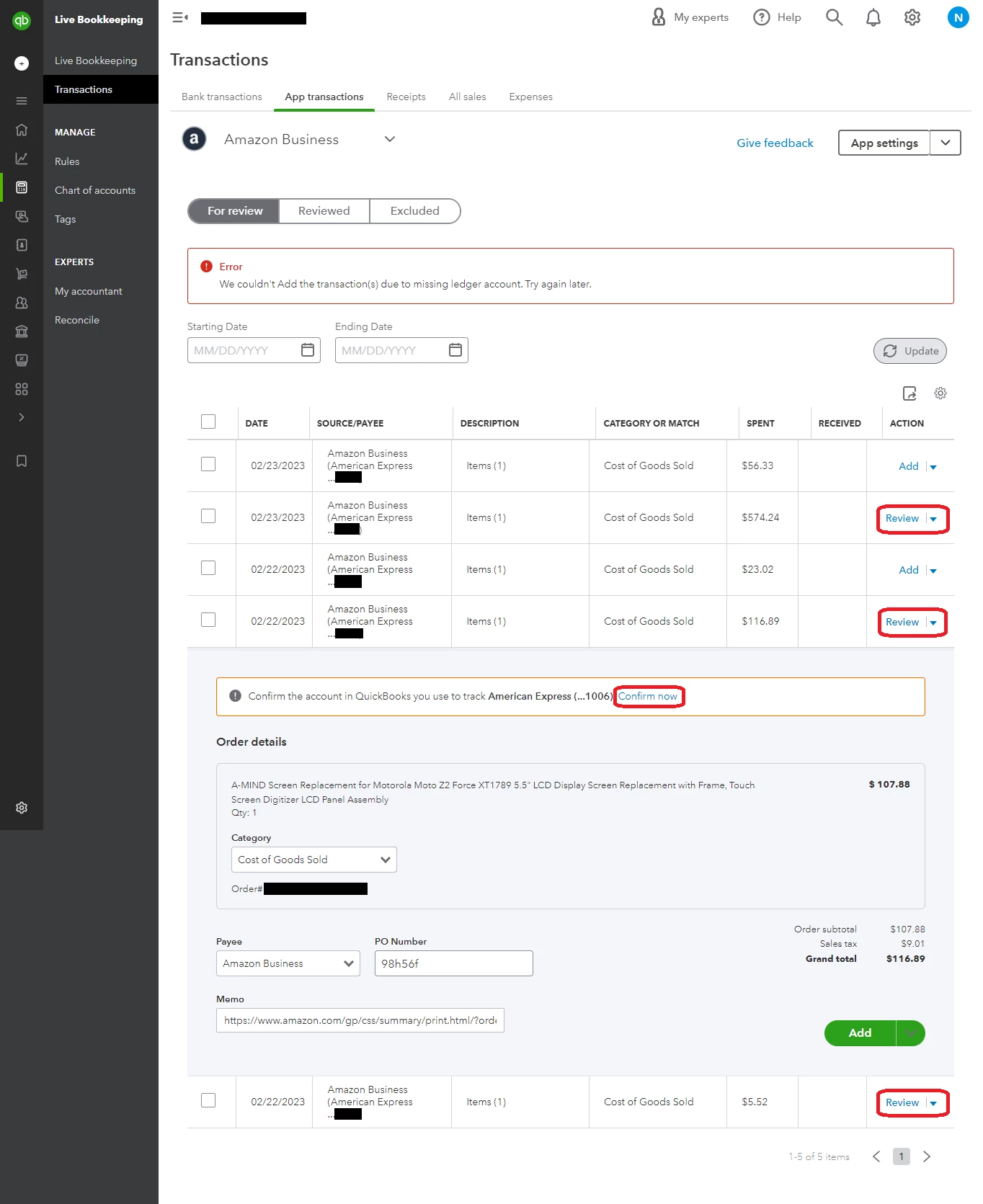
All "For Review" transactions that have the option "Add" under the "Action" column work just fine.  However, if the action says "Review" QBO requires me to "Confirm the account in QuickBooks you use to track American Express (...XXXX"  I went ahead and confirmed the credit card, and then tried to add the transaction and QBO gives me this error: "We couldn't Add the transaction(s) due to missing ledger account. Try again later."  The account in which I select is most certainly an active account, is 100% operational, and syncs with American Express.


It seems like when I select the card in which I use to track my American Express the setting doesn't get saved, thus prompting the error above.

Steps I have taken to troubleshoot so far:

  • Clearing cache/cookies
  • Trying multiple internet browsers (Google Chrome, Brave, Firefox)
  • Trying multiple operating systems (MacOS, Windows 10, Windows 11)
  • Trying multiple different computers
  • Removing and re-adding the Amazon Business account multiple times
  • Calling Intuit technical support and going through their troubleshooting steps


At this point I'm stuck.  Intuit seems to be stumped as well and has escalated my open case to a higher level of support.  I have no idea how long they will take to reply.


I'm hoping someone on this forum has maybe experienced the same issue and can provide me with a solution.  Thank you for your time.
 

3 replies

JenoP
February 26, 2023

Thanks for taking the time to reach out to us about the banking error, Nerd.


I also appreciate the amount of details an screenshots you shared to help us understand the issue. 


However, I checked our list of alerts and I can't see anything related to this error with Amazon Business App. 


I understand that you already reached out to our post support teams about this. However, it looks like you already tried all possible troubleshooting steps that we can provide in the Community.


In this case, I would recommend reaching out to our phone support team once again. They can take look at your previous case and check if there are any update.


Here's how to reach out to them:


  1. Click Help at the upper-right hand side of QBO.
  2. Type in the bank Error and press Enter.
  3. Select Contact Support, then type in the bank error once again.
  4. Click No, I still need help.
  5. Select Contact Support Team, then click Chat with us.


You can also visit this article for more information about their contact details: QuickBooks Online Support.


Allow me to share a couple more articles in case you need more reference and guidance when working with your banking transactions: 


 Let me know if the support teams was able to help you sort this out. You can also post more questions if you need anything else. 

NerdAuthor
March 1, 2023

So far I've opened two tickets with Intuit support, one on the 24th and one on the 27th.  Each one has been escalated, or at least that's what Intuit is telling me.  The first ticket I spent a 45 minutes of my time speaking to a representative of Intuit.  The second call on the 27th I spent 2 hrs and 15 minutes on the phone.  That's a total of 3 hours I've spent trying to get this sorted out and there still has been zero resolution for my issue.  Pretty upset with the lack of effort from Intuit to get this issue actually resolved.  I need to get this issue sorted out, and no one seems to know how to fix it.

March 14, 2023

Hello Nerd,

I am relieved to hear someone has experienced the same issue I am encountering. Unfortunately, I do not have any insight as to how to solve it.  We were also instructed to "re"-sign up. I initiated the process this morning and cannot get the QB/Amazon app to accept the credit card associated with the account. The app automatically downloaded the transaction vendor as Amazon Business, which I did not want, so changed the vendor to Amazon, but I can't think that has anything to do with the problem. Our issue mirrors yours in that it will not accept the credit card path assignment, which has not been modified in years, and strands us with the same error message you are receiving.


Hopefully the fact that this is not an isolated issue will help expedite the fix for both of us.

RaberBookkeeper
April 7, 2023

I just ran into this same exact issue after we lost the Amazon Business App connection in late February and finally got the client to reconnect it. I went into the 'App settings' and under the Defaults tab I changed the Category and Payee back to what they were previously before the update. Changing one or both of these seems to have fixed the issue. All the transactions now say "Add" instead of "Review." I also plan on going back through any expenses that did go through and making sure the payee is Amazon for continuity. Why on earth the "Amazon Business" payee was added when everyone had already been using "Amazon" is just beyond me. I assume that's what's causing the issue with the missing ledger account but I can only tell you what worked for me.

July 20, 2023

Thank you so much for your post. I've spent a total of 16 hours talking to different Intuit support and got no where. I followed your recommendation about going to app settings and then defaults and changing the payee from amazon business to amazon. My nightmare is over.

You're the best