

August 23, 2023
Question

Application with Revoked Certificate

  • August 23, 2023
  • 6 replies
  • 0 views

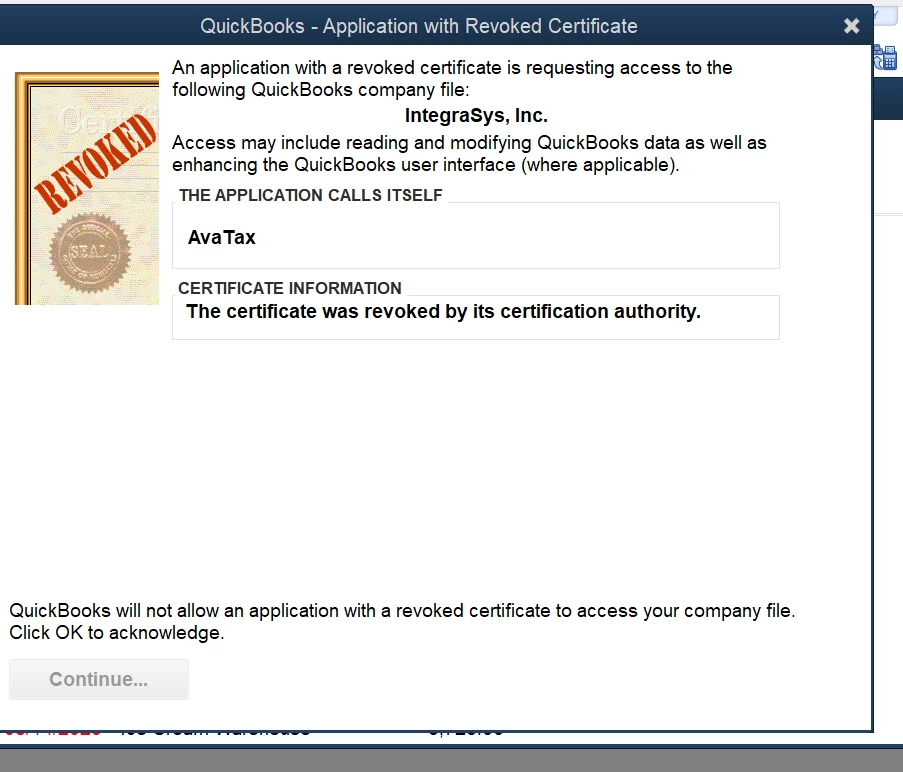
Getting the Quickbooks - Application with Revoked Certificate message.  I have instructions from Avalara on how to proceed, but your DIALOG BOX HAS A BUG! There is no OK button, and Continue is grayed out.  You have to hit the x, and even if you do that the box just keeps coming back over and over.


Another month, another quickbooks issue preventing me from doing invoicing (sigh)
 

6 replies

BigRedConsulting
August 23, 2023

The message probably comes up over and over because AvaTax keeps poking QuickBooks trying to do something.


QuickBooks isn't going to let that happen, per the messaging in your screenshot. You'll probably need to get a new release of the AvaTax app that does not have a revoked certificate in order to make it work.

Candice C
August 23, 2023

Hey there, @DawnD12


I appreciate you coming to the Community with your question about the Application with Revoked Certificate error. 


I recommend performing all the troubleshooting steps listed in the guide below to help resolve your issue: 


How to fix the error QuickBooks - Application with Revoked Certificate


If none of those steps work, I suggest getting in touch with our Customer Support Team because this problem is a known issue at this time. You can review the status of the problem here: Status updates


I hope this helps. Don't hesitate to come back if you have any other questions. Bye for now! 

DawnD12Author
August 23, 2023

Once upon a time... there was a small business owner.  It was hard to send out invoices, pay bills, do banking and keep track of financial statements manually. Then a fairy godmother said "go to Staples and buy Quickbooks -- it will make your life easier". And it did -- for many, many years. That software was always stable and prepared to do AR/AP and anything that the business owner wished for. When the business owner wanted to take advantage of an upgrade, they went back to Staples, got a new CD, and upgraded to the latest version, which would also serve the business owner well.


Then one day, someone at Intuit said "Wait -- we can make more money if we force everyone to a subscription model! They can pay us every year, and they get the latest update -- whether they want it or not".  Well, the revenue stream probably increased at Intuit, but the poor small business owners are frustrated. Every 8 weeks, their businesses are severely disrupted by some new "known problem" that rears its ugly head. The software that we have grown to depend on to make our lives easier, is now making our lives stressful.  Can't do payroll -- there is a problem!!  Can't sent out invoices -- there is a problem! They've expired my software -- can't do anything!   It is unbearable.


How can the small business owner live happily ever after?  Perhaps it is time to find new accounting software.  I wonder if whomever thought a subscription model would increase revenue, factored in long-time users who banished this software to the trash bin, never to use it again!

August 24, 2023

Cannot ship anything.  Cannot connect to fedex ship manager or avalar.  At a complete stand still.  40 employees, I guess we send everyone home and shut down for the day.  Probably cost about 50k.  All because some certificate problem.  

KlentB
August 24, 2023

Unexpected behaviors when integrating QBDT with third-party applications like FedEx Ship Manager and Avalara can indeed disrupt workflows. I want to assure you that we're committed to helping you overcome this hurdle and minimizing any further disruptions, toddhendy.


When dealing with connection problems linked to revoked  and expired certificates, it's important to follow a systematic approach to ensure a smooth resolution. In situations like these, our team has put together a comprehensive resource that outlines step-by-step instructions to help you troubleshoot and rectify the issue. You can find detailed guidance in the following article: How to fix the error QuickBooks - Application with Revoked Certificate.


However, if you've already performed these troubleshooting steps, I recommend reaching out to our Technical Support Team. This way, we can delve deeper into the problem and perform necessary diagnostics to identify the root cause of the snag.


  1. Open QBDT, then go to the Help menu.
  2. Select QuickBooks Desktop Help/Contact Us and click Contact Us.
  3. Enter the error message you received in the description box, then hit Continue.
  4. Sign in to your Intuit account and follow the onscreen instructions.
  5. Choose Chat with us or Have us call you.


To help manage your connected apps and learn how to resolve Web Connector runtime errors, check out the links below:


The Community is open 24/7, so please don't hesitate to visit us again if you have any further questions about web integration. We're always ready to provide the support you need to get back on track.

DawnD12Author
August 24, 2023

This solution is NOT WORKING for all customers!  

DawnD12Author
August 24, 2023

Has anyone else with an AvaTax revoked certificate opened a case with Avalara?  I opened one yesterday morning, before I was aware that this is a known qb issue. I've not heard anything from them today.  The latest quickbooks update says to contact the third party if it is a third party certificate. Not sure I believe that it is Avalara's problem to fix, but if we all open cases with Avalara, perhaps they will issue a response.

August 24, 2023

Yes, we have the same issue that started yesterday. I joined this community today because it is a QuickBooks issue, hoping to find a solution. As you can see there isn't one. We tried the so called fix at least a dozen times, it doesn't work. From what I have learned AvaTax/Avalara isn't the only connected application having this revoked certificate issue. 

I cannot believe that Intuit/QuickBooks doesn't have a fix for this yet. Two days now of not being able to invoice is more than a disruption. 

BigRedConsulting
August 24, 2023

Don't hold your breath. I'd expect them to fix it in a few weeks at the soonest.

August 24, 2023

Having same problem but with a different application this is a nightmare

August 24, 2023

Here is the latest update from Intuit:


Latest update: This issue was caused because a Symantec Root certificate, used in the development of applications, was revoked. This resulted in many certificates to be considered invalid. To maintain the highest security, QuickBooks is designed to only allow applications with valid certificates access to company file data. This may appear to be a QuickBooks bug because that is where the warning appears, but Intuit is actually detecting invalid certificates and is blocking access to company file data as it should. Intuit is just one of many developers that have been impacted by this recent event. This issue will be completely resolved once any developer using expired/invalid certificates update their apps accordingly with a new valid certificate.


Intuit continues to take the necessary steps to update our certificates, and other 3rd parties will need to do the same. First step was to release patches for our supported versions of QuickBooks. These patches deliver the newly updated Web Connector which has been mentioned in the help article we recently published found at intuit.me/cert. These patches only update the Web Connector app, so if a customer is using a 3rd party app that doesnt use Web Connector to sync data with QuickBooks this update will NOT resolve that. 


Sounds like Intuit is blaming third parties.  Third parties blame Intuit.  This is getting crazy.

August 24, 2023

Thank you for the information. In the past this group has helped tremendously in patching things in order to keep my Quickbooks functioning - I did want to mention that when I follow the steps i.e. go to file location, properties in the .exe file that there is NO digital certificate tab.  Is it possible that the error caused these to be deleted when revoked?  Just wanted to add this in case there is someone in the group working on a solution.


August 29, 2023

Hey there, I think I found a temporary workaround for exchanging data QB POS v18 data with older versions of Desktop Pro (I'm using 2017). FIRST Backup both files. Then, I changed the system date of my computer to the day before my POS data was last successfully exchanged. Then, I opened both programs and ran the End of Day / Exchange Data with QB. MY POS data transferred to QB Desktop with the correct dates! I changed my computer date back to the correct day and enabled auto sync and the exchange function is still working. I am not a programmer, just a small business owner trying to use common sense to find a solution.