September 20, 2020
Solved

Auto company file backups exceeding number of files allowed in folder

  • September 20, 2020
  • 1 reply
  • 0 views

Quickbooks 2020 Premiere, Windows 10

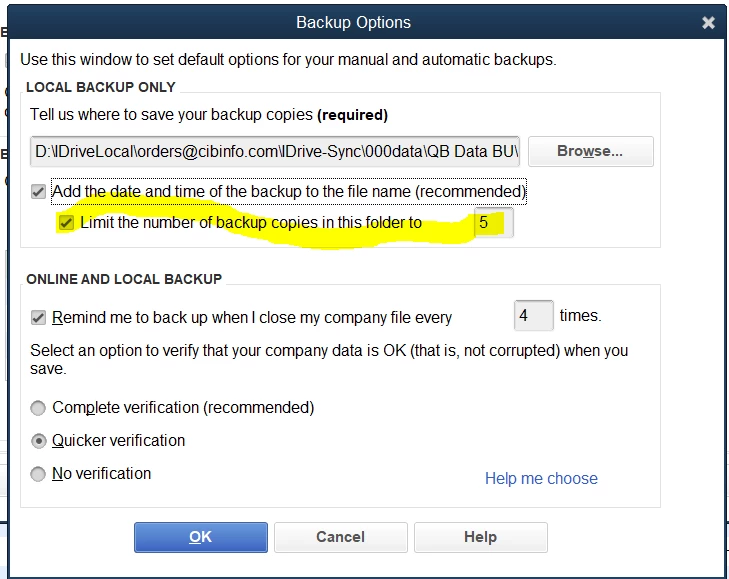
I have autobackup set, with a limit of 5 files per folder.

It is not staying within this limit.  Files keep piling up in folder.

What do I need to do to accomplish this to save needing to go in and manually deleting files?

Thanks

Rick

Best answer by Pabz_L

So I have been unable to finde exactly what the check box beside this comment actually does.

"limit the number of backup copies in this folder"

If you check this box and put in a number, what happens?

Thanks

Rick

Hello there, @rltidd27.


If you put a checkmark in the box and set up a number, this will limit the number of backups of your company file. 


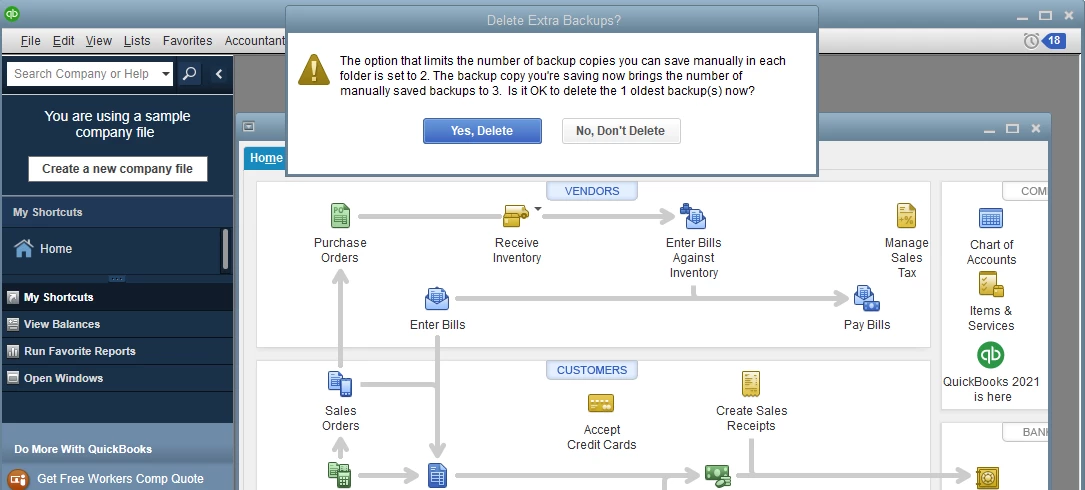
I tried to replicate this in my end and set the number limit into 2, also try to create a backup copy three times, and a warning window pops up requesting to delete one copy. 


 Please see the screenshot below.


If you still got the same result, I recommend contacting our support team. They have the proper tools where you can have a screen sharing to pinpoint the cause of this issue.


Here’s how:


  1. Login to your QuickBooks Desktop and click the Help tab on the upper right corner.
  2. Select QuickBooks Desktop Help.
  3. In the Have a Question window, click the Contact Us link. Then, select any topics.
  4. Under Here's how to connect with a QuickBooks expert section, click the Get Phone Number button.


If you want to save you backup copies of your company file online and save space on your computer, you can check out this article to know more about Intuit Data Protect: Common questions about Intuit Data Protect.


Let me know if you need further assistance. I am always here to help. Keep safe.

1 reply

September 20, 2020

Hello there, Rick.


It seems like you've posted twice. My colleague already shared an answer to your concern. Please check this link to view the details: https://quickbooks.intuit.com/learn-support/en-us/other-questions/multi-user-and-backups-quickbooks-2020-premiere/00/668819.


If you still have questions, please let us know anytime. We're willing to help you further. Take care and stay safe!


rltidd27Author
September 20, 2020

Sorry, this is a different question.  The other question involved multi-user backups.  This one is concerning more then the file limit I have set in QB which is 5.  I have many more files than that in the backup folder.  How do I fix this?

MaryLandT
September 20, 2020

I can help fix the backup issue of your files, rltidd27.


QuickBooks usually deletes the earliest backup when it goes to save the sixth backup.


If those other files are the same as the one you've already created and scheduled, I recommend contacting our QuickBooks Desktop Support Team. They can help delete them to save space on your folders.


I've added this link for more details about saving your accounting data: Back up your QuickBooks Desktop company file.


Let me know how the contact goes by commenting below. I'm always right here whenever you need additional information.
