

April 4, 2019
Question

Automatic update of cost of goods from bill of materials

  • April 4, 2019
  • 1 reply
  • 0 views

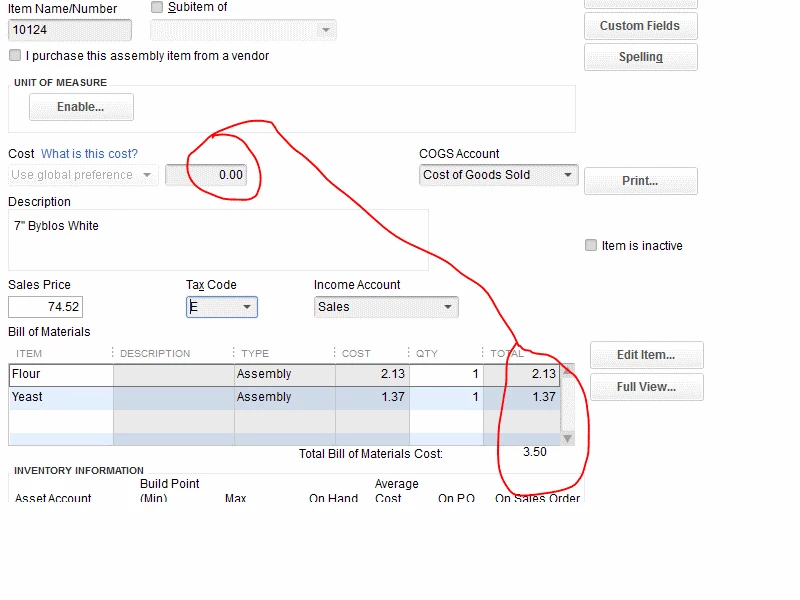
For an item that has a bill of materials list, is there any way to automatically update the cost of the item from the sum of the bill of materials? In the diagram, move the $3.50 in the cost of the item.
 

1 reply

AlcaeusF
April 5, 2019

Welcome back to the Community, @GrandpaG.


I appreciate you providing a screenshot. I'm here to share some information about the automatic update of the cost of goods from the bill of materials in QuickBooks Desktop (QBDT).


Yes, there is a way! All you need to do is select Use Total BOM cost on the drop-down. However, this option is only available in QBDT Enterprise versions, and you might have been using a different version that's why it's greyed out on your end (base on your screenshot). If that's the case, you need to manually update it as a workaround.


I also added some sample screenshots below for your guide.


On the Enterprise version:


On the other QuickBooks Desktop versions:


This should answer your concern for today.  For future reference, you can check out this article or click the What is this cost? link for more information.


Please let me know how it goes or if I can be of additional assistance. I'll be here should you have any follow-up questions. Have a great rest of the day!

GrandpaGAuthor
April 5, 2019

Sorry I didn't mention that I am using Premier. I wondered how to get that dropdown enabled. Thanks.