November 26, 2021
Solved

Beginning balance on account already in use

  • November 26, 2021
  • 1 reply
  • 0 views

I need help entering beginning balances on accounts already being used.  The account was set up and transactions entered prior to knowledge of the beginning balance.  I'm sure I need to make a GJ entry, I'm just not sure what I need to debit/credit.  The accounts never had a beginning balance, the entire company was set up new.

Best answer by Rea_M

I'm here to ensure you're able to fix the beginning balance issues on your accounts in QuickBooks Desktop (QBDT), @Soccer2021.


Yes, you're correct. You'll need to make a General Journal entry when you're unable to enter the beginning balance on accounts you've already used. Then, you'll have to do a mini-reconciliation to fix it. Let me guide you as to how.


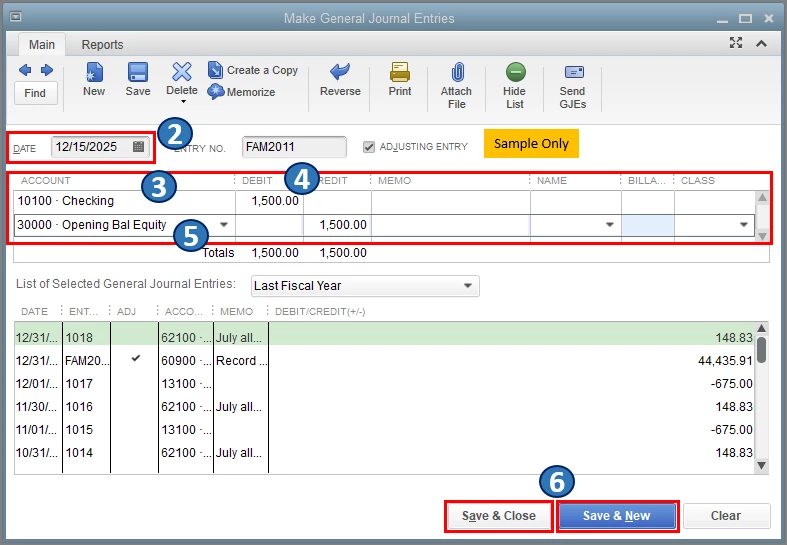
To start, create a journal entry using the correct date and amount you want to see in the Begin Reconciliation window. Here's how:


  1. Go to the Company menu, then select Make General Journal Entries.
  2. In the Make General Journal Entries window, change the date to the correct statement date of your beginning balance.
  3. On the first line, select the appropriate account from the Account drop-down.
  4. Enter the correct opening balance in the Debit column.
  5. On the second line, select Opening Balance Equity.
  6. Select Save & Close or Save & New


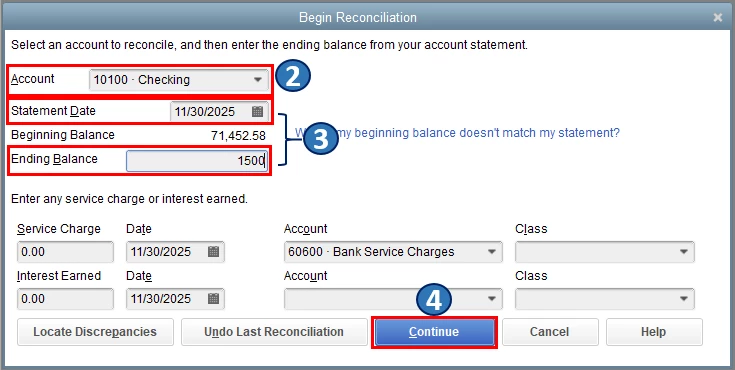
Once you're done, do a mini-reconciliation to correct the beginning balance in the Begin Reconciliation window. Here's how:


  1. Go to the Banking menu, then select Reconcile.
  2. Select the appropriate account from the Account drop-down.
  3. Enter the statement date and ending balance that matches your journal entry.
  4. Select Continue
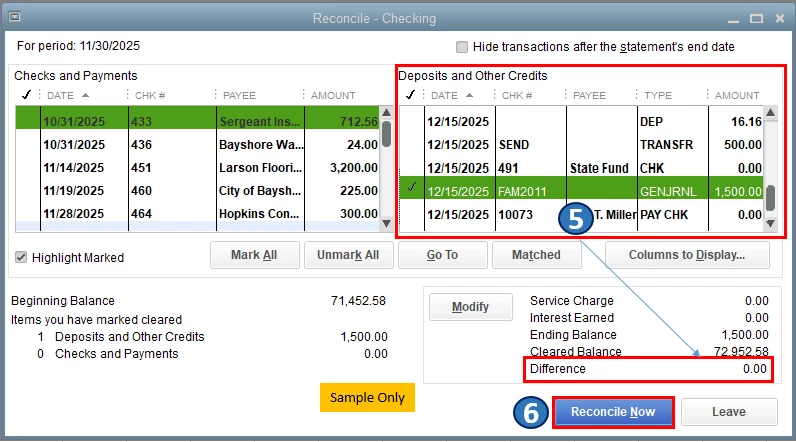
  5. In the Deposits and Other Credits section, select the corresponding Journal Entry. Note: The amount shown for the Difference should now be zero.
  6. Select Reconcile Now


Also, I would encourage you to reconcile your accounts every month. This way, you're able to monitor your income and expenses and detect any possible errors accordingly. To guide you anytime you need help doing or fixing a reconciliation, check out  this article: Learn the reconcile workflow in QuickBooks.


Please don't hesitate to keep me posted on how it goes in the comments below. If you have other reconciliation concerns or questions about accounts' beginning balance in QBDT, I'll gladly help. Take care, and I wish you continued success, @Soccer2021.

1 reply

Rea_MAnswer
November 26, 2021

I'm here to ensure you're able to fix the beginning balance issues on your accounts in QuickBooks Desktop (QBDT), @Soccer2021.


Yes, you're correct. You'll need to make a General Journal entry when you're unable to enter the beginning balance on accounts you've already used. Then, you'll have to do a mini-reconciliation to fix it. Let me guide you as to how.


To start, create a journal entry using the correct date and amount you want to see in the Begin Reconciliation window. Here's how:


  1. Go to the Company menu, then select Make General Journal Entries.
  2. In the Make General Journal Entries window, change the date to the correct statement date of your beginning balance.
  3. On the first line, select the appropriate account from the Account drop-down.
  4. Enter the correct opening balance in the Debit column.
  5. On the second line, select Opening Balance Equity.
  6. Select Save & Close or Save & New


Once you're done, do a mini-reconciliation to correct the beginning balance in the Begin Reconciliation window. Here's how:


  1. Go to the Banking menu, then select Reconcile.
  2. Select the appropriate account from the Account drop-down.
  3. Enter the statement date and ending balance that matches your journal entry.
  4. Select Continue
  5. In the Deposits and Other Credits section, select the corresponding Journal Entry. Note: The amount shown for the Difference should now be zero.
  6. Select Reconcile Now


Also, I would encourage you to reconcile your accounts every month. This way, you're able to monitor your income and expenses and detect any possible errors accordingly. To guide you anytime you need help doing or fixing a reconciliation, check out  this article: Learn the reconcile workflow in QuickBooks.


Please don't hesitate to keep me posted on how it goes in the comments below. If you have other reconciliation concerns or questions about accounts' beginning balance in QBDT, I'll gladly help. Take care, and I wish you continued success, @Soccer2021.

November 29, 2021

This was perfect!  Thank you so much for your help!