dpic44
November 21, 2024
Solved

Bill of Materials (builds) in QuickBooks Online

  • November 21, 2024
  • 1 reply
  • 0 views

I just spoke with an amazing business manager at QuickBooks.  He gave me a lot of information.  The one piece I need are instructions on how to create a bill of materials and include landed costs.  Can someone point me in the right direction? 


Thank you for your help!

Best answer by JoesemM

Creating a bill of materials with landed costs isn't available in QuickBooks Online and is only available in QuickBooks Desktop, dpic44. Instead, you can create a bundle and service item to meet your needs. I’d be happy to share the steps with you.


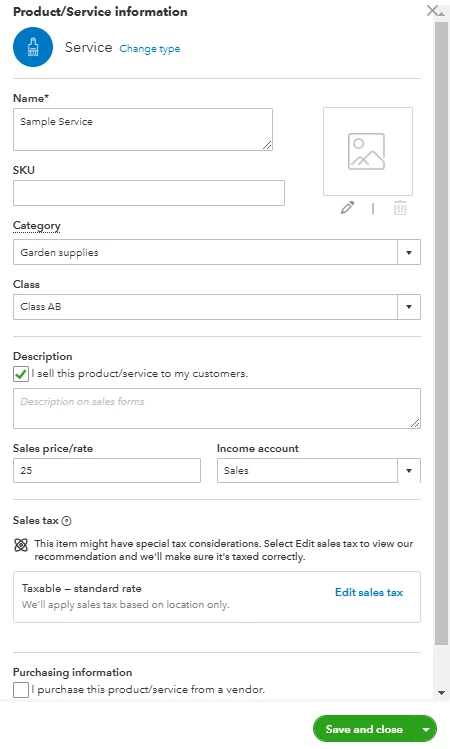
For the Bill of Materials, you can create a Bundle for the products or services you sell together as a single item. For the Landed Cost, you can create a Service item and add it as a second line item in your invoice.


Here's how:


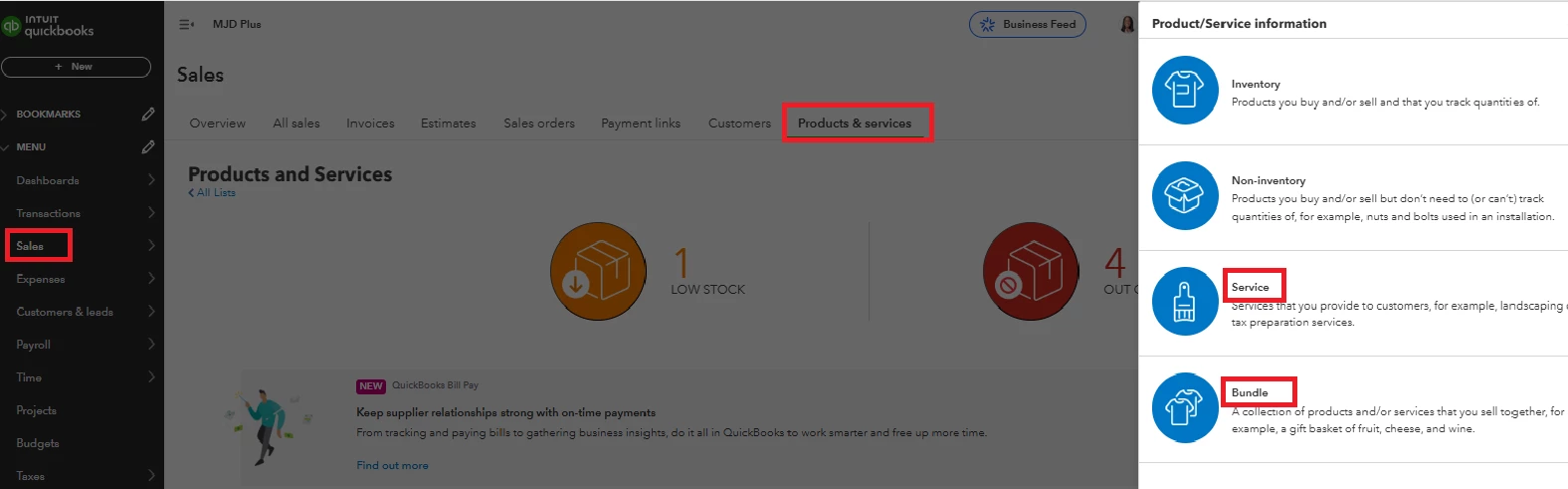
  1. Go to Sales then select Products and Services.
  2. Select New, then choose Bundle. 
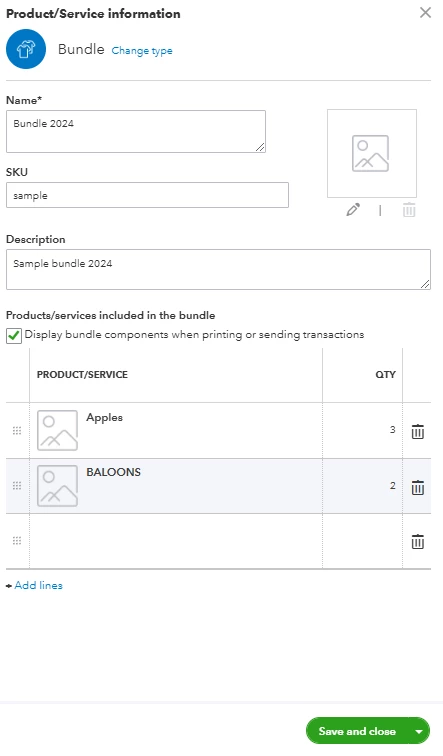
  3. Enter a Name for the product or service and an SKU, if you track them. 
  4. Fill out the rest of the field, then click Save and Close


Then, do the same process when setting up your Service item. For the detailed process, refer to this article: Set up and track your inventory in QuickBooks Online.


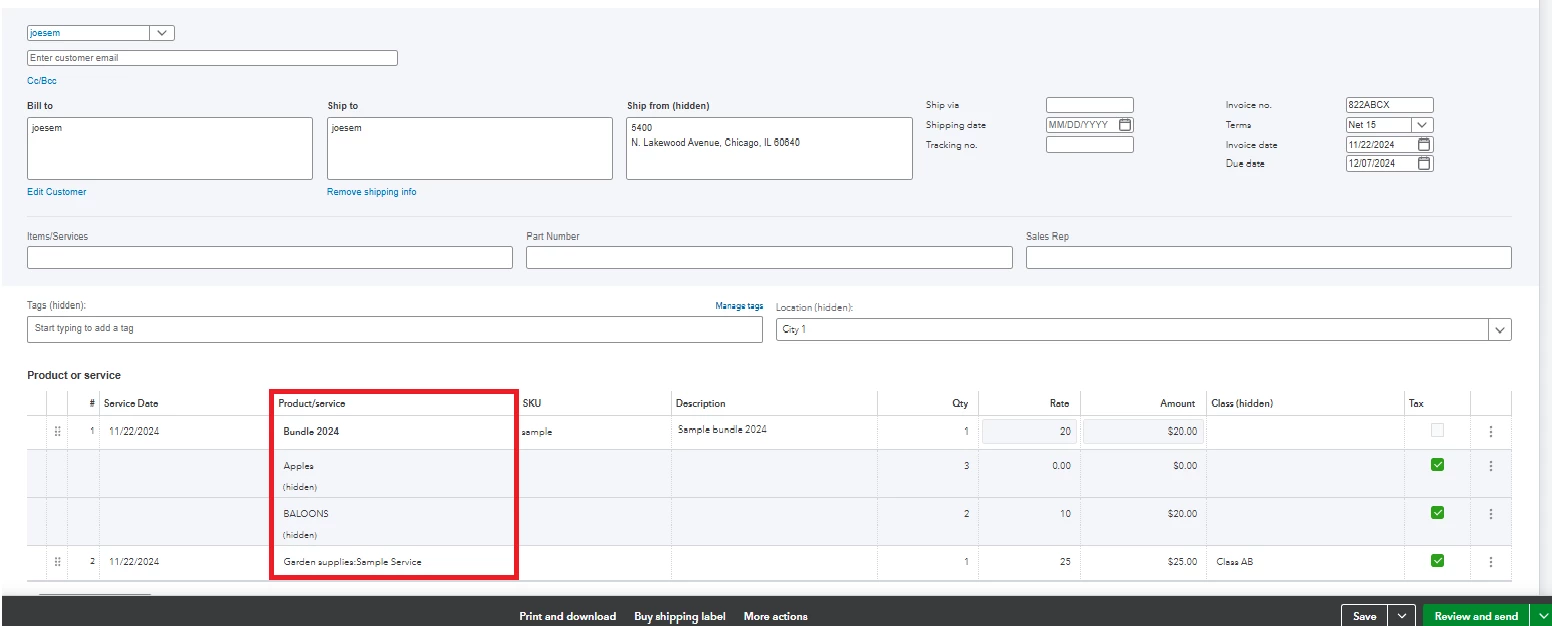
Once done, create an invoice and enter the products/services you've created. See screenshot for reference.
On the other hand, you can reach out to our Intuit Developer concerning the sandbox. They can offer applications for your client to test and respond to inquiries regarding integration.


Additionally, I'll be sharing these resources that will guide you in pulling up inventory reports and recording customer payments in QuickBooks:


If you require additional support while creating your new items, please don't hesitate to click the REPLY button below. I'm here to help you with any questions or concerns you may have. Stay safe and take care!


1 reply

dpic44
dpic44Author
November 21, 2024

I forgot to ask, is there a sandbox to try it out to see if it will work for my client?

JoesemM
JoesemMAnswer
November 21, 2024

Creating a bill of materials with landed costs isn't available in QuickBooks Online and is only available in QuickBooks Desktop, dpic44. Instead, you can create a bundle and service item to meet your needs. I’d be happy to share the steps with you.


For the Bill of Materials, you can create a Bundle for the products or services you sell together as a single item. For the Landed Cost, you can create a Service item and add it as a second line item in your invoice.


Here's how:


  1. Go to Sales then select Products and Services.
  2. Select New, then choose Bundle. 
  3. Enter a Name for the product or service and an SKU, if you track them. 
  4. Fill out the rest of the field, then click Save and Close


Then, do the same process when setting up your Service item. For the detailed process, refer to this article: Set up and track your inventory in QuickBooks Online.


Once done, create an invoice and enter the products/services you've created. See screenshot for reference.

On the other hand, you can reach out to our Intuit Developer concerning the sandbox. They can offer applications for your client to test and respond to inquiries regarding integration.


Additionally, I'll be sharing these resources that will guide you in pulling up inventory reports and recording customer payments in QuickBooks:


If you require additional support while creating your new items, please don't hesitate to click the REPLY button below. I'm here to help you with any questions or concerns you may have. Stay safe and take care!

dpic44
dpic44Author
November 22, 2024

Thank you for the screenshots! I will speak to my client about this.


The bundles are not needed for customers.  They would have to work for the suppliers.  We need the landed cost to be able to give an accurate quote to their customer.