March 25, 2023
Solved

Billable Expenses Quickbooks Online

  • March 25, 2023
  • 2 replies
  • 0 views

Is there a way to mark only some of the same vendor expenses as billable and not all?

Best answer by mv32

Yes, there's a way to mark some of the vendor expenses as billable, SJ.


While on the expense form, you can check the Billable column to select billable expenses and items. Make sure to turn on the feature to make expenses and items billable first in your Bills and expenses settings.


Here's how:
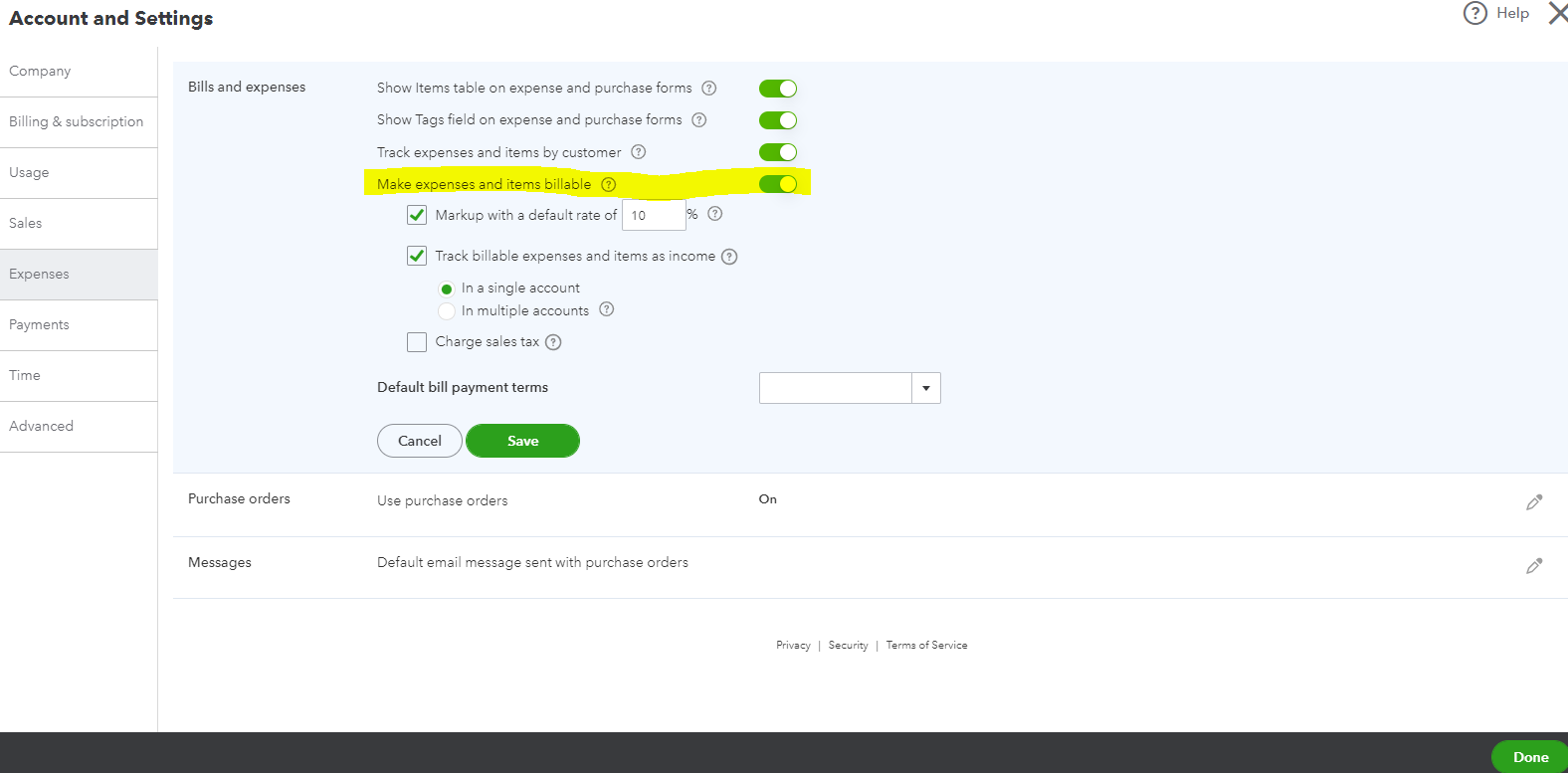
  1. Click the Gear icon and then select Account and Settings.
  2. Go to the Expenses section.
  3. Click the Pencil icon on Bills and expenses.
  4. Switch on Make expenses and items billable.


  5. Hit Save.


Once turned on, you can mark some categories or items billable in an expense form. You can check the visual reference below:


Please refer to this article for more insights about the categories that you can mark as billable when entering billable payments: Enter billable expenses.


In addition, you can run a customized Transaction List with Splits to see your billable expenses. Just click the Mini Gear icon on the report and then check the Billable box. You can also reorder this column and memorize this report.


I'm always here to help if you have other record-keeping concerns in QuickBooks. Have a great day and take care!

2 replies

Shafiqch
March 25, 2023

Yes..you can split even a transaction for billable 

SJ KinnanAuthor
March 26, 2023

Thank you very much!!!

March 26, 2023

You’re always welcome, SJ.


I’m glad to hear that my colleague was able to help you with marking some of the vendor expenses as billable in QuickBooks Online (QBO).


Rest assured that every concern posted in this forum is addressed accordingly. Please don’t hesitate to come back if you have any QuickBooks-related concerns. Have a good one!

mv32Answer
March 25, 2023

Yes, there's a way to mark some of the vendor expenses as billable, SJ.


While on the expense form, you can check the Billable column to select billable expenses and items. Make sure to turn on the feature to make expenses and items billable first in your Bills and expenses settings.


Here's how:

  1. Click the Gear icon and then select Account and Settings.
  2. Go to the Expenses section.
  3. Click the Pencil icon on Bills and expenses.
  4. Switch on Make expenses and items billable.


  5. Hit Save.


Once turned on, you can mark some categories or items billable in an expense form. You can check the visual reference below:


Please refer to this article for more insights about the categories that you can mark as billable when entering billable payments: Enter billable expenses.


In addition, you can run a customized Transaction List with Splits to see your billable expenses. Just click the Mini Gear icon on the report and then check the Billable box. You can also reorder this column and memorize this report.


I'm always here to help if you have other record-keeping concerns in QuickBooks. Have a great day and take care!
