Solved
Can I log items I purchased to sell? I run a small plant business so purchase stock to grow and propagate. How to enter and label inventory purchases to create COGS?
Original commenter did not share additional details


Welcome to the Community, Jenny. I can provide information about labeling inventory purchases to create COGS.
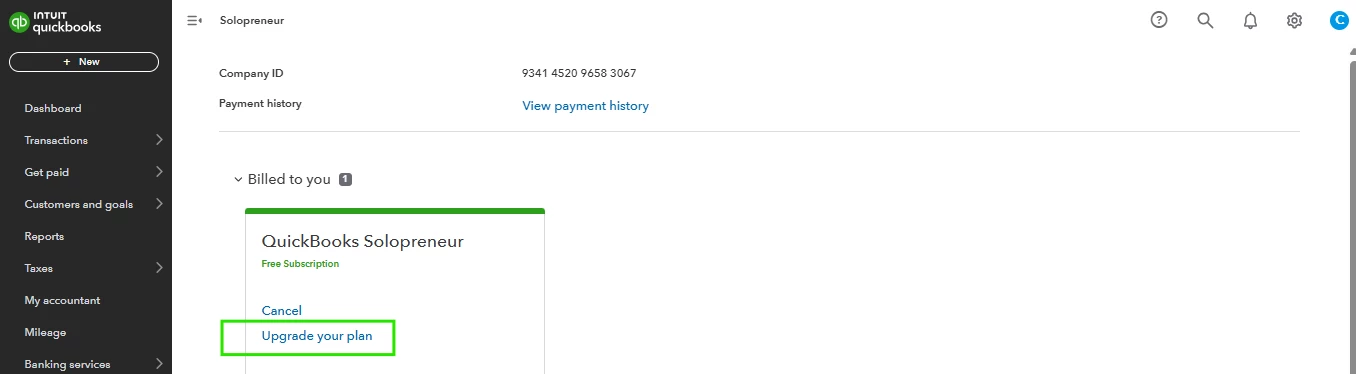
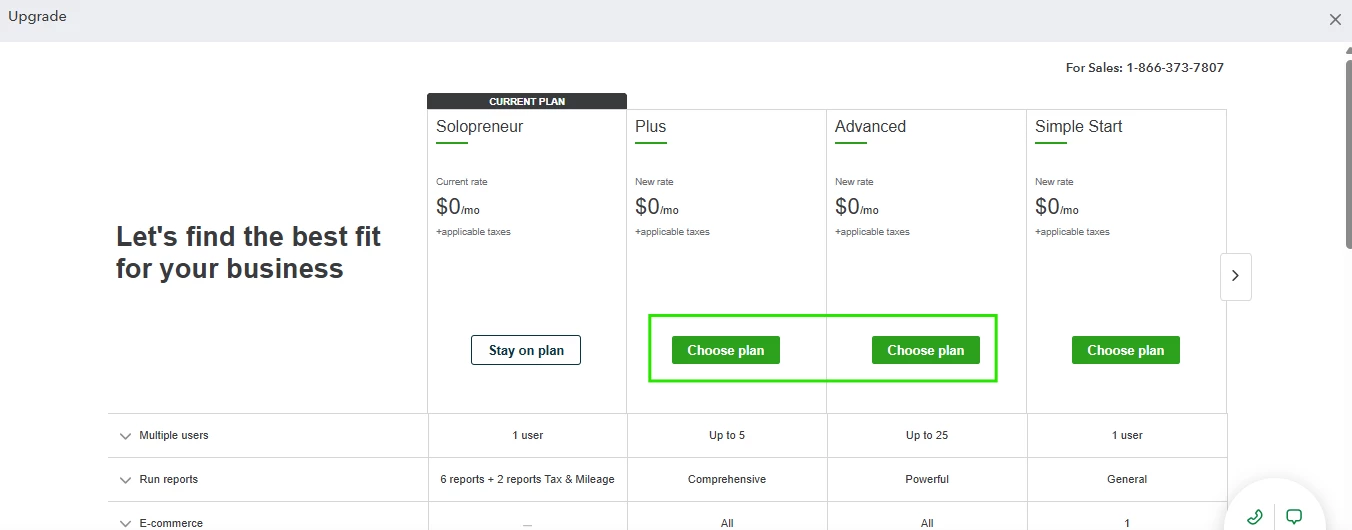
QuickBooks Solopreneur currently doesn't support entering and labeling inventory purchases to track COGS. For enhanced features like entering and managing inventory items to track COGS, consider upgrading to QuickBooks Online (QBO) Plus or Advanced.
Here's how:
Please refer to this article for more details on categorizing your bank transactions in Solopreneur. It also explains how these categories will be displayed in your reports for future reference: Schedule C and expense categories in QuickBooks Solopreneur and QuickBooks Self-Employed.
For additional resources about inventory and COGS tracking in QBO Plus and Advanced, take a look at these guides:
As always, please don't hesitate to comment if you have more questions about tracking your categories in Solopreneur. We'll be more than happy to help, Jenny.
Enter your E-mail address. We'll send you an e-mail with instructions to reset your password.