Thank you again for your answer. I really appreciate it and this is helping me work through this a little more confidently.
I am thinking that rather than put myself through any more stress on trying to figure out how to fix what I did especially since I'm not familiar enough yet with QuickBooks online, it is going to be best if I just restart at Ground Zero. I've only had this plan for a week or two maybe, so starting from the beginning again is not going to be such a problem. I don't think I need to cancel and restart because I've only worked on January's numbers so far.
The question that comes to mind is will I have to re-download or reassign the bank in order to download transactions? I realize that I will probably have to input all of January again but at least this time I'll have a little more certainty as to what I need to do in order to get the books reconciled and be able to present financials to my client.
I did not have any problem with migrating the first time, and I feel confident starting with a clean slate on this will help me to move forward much more confidently. I'm just trying to think through all of the consequences of doing this and making sure that I have everything accounted for accordingly. The first time I did the immigration everything did transfer over perfectly, so, maybe I should just somehow close out the December books on the QuickBooks online? I'm just not sure what will effectively handle the nearly 3000 transactions the banks will download from 2024, which I do not actually need to assign categories to in QBO. I hope that makes sense. I'm still trying to think through this process.
Sorry to have so many questions about this, but I want to be prepared for as many surprises as might happen when I do this. Lol thank you so much for your help.
In preparation for the re-migration process, we need to start by reversing the entries that were previously added in the categories section of your QuickBooks Online account. This ensure that the data in your account is correctly organized and up to date before we proceed with the migration. I will provide a step-by-step guide to help you accurately undo these entries, Kari S.
To avoid duplicate entries once we re-migrate the from QuickBooks Desktop (QBDT) to QBO, I suggest undoing the transactions first in QBO so it will add back in For Review section. Please follow the instructions below:
- Go to the Transactions menu.
- Select Bank Transactions.
- Within Bank Transactions, click on Categorized.
- Choose Date to enable batch undoing.
- Click on Undo to revert the transactions back to the For Review section.
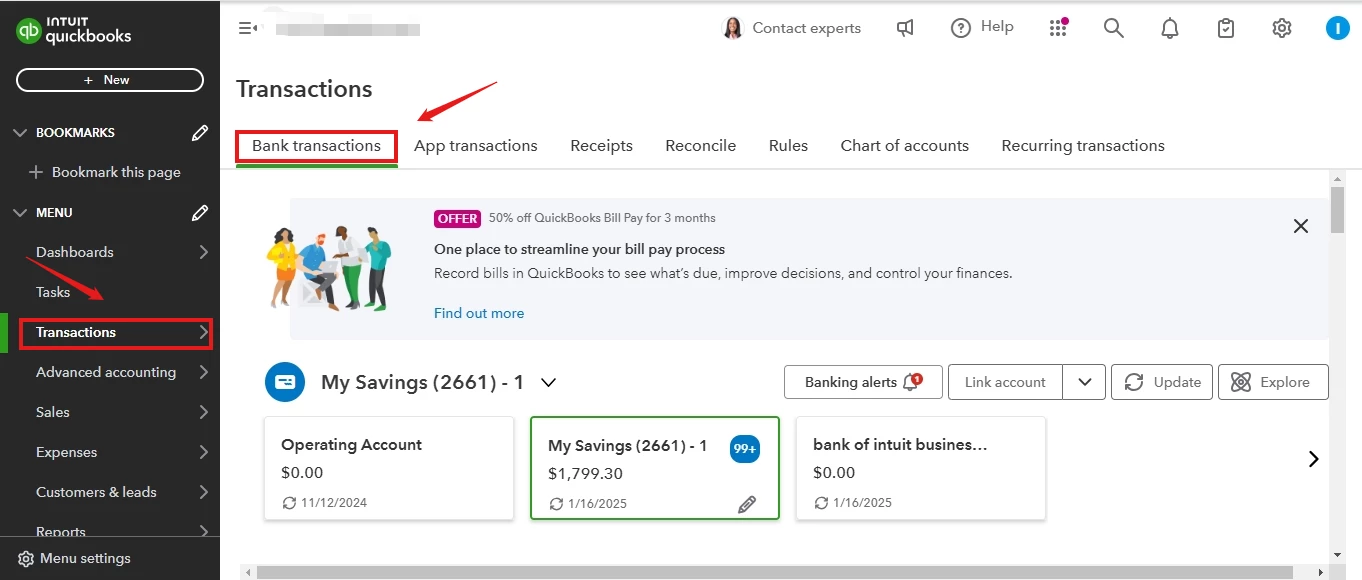
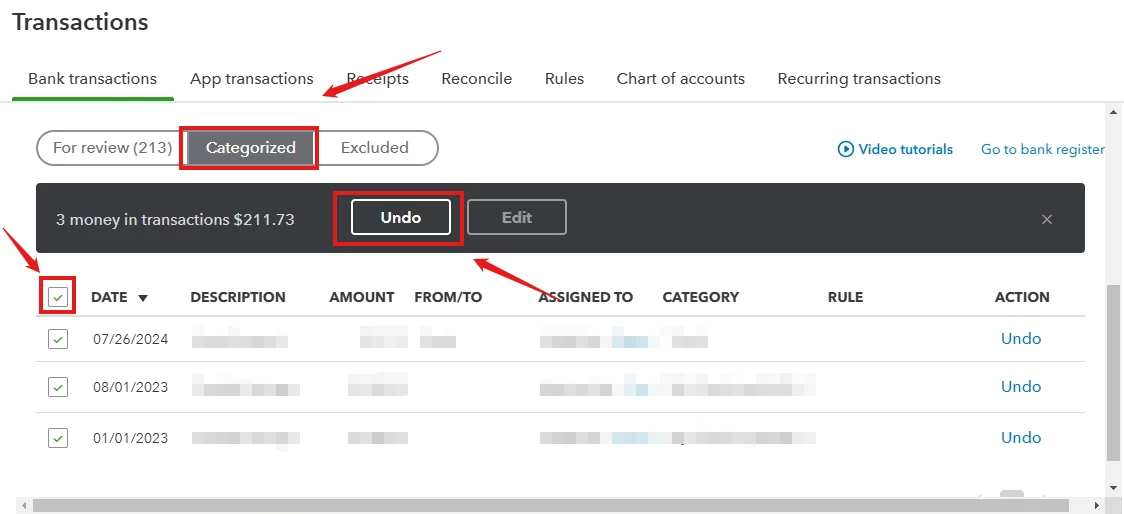
Once this is completed, you can proceed with your re-migration process. It is also advisable to correct your entries from QBDT to prevent any duplications when re-migrating the transactions from QBDT to QBO.
In downloading of transactions, if your bank is still connected to your QuickBooks Online account, there is no need to reconnect it. If the link was disconnected, you need to reconnect in order to re-download your transactions. Please be aware that only 90 days' worth of bank transactions will be downloaded from your bank to QuickBooks Online.
You also indicated the need to close your books for December in QuickBooks Online (QBO). This task can be performed in either QBO or QuickBooks Desktop (QBDT). However, before proceeding, I recommend consulting with your accountant for professional guidance to ensure all financial reporting is accurate and everything is handled correctly.
Moreover, you can check this article on how to properly categorize transactions or if you need to exclude unnecessary entries: Categorize online bank transactions in QuickBooks Online.
If you need guidance in reconciling your account in QBO, you can check this helpful article for detailed steps: Reconcile an account in QuickBooks Online.
Are you looking for a reliable and efficient solution to manage your business finances? Look no further than QuickBooks Live Expert. Our team of bookkeeping expert is dedicated to providing personalized support to help your business thrive.
I am glad I was able to assist you, Kari S. If you have any questions during the migration process, I am here to provide support and help guide you towards the best solutions.

