August 30, 2021
Solved

Cannot add inventory item in product and service after setting up quickbook commerce

  • August 30, 2021
  • 3 replies
  • 0 views

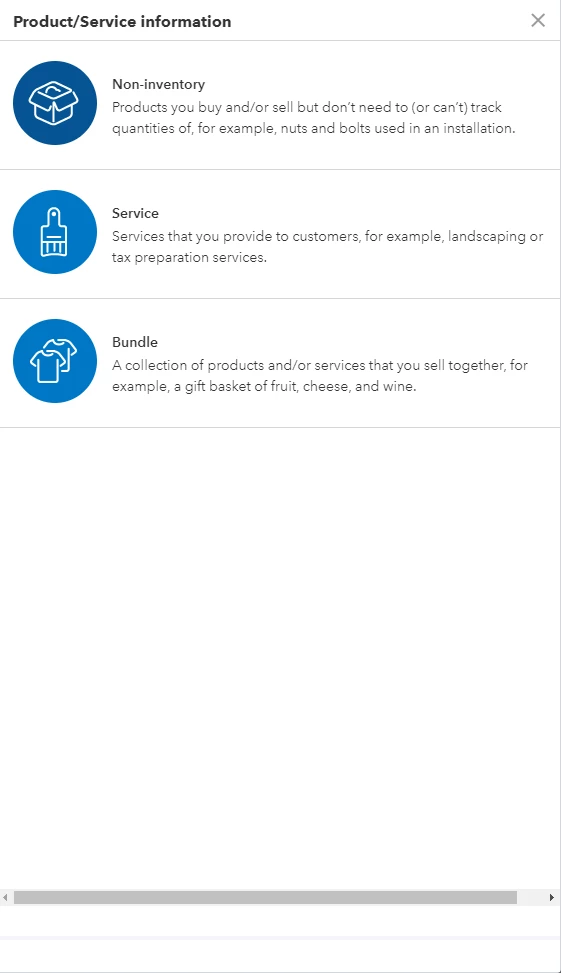
I am on QBO Plus, but I cannot add an inventory item to products, neither change an existing product to inventory. 


I called two QB experts each for 1h, first one told me it is my account issue, ask me to change my primary account, second one says if I use Quickbook Commerce, I won't be able to manage inventory in my QBO.


I don't think they understand the problem. Did anyone encounter this before?


Best answer by Rubielyn_J

Let me add some insights about creating inventory after setting up to QuickBooks Commerce, @ttlancher.


The second agent was right. Once you set up your QuickBooks Commerce, you will not have an option to manage products in QBO. The reason for this is that QuickBooks Commerce has another way on how to set this up. 


What we can do is add the product to your QuickBooks Commerce. Remember also that when setting up your items, it must reflect your business.


To add the product manually, here's how: 


  1. Go to Inventory, then select Products.
  2. Click Create New.
  3. Follow the instructions.
  4. Fill in the details of the purchased product. 
  5. Once done, choose Create Product.


If your sales channel is connected to QuickBooks Commerce, you can add your products to your inventory. For detailed steps, please see this article: Get started with your inventory in QuickBooks Commerce. It covers some ideas on how to handle products and a relevant video you can use for visual reference.


I'm also adding this link to help you access and set up QuickBooks Commerce from within QuickBooks Online. It includes relevant information on how you can explore the product. 


Hope that clarifies everything. If you have other questions about creating inventory, just let me know in the comment section. I'll be around to help you. Have a pleasant day.


3 replies

Rubielyn_J
August 30, 2021

Let me add some insights about creating inventory after setting up to QuickBooks Commerce, @ttlancher.


The second agent was right. Once you set up your QuickBooks Commerce, you will not have an option to manage products in QBO. The reason for this is that QuickBooks Commerce has another way on how to set this up. 


What we can do is add the product to your QuickBooks Commerce. Remember also that when setting up your items, it must reflect your business.


To add the product manually, here's how: 


  1. Go to Inventory, then select Products.
  2. Click Create New.
  3. Follow the instructions.
  4. Fill in the details of the purchased product. 
  5. Once done, choose Create Product.


If your sales channel is connected to QuickBooks Commerce, you can add your products to your inventory. For detailed steps, please see this article: Get started with your inventory in QuickBooks Commerce. It covers some ideas on how to handle products and a relevant video you can use for visual reference.


I'm also adding this link to help you access and set up QuickBooks Commerce from within QuickBooks Online. It includes relevant information on how you can explore the product. 


Hope that clarifies everything. If you have other questions about creating inventory, just let me know in the comment section. I'll be around to help you. Have a pleasant day.
ttlancherAuthor
September 3, 2021

Hi, thanks for your reply! It did answer my question on the inventory part. I do have another question that, I found I am not so satisfied with quickbook commerce, so that I might turn if off and manage everything in the QBO. Is it possible to get everything back by just turning off the QB Commerce?

September 4, 2021

Hello there, @ttlancher


Thanks for getting back to us and we're glad to know that my colleague was able to provide the information you need.


Yes, you can get back everything by just turning off the QB Commerce. Please take note that once you turn off the QuickBooks Commerce, you'll not be able to access the features coming from it.


Afterward, make sure to turn on inventory tracking in QuickBooks Online. Here's how:


  1. Go to the Gear icon.
  2. Select Account and settings under Your Company.
  3. In the Sales tab, select Edit ✎ in the Products and services section.
  4. Turn on Show Product/Service column on sales forms.
    You can also turn on price rules if you want to set up flexible pricing for the things you sell.
  5. Turn on both Track quantity and price/rate and Track inventory quantity on hand.
  6. Select Save. Then, Done to reflect the changes.


You can use these articles for more details and tips about tracking your inventory in QuickBooks Online.


Please let  us know if you need more assistance. I'm right here together with my colleagues to help you more. Take care and stay safe.

Rubielyn_J
September 1, 2021

Hi, @ttlancher.


Hope you’re doing great. I wanted to see how everything is going about the inventory item concern you had the other day. Was it resolved? Do you need any additional help or clarification? If you do, just let me know. I’d be happy to help you at any time.


Looking forward to your reply. Have a pleasant day ahead!

ttlancherAuthor
September 3, 2021

Hi, thanks for your reply! It did answer my question on the inventory part. I do have another question that, I found I am not so satisfied with quickbook commerce, so that I might turn if off and manage everything in the QBO. Is it possible to get everything back by just turning off the QB Commerce?

November 30, 2021

The solution worked for me thanks to the community and the members for the solution. mcdvoice survey

November 30, 2021

I'm glad that we're able to help you with your concern, @Pou74.


As always, you can count on us if you need assistance in logging in to QuickBooks. It's always our pleasure to help.


Stay safe and healthy. Cheering you and your business to continued success!
