I'll help you in resolving the issue you're having, StOlaf1.
The error message "There's a new QuickBooks software update waiting for you. Looks like you don't have the needed permissions" appears when:
- QuickBooks Desktop (QBDT) isn't run as an administrator.
- There are pending QuickBooks updates that need attention.
I have the steps to fix it. Let's begin by running QuickBooks Desktop as an administrator. To do this, right-click on the QuickBooks icon, and choose Run as Administrator.
After that, enter the correct login credentials when accessing your company file. You can try manually resetting your password if you're still unable to login. Alternatively, use our Automated password reset tool instead if you prefer.
Update QuickBooks to the most recent version after logging in successfully to get the newest features and fixes. Before doing so, make sure you're in single-user mode. Go to the File menu and then select Switch to Single-user Mode.
To update your QBDT, follow these steps:
- Go to the Help menu at the top, and then choose Update QuickBooks Desktop.
- Select the Options tab, and then click Mark All.
- Choose Save.
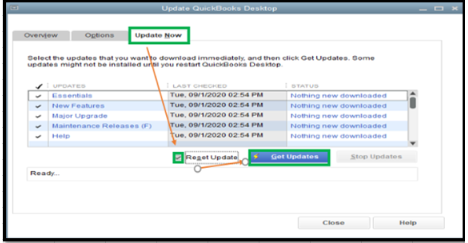
- Proceed to the Update Now tab.
- Check the Rest Update box, and then click Get Updates.
Close QBDT and open it again after the upgrade is complete. Restart your computer to refresh the program and apply all the patches.
For your reference, please visit this link for more details: Update QuickBooks Desktop to the latest release.
I've also included the following article as guidance in case you can't open QBDT in the future: QuickBooks Desktop won't open.
If you have further questions about account management, don't hesitate to post again. I'll be around to help you.

