January 16, 2024
Solved

Change Back Hierarchy View

  • January 16, 2024
  • 1 reply
  • 0 views

For whatever reason my view for my customers has changed.  It was Customer Name then Job Name.  How do I get it back to the heirarchy view?  I am currently using Quickbooks Desktop Contractor 24.0.


Thank you in advance!

Best answer by Rea_M

I'll ensure you can get back to your preferred customer list view in QuickBooks Desktop (QBDT), kelper62.


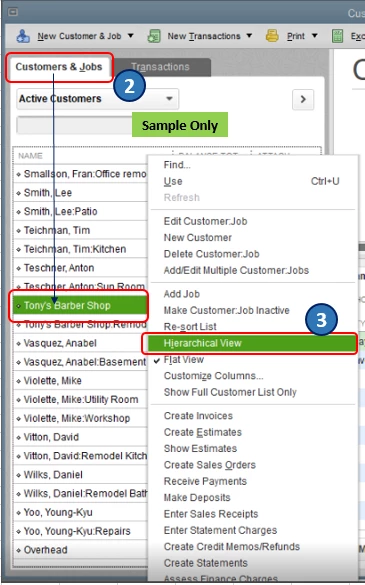
Based on your screenshot, I can tell you've switched to the Flat View option, causing your customers and job names to be listed in line with each other. To return to the hierarchy view, follow these steps:


  1. Go to the Customer Center.
  2. In the Customers & Jobs tab, highlight any customer or job name.
  3. Right-click and select the Hierarchical View option. 
 

Also, I've included this article to help you track customer transactions in QBDT: Get started with customer workflows in QuickBooks Desktop.


Please let us know in the comments if you have other concerns about managing your customer list in QBDT. We'll get back to you right away to assist you further.


1 reply

Rea_MAnswer
January 17, 2024

I'll ensure you can get back to your preferred customer list view in QuickBooks Desktop (QBDT), kelper62.


Based on your screenshot, I can tell you've switched to the Flat View option, causing your customers and job names to be listed in line with each other. To return to the hierarchy view, follow these steps:


  1. Go to the Customer Center.
  2. In the Customers & Jobs tab, highlight any customer or job name.
  3. Right-click and select the Hierarchical View option. 


Also, I've included this article to help you track customer transactions in QBDT: Get started with customer workflows in QuickBooks Desktop.


Please let us know in the comments if you have other concerns about managing your customer list in QBDT. We'll get back to you right away to assist you further.

kelper62Author
January 17, 2024

Thank you so much for the solution.  I have no idea how it was changed to flat view but regardless your solution worked perfectly!

January 17, 2024

You're most welcome, @kelper62.


We're glad to know that my colleague was able to provide the right solution to your concern.


Please know that assisting and providing the right resolution for our valued customers is our top priority. If you have any questions about your QuickBooks, you can always drop by and post your concerns. We'll make sure to address that as soon as we can.


Also, I added this article to your reference when checking the latest updates about the product: The QuickBooks Blog.


We're always around to help. Have a good one!